
Intervention Study Overview
We ran an intervention diary study where participants recorded their work sessions, posture, and interactions with Hunchie over several days. Sessions ranged from about 30 minutes to 2 hours and mostly involved desk work like coding, writing, research, and meetings. Across sessions, participants frequently reported slipping into poor posture without noticing, most commonly forward head position, rounded shoulders, or slouching toward their laptop. These positions were often associated with physical discomfort such as stiffness, tight shoulders, or soreness, especially during longer, focused work periods.
Hunchie mainly worked as a subtle awareness cue. Participants typically looked at it one to three times per session, and even these small reminders often triggered posture corrections like rolling shoulders back, straightening the spine, or pulling away from the screen. In some cases participants physically interacted with Hunchie (hitting it), which acted as a stronger reset moment and prompted more deliberate posture adjustments. After correcting posture, users frequently reported feeling physically better aka less stiff, looser, or more comfortable, and sometimes mentally refocused as well.
One interesting insight was that posture problems happened most during deep focus, when users were least likely to consciously monitor their body position. This suggests posture interventions need to be passive and ambient rather than interruptive. Hunchie’s presence generally wasn’t very distracting (most users rated distraction between 1–3 out of 5), though a few participants mentioned feeling slightly self-conscious interacting with it in shared spaces.
These insights directly informed our MVP design. Because awareness alone often triggered posture corrections, we focused on making Hunchie a subtle physical reminder rather than an alert-heavy system. At the same time, the study showed the importance of automatically detecting slouching during focused work, which led us to prioritize camera-based posture sensing in the hardware. On the software side, we decided to log slouch events and hits and provide simple session summaries so users can reflect on their posture patterns over time. Overall, the intervention study reinforced that Hunchie should work as a lightweight behavioral nudge, something that gently brings posture back into awareness without interrupting the user’s workflow.
Intervention Study Set-Up Photos
Hunching and Hitting Hunchie

Slouching and Seeing Hunchie
Good Posture with Hunchie

System Paths and Personas
Here are our system paths for our three personas: stressed and focused student, diligent office worker and dedicated gamer!

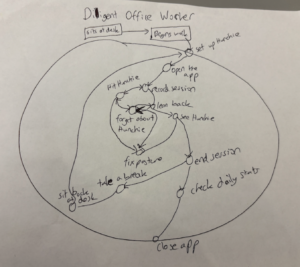
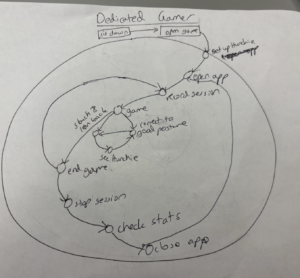
View the images more clearly here.
Story Maps
(View the images more clearly here: Our Story Map and here)
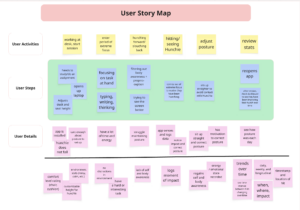
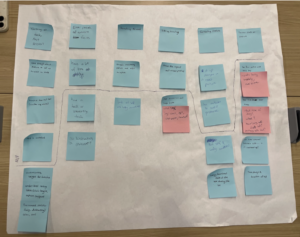
Above is our story map for the “stressed and focused student” persona—first done with sticky notes and later translated into Miro. Their story’s main activities circle around a working/studying session, taking place at a desk, much like the system path. Throughout this user journey, we notice a flow of focus increasing and decreasing, like when a user is concentrated in a task versus when that flow is paused, such as when they notice, check, and correct their posture. We noticed that especially in the first half of the map, flow and proprioception/body awareness are inversely correlated in one way: as the user focuses more on their work, their body awareness decreases, thus letting their posture hunch. This is when the intervention kicks in, in order to help the user recognize and regain their body awareness.
However, we also recognize the challenge this sets for our MVP, as simply helping a user regain body awareness could very well affect their level of focus on their actual task (working at desk). This would require our solution to achieve its goal without fully taking the user out of their personal tasks; ideally, it would accomplish this.
Another thing we noticed is that as a user is known to care enough about their posture to fix it, it is also observed that they would want to learn about their behavioral patterns too; this becomes a problem when the user loses body awareness as they’re working and not thinking about their posture, because their body isn’t directly recording information or keeping track of their hunching pattern. This suggests to us a need of tracking information for the user, whether it’s how severe the hunching was, how long or how frequently a user slipped into poorer posture.
MVP Features
With the story maps we included in the previous section, you will notice that both have a line cutting through the User Details section; this separates our minimal features needed for a functional product from our additionally helpful or nice-to-have features. After team discussion and further consideration, below is the list of features we wanted in our MVP:
Hunchie (hardware/physical component)
- NEEDED FEATURES:
- Senses hits at the moment of impact
- Senses slouched with a camera
- Stays up / doesn’t lose suction to table
- IF TIME ALLOWS:
- Customizable height
Hunchie’s App (software component)
- NEEDED FEATURES:
- Onboarding setup and bluetooth connection
- Keeps logs of hits and slouches (time, session number, hit severity)
- Shows a summary at end of session
- IF TIMES ALLOWS:
- Rating environment comfort (chair, floor, cushion, etc.) and state (noisy, calm, etc.)
- Records energy and emotional user state (as text input)
- Trends over time (sessionly, daily, weekly, and longitudinal)
- Time interval between hits
- Timestamps and location of hits
Many of these features were explained in the Story Maps section, like the sensing and logging of data and inclusion of giving users the data regarding their own activity and patterns.
Additionally, though, we want to emphasize that our MVP must also satisfy the seamlessness that keeps users influenced by the product without being turned off by its physical presence. If we have time, therefore, we hope to include a user-inputted environment rating for comfort levels and emotional states. In our story map, we noticed that part of the User Tasks for starting a session is setting up the work environment, so our MVP would benefit from also utilizing that information, as certain environments and setups can also be distracting and we’d want to know if our user is in their preferred environment or not for that session. This would allow us to track relationships between posture and physical set-up. For the Hunchie component, this would also reflect as allowing the physical product’s height to be customizable in accordance to the user’s setup, so that it further integrates into the environment.
Bubble Map
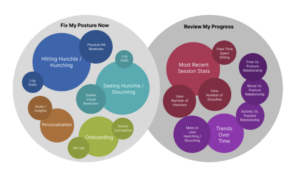
To create this bubble map, we focused on the two primary goals of our product. These are allowing the user to fix their posture in the moment and allowing them to see their progress. For immediate posture changes, the features needed are primarily the physical device that reminds the user to fix their posture with a physical hit or visual cue and the onboarding on the app to teach the user how to connect to and use the device. For progress over time, seeing your session result immediately and your general increase or decrease in bad posture over time are the most critical. Additionally to these necessary features, being able to personalize goals and insights and see the relationship between your posture and other factors in your life could really benefit the user. The key insights we took away from creating this map are the general organization of our product into these two main goals and a hierarchy of what features, as explained above, are most critical to making the product successful.
Assumption Map
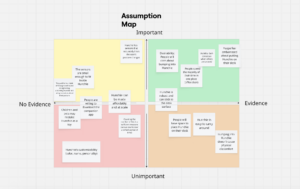
Key Insights
- Social influences
- People may feel self-conscious about bringing a gadget to work
- They fear judgement from their co-workers
- They worry about being seen as immature or unprofessional
- Hardware
- The sensors must accurately capture user hits
- Units must be small, lightweight, and easy to mass produce
- Hunchie must be robust enough to withstand hundreds of hits
- Onboarding Friction and Usage
- Users are willing to download and use a companion app
- Users are comfortable with bringing a physical object with them around work
- Users are willing to undertake the process of setting Hunchie up in their new environment
Based on these insights, we can see that Hunchie’s effectiveness depends on the user’s willingness to bring and engage with a physical object that is visible to others around them. While this element may deter more self-conscious users, it could also provide an opportunity for social monitoring. Our MVP could incorporate a social connection and gamification element that connects Hunchie users in the workplace and normalize the behavior, fostering a community of users who gamify their posture together. Additionally, to address the risk of users forgetting to bring Hunchie with them, the companion app should include habit notifications and onboarding instructions to ensure Hunchie is readily synced and beside the user when they need it.
Assumption Tests
- Assumption: People spend the majority of their work time in one fixed location (office desk).
- Test Name: Workspace Environment Audit
- Method: Conduct a “Typical Day” diary log with office workers and remote professionals. Participants will track the various environments for which they complete their work on a typical weekday.
- Questions:
- How many hours of your day is spent at a primary, dedicated work desk? (0-2 hours, 2-4 hours, 6 hours+)
- What alternative places do you go to complete your work? (e.g. couches, bed, cafes)
- Objective: To determine if a static intervention like Hunchie that requires a platform to be set up upon is viable for the modern workforce.
- Success Metric: A finding that more than 70% or more of the target audience spends at least half of their working hours located at a specific desk.
- Assumption: Hunchie is a socially acceptable tool to use in a professional or public environment.
- Test Name: Social Friction
- Method: A questionnaire reflection on how users felt about setting Hunchie up at a public location and the reactions of others around them.
- Questions:
- On a scale of 1-10, how self-conscious did you feel having Hunchie on your desk?
- Were you distracted by Hunchie’s presence and worried about how others might react?
- Did any coworkers comment on Hunchie? If so, was the reaction positive, confused, or negative?
- Were there times when you felt compelled to remove Hunchie?
- Objective: To gauge the level of social stigma associated with having a physical posture aid in public.
- Success Metric: Participants reporting that Hunchie’s average level of distraction is below 2/5 and there was very little negative feedback from co-workers and peers.
- Assumption: Users are willing to download and maintain a companion app for Hunchie.
- Test Name: App Friction Poll
- Method: Conduct a targeted poll among users who already use hardware gadgets that have a companion app (smart scales, workout apps)
- Questions:
- How many apps do you currently have on your phone that is connected to a physical device?
- If a posture tool is functional without an app, would you still download it to track your progress and data?
- What is the primary reason you delete “companion apps” for hardware?
- On a scale of 1-5, how likely are you to compete with friends on a leaderboard or “Hunchie health score”?
- Objective: To validate if the companion app is useful and attractive to users
- Success Metric: Over 60% of respondents consider data tracking to be a necessary or desirable feature.



