
Architectural Design of Our Solution
The following diagrams will outline the main features within our solution. Our solution is meant to be a nature scrapbooking app where the user is expected to upload at least one nature photo they took that day. By asking the user to do this simple task everyday, we can encourage them to build a habit of going outside to enjoy nature and reduce stress levels.
System path
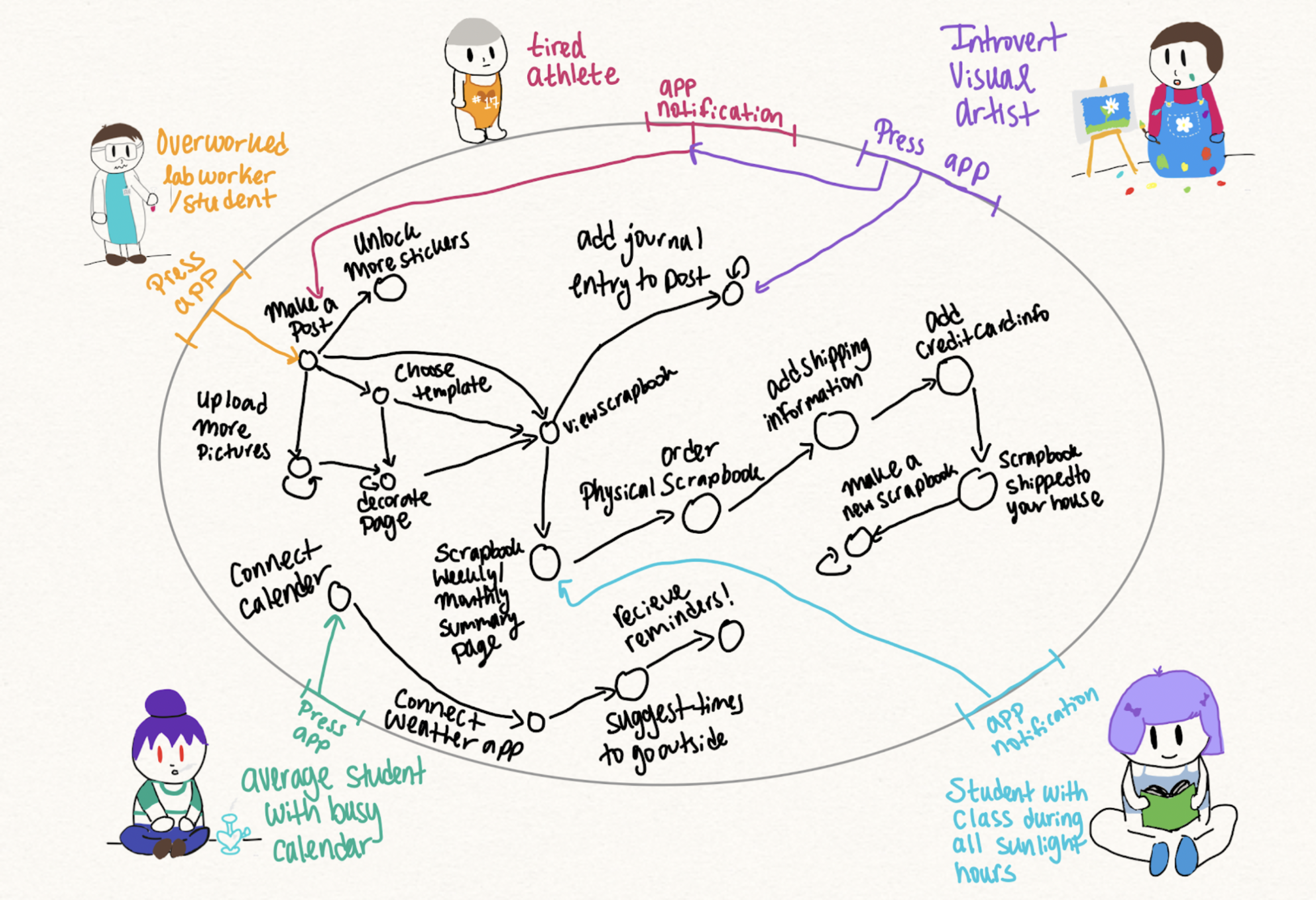
Users will have two main points of entry into our solution: either they press the app icon or a notification from the app. Users who are busy throughout the day may forget about the app, especially when first starting and will need the notification reminder. We ask the user to connect their calendar and weather applications in order to maximize the likelihood the reminder will come at an ideal time to go outside. Otherwise, the reminder will just be another pesky notification the user is unable to attend to.
The main aspect of the app is to create a scrapbook page by uploading a photo. They can revisit pages to optionally add a journal entry or decorate the page. The more the user posts, the more stickers they unlock that they can use to decorate their page which should encourage a deeper investment into the app. The app will create weekly/monthly/yearly summary pages and offer the option to print out a physical version of the scrapbook which should encourage more consistent use.
Bubble map
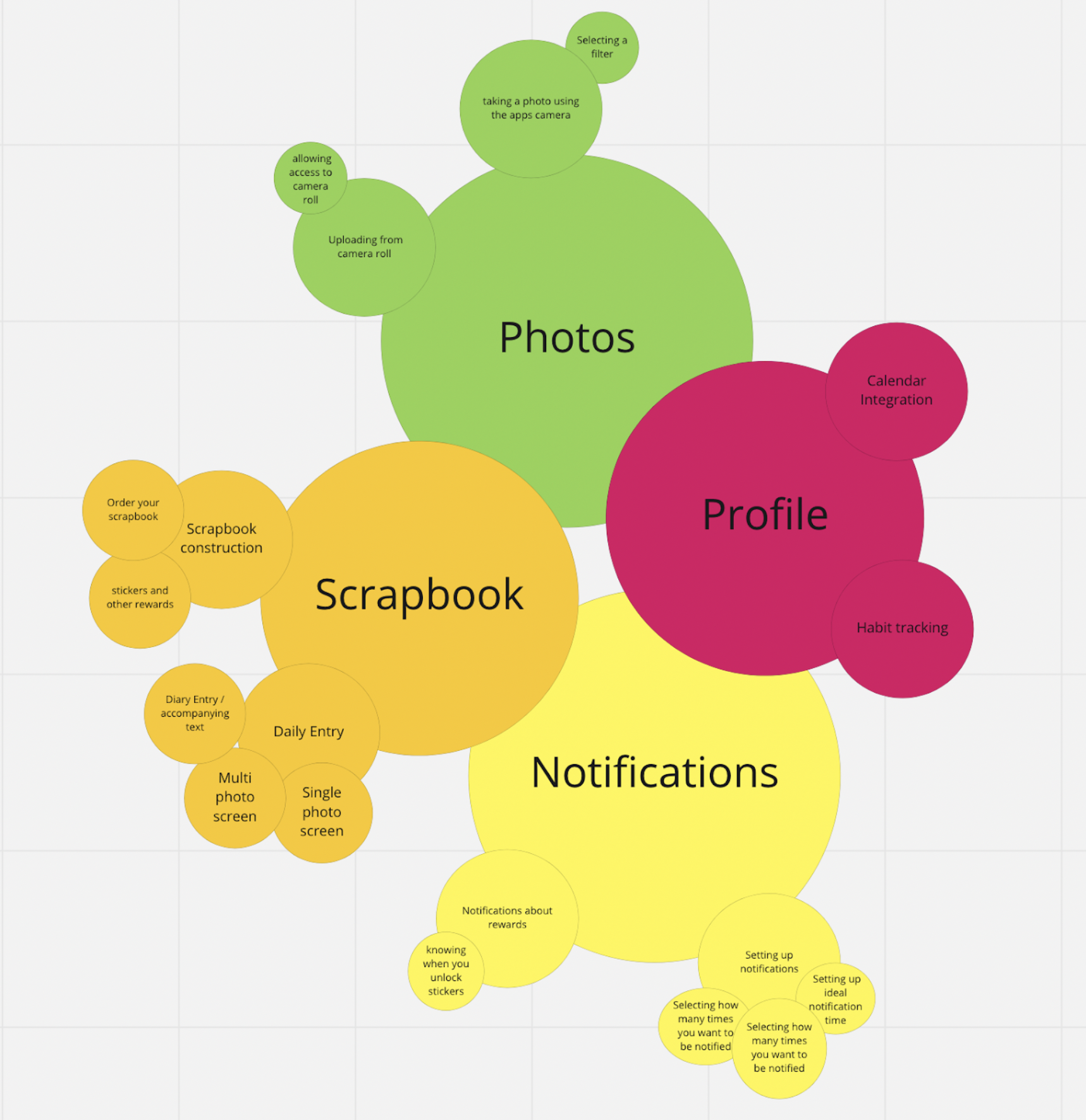
The four main features of the app are adding photos, virtual scrapbooking (that can then be sent to you as a physical scrapbook), notifications, and creating your profile. Creating the profile is the most straightforward function, as that is where you would begin your calendar integration. That helps inform the notifications section, where you would set up custom notifications that cater to the times you would want to go outside, i.e. you won’t get notifications during your class time. Also in the notifications sector are reminders about being able to order the physical scrapbooks due to having enough photos. When it comes to what the user would usually see and use on a day-to-day basis, the photos and scrapbook section are the most important. The photos section is where the user would either take a photo outdoors using the in-app camera, or upload a photo from their time outside that day from their camera roll. This photo would then lead into the scrapbook flow. There is the task of daily entries, where you take the photos and add stickers, and also the task of creating a full scrapbook that you can have shipped to you.
Wireflows
Ordering Physical Scrapbook

In this wireflow, once the user achieves a certain amount of photos, they will get a notification that they have enough photos to create and order a scrapbook. From there, they can select whichever scrapbook format they want, and then they are able to choose which photos they want in the scrapbook. After that, they check out and put in their necessary information such as their address and payment information.
Creating a Profile

The biggest component in this wireflow is the straightforward approach to the simple task of creating a user. Hence, this is a one page wireflow that lets users choose and describe themselves in various ways. There might be more than one approach to how we can let users express themselves initially in our app.
Rewards: Sticker Decorations
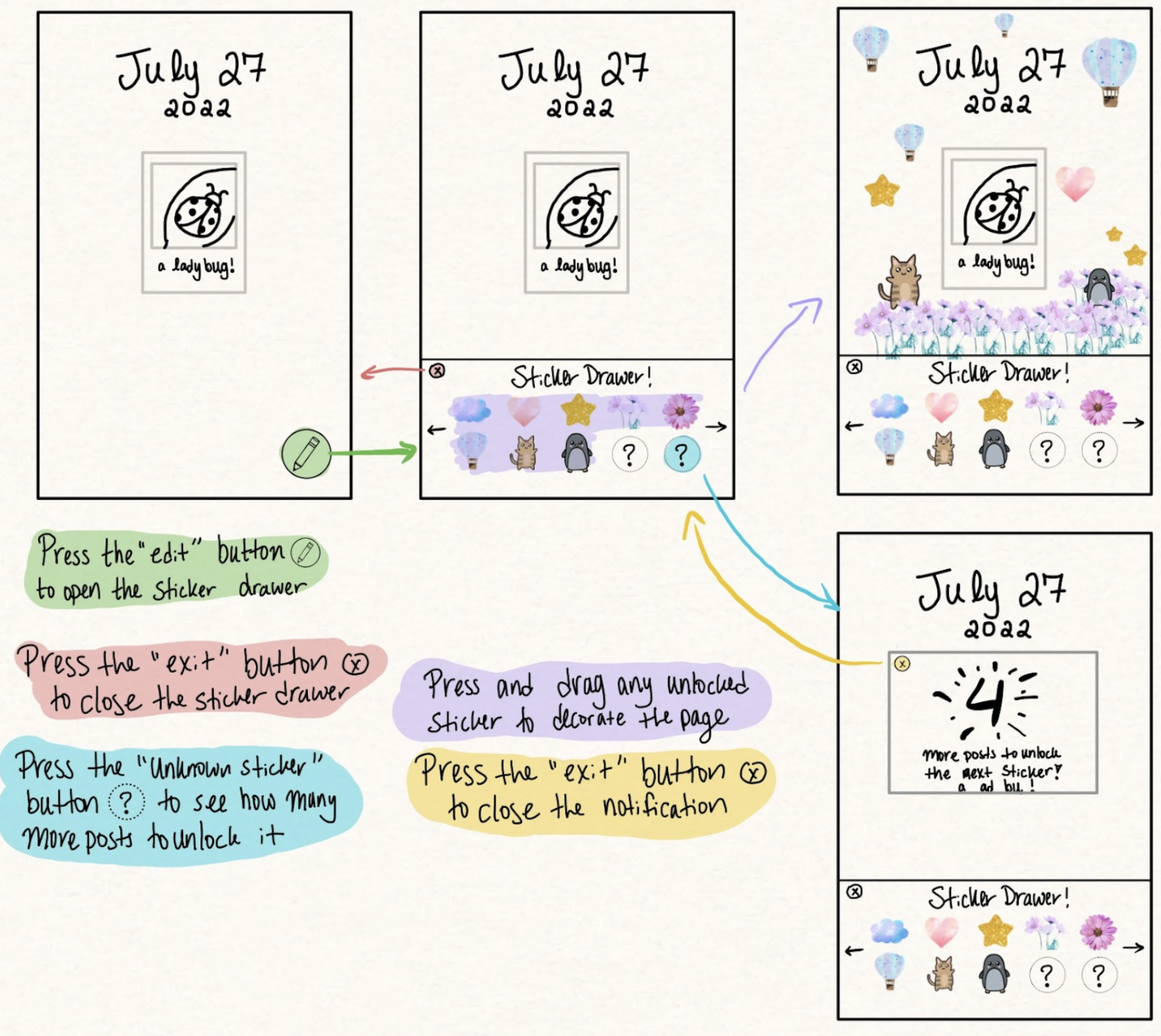
The user will earn “stickers” they can use to decorate their scrapbook pages by posting on the app. Having a reward for just using the app that is earned in incremental steps will gamify the experience. Having the ability to beautify the pages will make them invested in maintaining their scrapbook and encourage consistent use.
New Scrapbook Entry
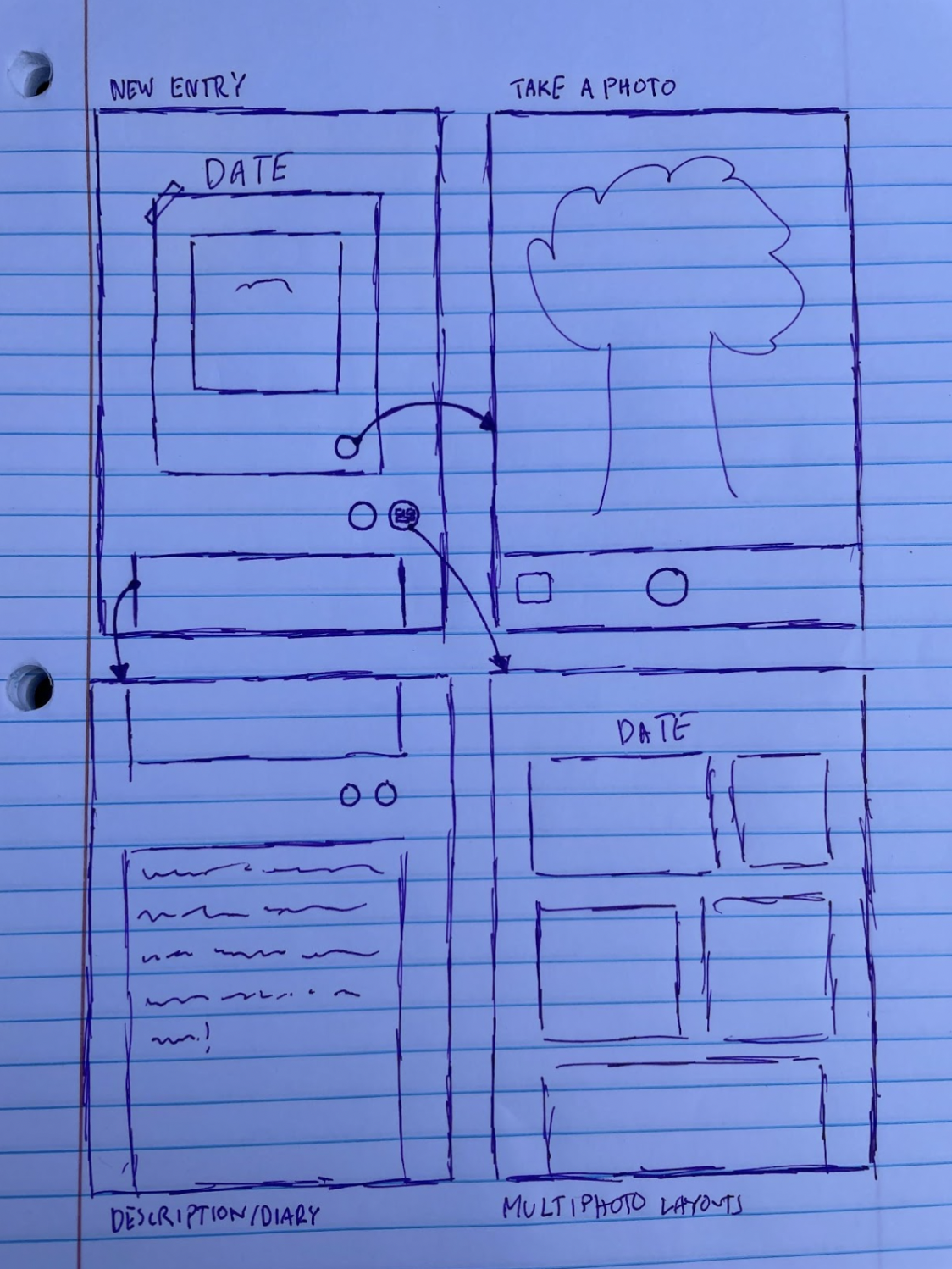
A large portion of the regular usage of the app will consist of scrapbook entries. This is how the
user tracks their progress and reflects on the time they’ve spent outside. The scrapbook entries are
based around a photo, which can either be uploaded from the photo library or taken directly in the
app. The photos are also accompanied by an optional description/journal entry, which can be
entered and accessed below the photo. Additionally, if a user wants to include multiple photos with
their scrapbook entry, there is an option to explore additional layouts to properly document their
experience. Finally, there is a button that will open the sticker drawer, which is in another wireflow.
Weekly/Monthly Summary Pages
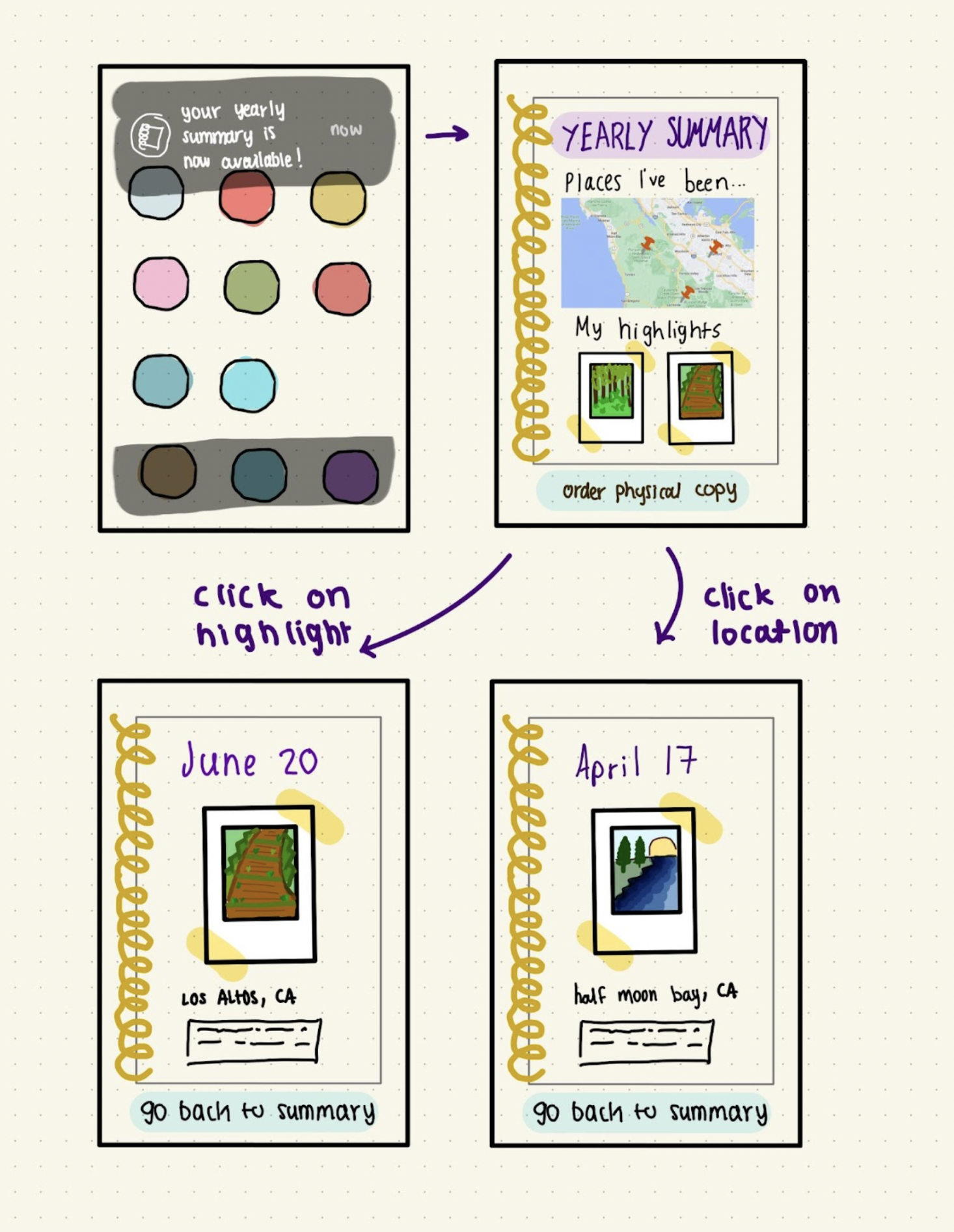
This flow describes an example of our application’s summary pages, specifically yearly summaries (we also plan to have monthly and weekly summaries that resemble the flow above). The user can use the summary page to access highlights and reflect on their year. They can also access pages from the map shown. These summary pages aim to motivate the user to use our application and go outside to different places.
Cohesive workflow
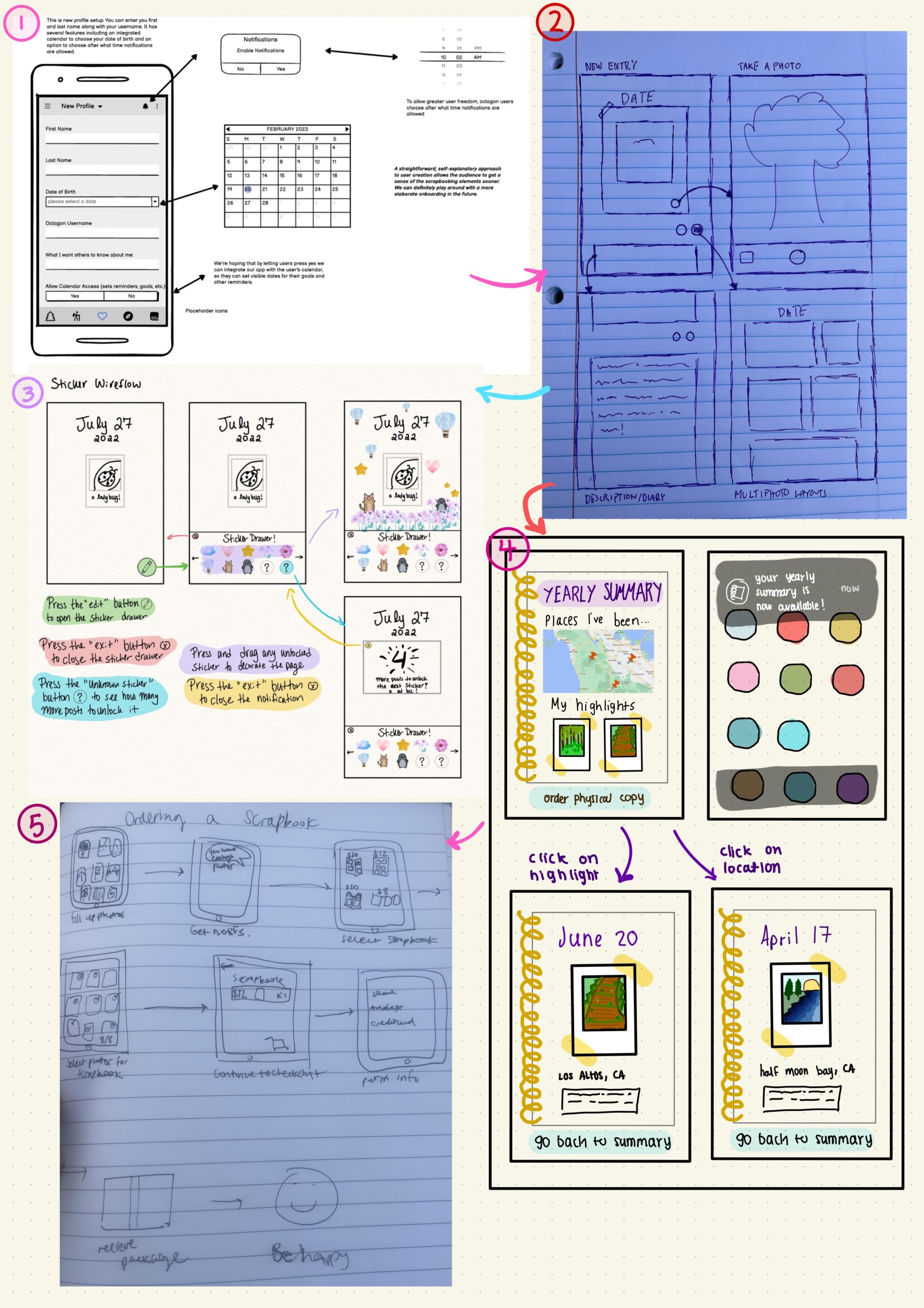
(1) The user first creates an account and sets their notification preferences when doing so. The notifications are then set for a time that is convenient for the user to remind them to go outside. (2) The user then can start uploading their pictures into templates from our application. They can also add a description or a diary entry if desired. After uploading a few posts, the user then receives reward stickers. (3) The stickers represent a short term reward method to encourage the user to go outside. (4) Our more long term reward method is the weekly/ monthly/ yearly summaries. When these summaries are available, (5) the user will have the option to get a physical copy of their online scrapbook. Our design targets users who are more sentimental and appreciate the visual aspects of nature who would like to spend more time outside. Our design assumes that the stickers will motivate users to use the application regularly. It also assumes that the long term reward will help the user stay.



