
Our intervention study was a one-week experiment testing a Pause Menu that we designed. The pause menu prompts participants at the point in time at which they want to take a break from focused work, labels what they need (Calm, Energy, Reset, Attention, or Body), and then they are matched with a 30-90 second micro-break. After each pause, we asked them to note down a quick rating of stress, focus, and energy to see how restorative the break really was. Our goal was to see if the guided breaks that were matched to need helped improve their state of mind when they returned to their work after completing their work.
We had 8 participants in our study, 5 returning participants from our previous study, and 3 new participants. The new participants were recruited from a more diverse group of grad students since we were initially overly skewed towards PhD students. The age range of our participants was between 20 and 24.
How did the intervention study go? What did you learn?
- How did your intervention study go? What did you learn?
- Walk us through key insights from your intervention study.
- How does this change your solution design?
The intervention study was successful in noting down pauses across multiple days and environments. The participants used the Pause Menu during work breaks (such as schoolwork, lab work, coding, interviews, and rehearsals), rather than additionally adding extra pauses to their day. Some indicators suggested that this study operated effectively. Firstly, participants consistently initiated PAUSE events in the week, and all four categories (Calm, Energy, Reset Attention, and Body) were used. Completion rates were high, with most pauses ending in Done and participants providing their ratings. Participants were logging their natural breaks rather than only idealized restorative behaviours — we saw them log scrolling, stretching, drinking water, walking. Also, post-break restorative ratings were often moderate to high (ranking 6-8), especially for the Calm and Energy categories. We designed our study to be as lightweight as possible, so that participants would use it repeatedly and not have it disrupt their workflow significantly.
Insight 1:
We learnt that most default pauses were not restorative, but could be redirected. Across the logs, many pause triggers were “stuck”, “overwhelmed”, “looping”, “scrolling”, and more. Without intervention, these feelings materialized in doomscrolling, scrolling on platforms such as Slack, Reddit, and other social media loops. However, when directed into short walks, breathing exercises, stretching, a quick tidy of their room, and more, we saw that participants reported returning with higher focus and energy. The learning from this is that the pause moment has a lot of power to be a leverage point. Our participants were already pausing, so the intervention shifts what kind of pause it becomes.
Insight 2:
One important aspect of this study was the pause menu, and looking at what kind of pause the participants would want to take. From the ratings, we saw that Calm and Energy breaks would often lead to restorative scores of 7-8, whereas attention resets were more mixed. The body breaks were situationally helpful (seemed to fix tight necks, eye strain, etc.), but not as consistently tied to mental focus boosts. The Calm examples that seemed to work were the breathing, quiet walks, and screens/phones off, while the energy examples that seemed to work were the quick walk, coffee/movement, and the dance rehearsal. Overall, here we learnt that regulating emotional states and physical activation were especially impactful on our participants’ ability to return to work in a smooth/efficient manner.
Insight 3:
We noticed that the attention resets were the most fragile. Many of the attention-labeled pauses started as benign stuck, looping, self-doubting, but when the break was something like scrolling/social feeds, the restorative ratings were often quite low (scores around 2-3). When the attention breaks were presented in a structured form, the ratings were higher (structured forms such as write the next 3 steps, close your tabs, tidy for 2 minutes). Here, we learned that to reset attention, we needed to make sure our prompts for pauses were structured, to keep users from leaning to distraction instead of restoration.
Insight 5:
Even when participants chose to do similar activities without the prompt, we saw that when prompted to do so, they reported better restorative scores. This suggests that with a prompt, and the fact that the participants are going through the process of selection, thinking about what they need in the moment, they were able to make their pauses more deliberate and less guilty/avoidant. Additionally, we saw that the 30-90 second pause break seemed enough, as micro-breaks were short enough to fit in between meetings, not feel indulgent, and reduce friction. We saw that the participants did not report that the breaks were too long, with many even extending the breaks organically/by themselves, suggesting that the micro break was almost acting as a gateway.
How this changes our solution design
The first change would maybe be to split the “Reset Attention” into two subtypes. Currently, it is just resetting attention, but we would propose splitting it into one for “clearing my head”, which includes mental clutter and looping, and another for “unsticking task”, which includes task friction, confusion, and avoidance. Another change could be to add more structure to the attention scripts, giving them a concrete step to work on, which is more implementation-focused.
One additional feature for future iterations would be to build personalization based on time of day, as looking at the data, it seemed that in the morning, people were choosing Energy/Body, while people in the afternoon were picking Calm. We could look into having the menu reorder options based on time of day, and suggest the likely best category, giving the participants messages such as “you often choose Calm at this time”. We would want to look further into this idea of customization/personalization — maybe there could be a place for participants to give their own ideas of pause prompts, which can be fed into the options that they are presented with.
Takeaway: The intervention study showed that people are already pausing, but the Pause menu helps shift these pauses into a more restorative use of their time, especially in the Calm and Energy categories. The most important insight was probably that labelling the need before taking the break helped increase intentionality and thus improve how the participant returned to work. However, the Attention category needs to be worked on a little more to create more structured scripts (to detract from the allure of distraction).
System Paths

For our system path, we focused on the one main persona featured in our study: the High-Performance Undergraduate Student. The following system path diagram outlines the expected flows that this persona will take as they engage with the app.
It is expected that users will come to the app when they need to effectively lock in for whatever tasks/assignments they may have, and the aim is to streamline the way in which a user takes breaks during a work session. In the diagram, the green boxes represent the expected flow for a user: they open the app, configure their work session, and start working. At certain intervals, they will receive an alert to take a pause along with a certain kind of pause activity to do (such as getting up and stretching), then sitting back down and getting back to work. The pause activity alert is a focal point of our app as our studies have shown that users respond more positively and report better outcomes when they are prompted to choose from a selection of activities. Depending on how long the user works for, they may get another pause alert, which begins the same loop again. Whenever the user decides they are done, they can end the work session and take a look at some statistics regarding the work session and close out the app.
Additionally, there are red boxes indicating where the expected flows may go awry, whether that be when a user ignores an alert for a pause activity and just keeps working, or when a user does not return to the work session after their pause activity. To prevent such cases, we will need to carefully consider how to clearly signal what the user should be doing at each step of the journey.
Story Maps
For our story map, we again focused on the same persona, the High-Performance Undergraduate Student. For this persona, we crafted a story in which the user is inundated with numerous deadlines for various assignments that are overwhelming them. This user wants to be able to grind out all their work, but they feel that working for many hours straight will inevitably lead to burnout. To avoid this, our app is intended to help the user take more restorative pauses throughout their work session, breaking it up so that they can work effectively while pausing to take breaks when they need to. The featured story map outlines the expected journey that our High-Performance Undergraduate Student may take.
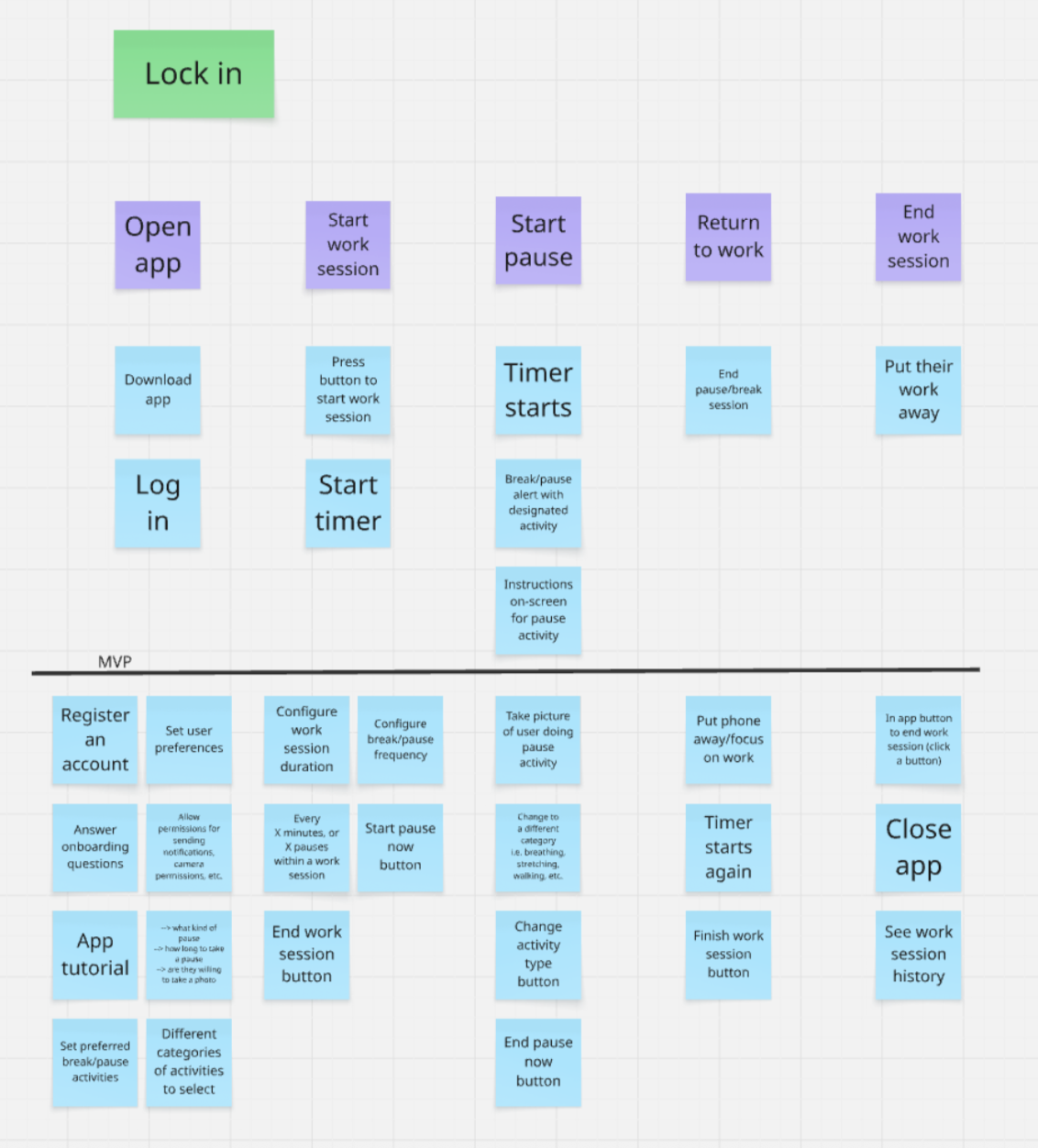
From our story map, we recognized that the purpose of our solution is to streamline a user’s work session as much as possible. To that end, our app should be as straightforward and minimalist as possible. This app does not need any fancy bells and whistles because the focus should be on what the user is doing beyond the screen. As we organized the different features and steps that could be relevant to our app, we identified the most core features that our app could not function without: starting a work session with a timer, receiving pause alerts with an activity to do, resuming a work session, and finishing the work session. This is the core loop that the app hinges on. Everything else—from configuring the exact intervals of pauses to customizing different kinds of pause activities—come as secondary to these main functionalities. Thus, we drew a line to initially separate the MVP and non-MVP features, which we continued to refine from there.
MVP Features
Our MVP focuses on being able to create pause guidance in the moment, without detracting from our users’ work. The features that our study had and we will continue to work on are as follows:
- Starting a work session: Users can tap a button to begin a work session, which will start a timer
- Being able to record a pause: Users can initiate a pause in real time, by tapping Start Pause or sending PAUSE (in the case of this study)
- Label the current need: Users can quickly select how they’re feeling (Calm/Energy/Reset Attention/Body), to indicate what they need from the break.
- Matched Micro-break Prompt: The system delivers a 30-90 second micro break, which is matched to the need that the user selected
- Indication of Completion: Users confirm when they’ve completed the micro-break, creating a clear transition point to when they go back to work.
- Post-Pause Check-in – Ratings for how restorative the pause felt (in our final app, we can have optional feedback loops so that participants can report how helpful the prompts were, and we can use that to change the prompts)
- Ending a work session: Users can tap a button to end their current work session
Non-MVP Features
- Pause History View – Users can review past pauses, including the category/activity/outcomes, helping to build awareness of patterns over time.
Bubble Maps
Creating this bubble map helped us visualize our solution as two interconnected systems: Work Session & Cognitive Flow and Pause Orchestration & System Feedback. On the left side, mapping the Work Session Architecture and Need Identification Layer clarified how the user tracks their time and actively labels their current mental state. On the right side, the Core System & Logic, Intervention Engine, and Reflection & Outcome Layer illustrate how the app processes those triggers to deliver and evaluate structured micro-breaks. Positioning the User Decision Flow directly in the overlapping center highlighted it as the critical bridge where a user’s natural workflow actively intersects with the app’s interventions. Finally, by sizing the bubbles based on their importance to our MVP, it became instantly clear that diagnosing the exact need and delivering the matched break are the true heavy lifters of our solution, while smaller clusters like the Data & Analytics Layer remain secondary to the immediate goal of behavioral change.
Assumption Tests and Map
We have attached our assumption map, tests, and overall insights for each assumption in this document.



