Intervention Study Synthesis
Concept
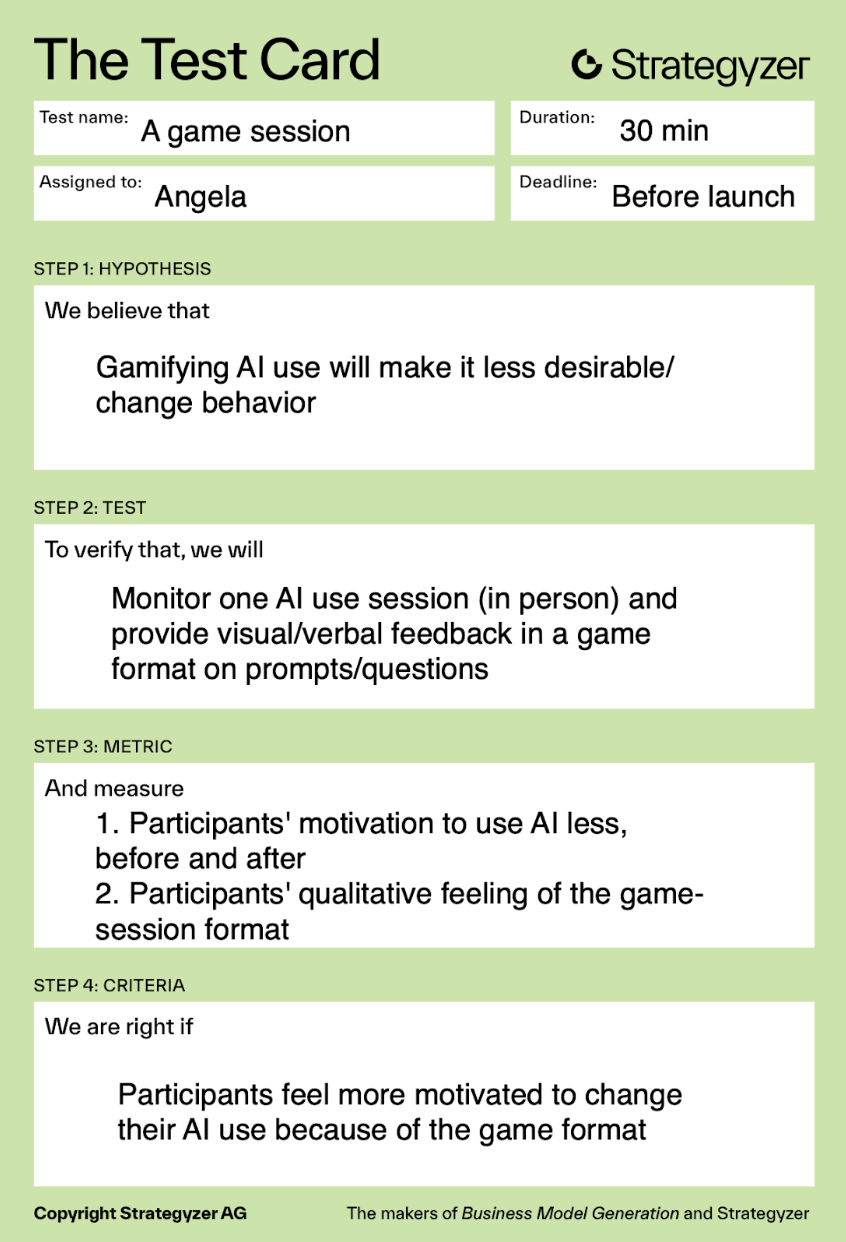
In our intervention study, we investigated how prompting participants to reflect on their daily AI usage goals and providing visual feedback (via hand-drawn brains) based on their self-assessed performance influence both AI usage trends and self-awareness of AI use over 7 days.
Our guiding research question is: does a reflective intervention prompt with visual feedback improve how effectively participants use AI tools to achieve their goals?
Data Collection
We conducted the intervention study for 7 participants over 7 days. A majority of these participants also took part in the baseline study, which gave our team a stronger understanding of their AI usage behaviors over a multi-week time horizon. This allowed us to identify any changes or trends associated with our intervention. We collected data using twice daily text prompts:
- Morning:
- Goal statement (text)
- Recurring text 9 AM: “In one sentence, how do you intend to use AI today? (example: get step by step help on my 224N p-set today)
- Goal statement (text)
- Evening:
- Self-rating (1–5)
- Recurring text 9 PM: “How successful were you in accomplishing your AI use goal today? (1 – terrible, 2 – poorly, 3 – OK, 4 – well, 5 – really well!)
- Reflection on AI usage: “Please briefly describe what worked and what didn’t.”
- Self-rating (1–5)
- Optional: Log AI usage data (ask participants to send their AI chat logs via PDF)
- Logistics:
- Team members sent daily text messages to their assigned participants and entered all responses into a shared Google Sheet: Intervention study data
Post Study Interviews
We interviewed all seven participants to understand how their intentionality shifted across the week, what shaped their daily reflection ratings, and whether the brain visuals actually motivated them to change AI behavior. Through these interviews, we were able to connect three specific threads: daily rating trends (targeting the question – did intentionality improve or fade over time), the relationship between goal specificity and effectiveness (targeting the question – did clearer and more intentional goals lead to higher quality AI use), and the impact of visual feedback on self-assessment and engagement (targeting the question – did the imagery create a “glimmer” that nudged behavior). We also noticed that participants pointed out clear design gaps that reframed our direction. They mentioned that feedback felt too delayed to be actionable, “intention” was too easy to game without improving the quality of use, and daily prompts sometimes acted as a cue that increased AI use rather than adding meaningful friction.
Post Study Interviews can be found here: Interviews
Reflection and Key insights
Initially, we wanted to collect data to focus on two specific things. First, we wanted to understand the relationship between goal specificity and effectiveness rating: we want to know how intentional goal-setting impacts effectiveness – do more specific, intentional goals produce better outcomes? Secondly, we wanted to understand the impact of visual feedback (images of a brain character rotting) on self-assessment and AI engagement: we want to know whether the visual feedback gives users the “glimmer,” the motivation, to change their AI usage.
With our post-study interviews and data, however, we found that what we were really testing was the format of the morning/evening prompts, which counterintuitively increased how much users were using AI, because they were reminded that they could/should use it. This was partially due to the limitations of the study format: it was impossible for us to know exactly when users used AI, and it would’ve been really strenuous on the users to have them log interactions after every single use. With an app, however, we can provide immediate, responsive feedback during and immediately after AI use.
Because Barry the character was also sent after a whole day of use, Barry was not really interactive and therefore many participants did not feel invested in the character, which is the main draw of the intervention. Moreover, the intention setting did not work well because it was too easy to set an intention that could be ineffective; it didn’t add any friction to using AI, and it didn’t push participants to improve their use – only recapitulate what they were already thinking of.
On the other hand, some participants did enjoy Barry – they felt that the character made the experience more engaging, which made the study feel less like a standard tracking task. The daily prompting was a good format for keeping participants accountable, and many said that they would have forgotten to reflect without the morning/evening check-ins. A few participants said they started looking forward to seeing the brain image each night, which increased consistency in responding even if it did not fully change behavior.
Overall, the most important change is that we should prompt our users only when you open AI itself. This makes sense if we consider that we need to change the behavior during the behavior itself; the app will serve as a contextual cue. We also want Barry to be an immediate visual indicator, and allow the app to show progress/trends over time rather than a single delayed feedback loop.
Another important reorientation is shifting our focus. We want the app to be less mindfulness-oriented, and more goal-oriented; think Duolingo, not Calm. We want the questions to be more in the line of: “How can you use AI more effectively today?” “How can you use AI to improve yourself?” “How can you grow with AI?” Rather than “What is your intention for using AI today?” Following this, we want to modify Barry’s appearance so he can be more visually appealing and his role is clearer; the overall tone of the app will fall more in line with Duolingo’s scary owl.
Synthesis Models
System Paths
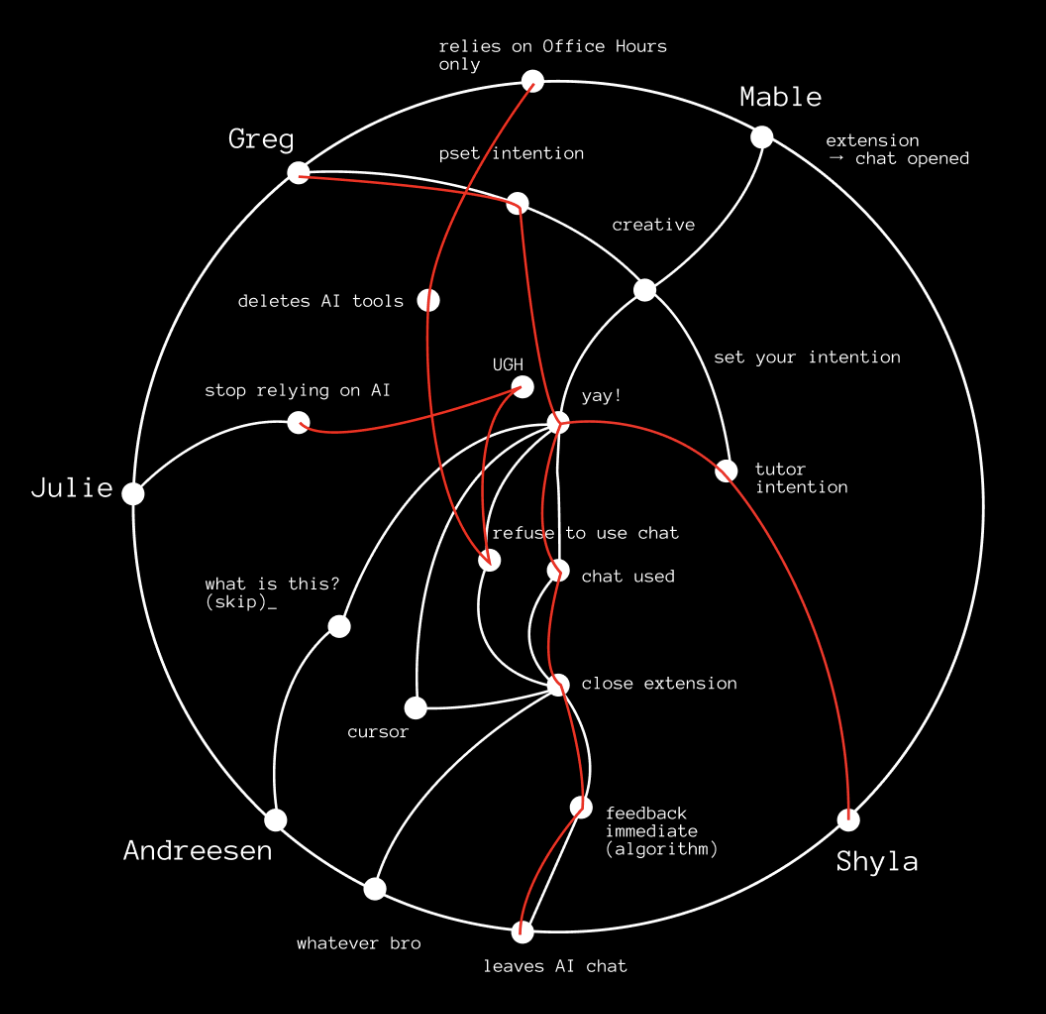
When constructing this system path diagram, we mapped how each persona experiences a complete AI session experience where our intervention enters that flow. We traced by behavior: what prompts a user to open an AI chat, what emotional state they are in, whether they enter the chat with a clear intention or not, how they engage with our tool, and how the session ends. Plotting these flows for each persona revealed that though motivations may vary (stress, confusion, inspiration), they all open an AI chat to solve their problem. From there, the paths diverge. Some personas set intentions, others skip that step and dive right in. Some over-trust outputs and some resist or close the extension entirely. The mapping clarified that the best point of intervention is right when a user opens the AI chat.
The system paths also exposed the weaknesses in our original design. Delayed feedback weakened the behavioral loop because by the time users received their Unrot brain character at night, the emotional context of their AI use had already passed. We also saw that intention-setting alone didn’t actually alter their subsequent behavior. Users could set vague goals and continue using AI in the same way. They could game the system without improving their habits. Ultimately, this exercise reframed Unrot as a behavioral feedback loop embedded within AI use itself rather than an external tracking tool or diary. This directly informed our MVP which is now a check-in triggered by when an AI chat is opened featuring a real-time visual indicator and an immediate session feedback summary that rounds out the feedback loop without feeling judgemental or negative.
Story Map
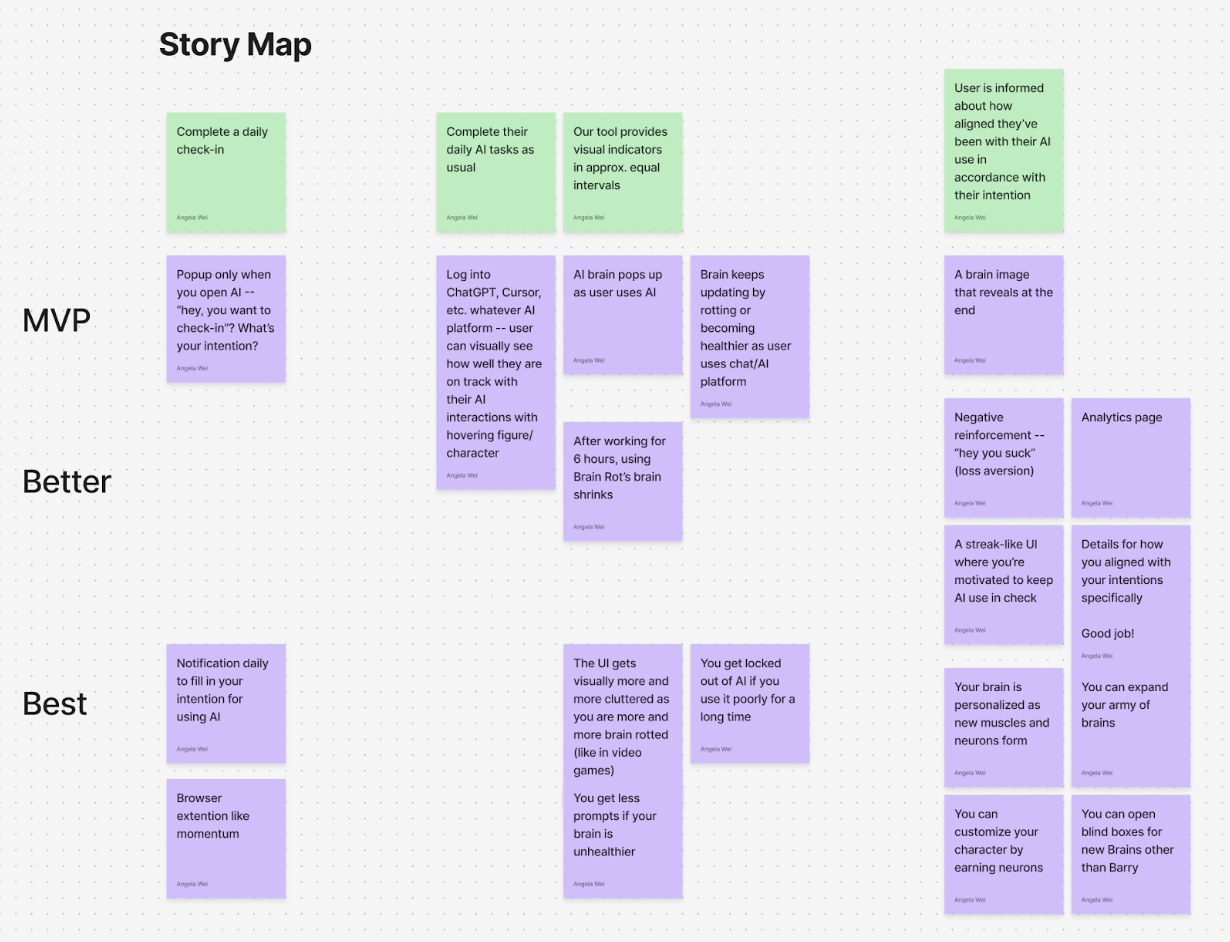
After taking our main results from the baseline study, we built a story map centered on what a “day with AI” actually looks like for our participants and where our intervention realistically fits. We outlined a simple timeline across the top (before opening an AI tool → using AI → finishing the AI session) and then filled it in with real user behaviors and app responses. Under each moment, we added sticky notes for: what users are trying to do, what typically goes wrong or feels off, and what an ideal outcome would feel like. Then we brainstormed potential fixes and sorted them into MVP/Better/Best so we could be honest about scope and performance. This mapping exercise helped us stop thinking in terms of “a daily diary prompt” and start thinking in terms of “what help does someone need during the moments they’re about to turn to AI?” By thinking with this lens, we were able to craft an appropriate intervention study.
Even before testing anything, the story map showed us that the highest-impact moments weren’t really abstract but rather specific points in the day where people go into autopilot mode. In our baseline work, we saw users often open AI impulsively when they’re stuck or feel rushed, then either over-trust the output or use it in ways that don’t match what they actually want. The map also helped us identify an important tension: if we intervene too generally (like a daily reminder), we risk becoming noise; and if we intervene too forcefully, we risk feeling too judgmental and nosy. Thus, the story map pushed us toward the idea of what we call ‘contextual support’ (right when someone opens AI, and while they’re in it), paired with an outcome that feels personal (“did this match my specific goal?”) rather than externally graded good versus bad AI use.
Since the story map tied problems to specific points in the journey, it helped shape our MVP feature set and the design of what we later evaluated in the intervention study. Our MVP focuses on three things: 1) a lightweight check-in that appears only when you open an AI tool (not like a random daily notification), 2) a visual brain indicator that stays on screen and updates during the session, and 3) a quick end-of-session summary that shows how aligned the session was with what the user said they wanted. The “Better/Best” labels show the ideas that we did not want to build first, like streaks, heavy analytics, lockout permissions, etc., because the story map reminded us that too much friction could feel annoying and essentially lead to drop-off. Instead, we’re using the MVP to test the core thesis: if we make the check-in contextual and feedback more responsive, Barry becomes easier to understand, and ideally, people become more intentional without feeling judged. We decided that if the primary hypothesis is confirmed to hold true, we can always build out additional scopes to the product.
List of MVP Features:
- Contextual Check In (pop-up when you open an AI tools)
- An extension pop up appears at the moment the user opens any AI tool (ChatGPT, Claude, etc), as opposed to a random daily notification.
- Prompts users to set a goal/intention using questions like: “What are you trying to do in this session?” or “How can you use AI to help you grow today?”
- Optional ‘skip’ button so it doesn’t feel overbearing or forced.
- Always on visual indicator during AI sessions
- A small, persistent brain indicator stays on screen while the user is in the AI session.
- Visually reflects the current brain state so feedback is immediate and tied to real time AI use.
- The brain indicator updates during the session, becoming healthier or more rotting, based on signals like how the user is engaging with AI and whether they are doing so in a way that aligns with their goals.
- End of session summary
- When the session ends, our extension shows a short recap consisting of:
- The user’s stated goal
- summary/analytics of users’ alignment with stated goals
- Short Onboarding
- A short first time flow along the lines of “This is your brain. Your brain will be happier if you use AI more effectively, and unhappy if AI usage is poor.”
- Clarifies what the indicator means so Barry is not confusing, and sets the tone as supportive rather than judgmental or overbearing.
Bubble Map
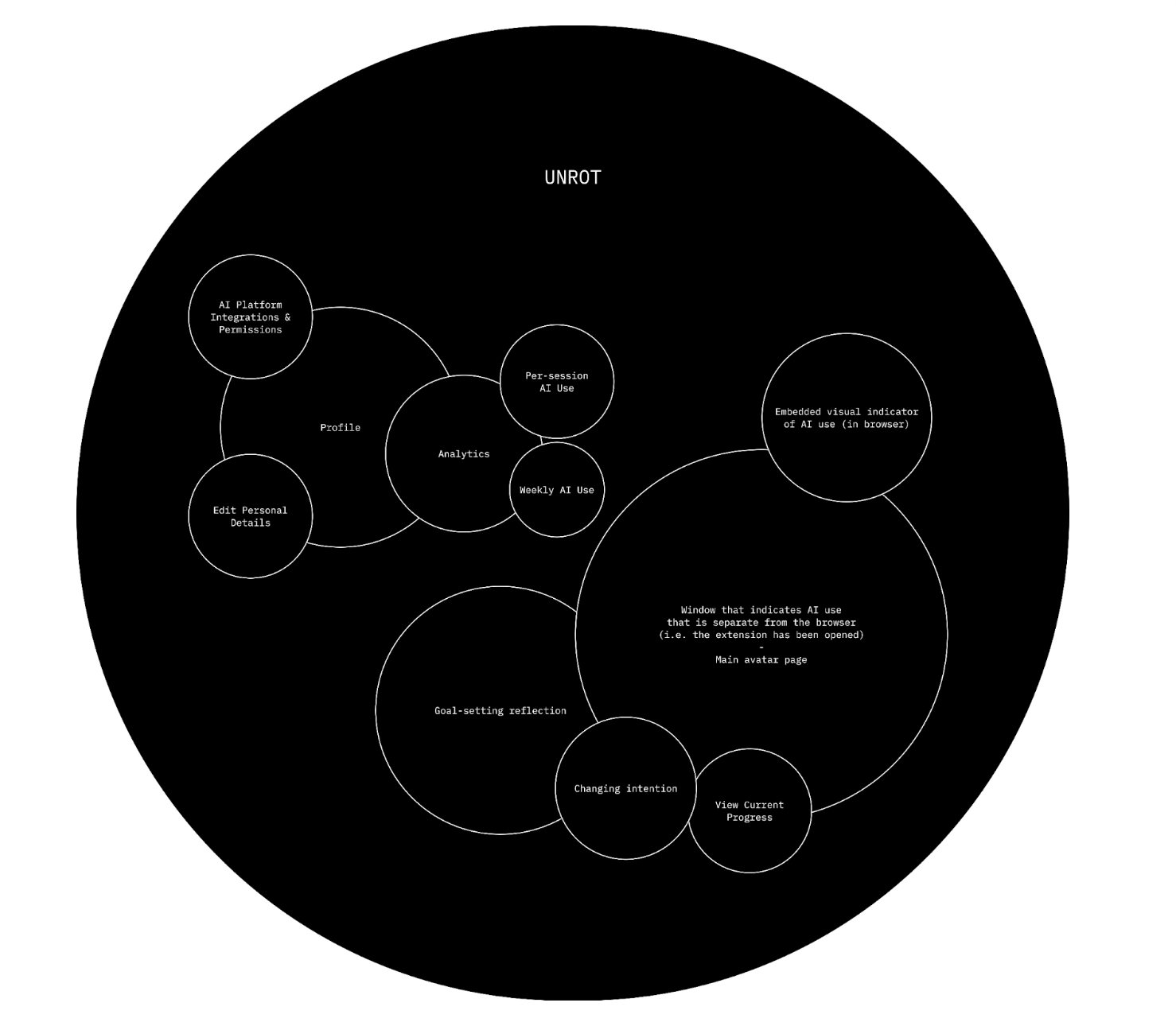
We started by thinking about the key components of our intervention. We had decided that it would be an extension that would get hooked to the device of the user and help them stay on track by letting them set their goals for the AI session and reflecting afterwards to see if they achieved those goals. Our main bubble is our extension, Unrot, which has two separate clusters inside. The first cluster contains the profile of the user, their analytics on how they used AI weekly and per session, as well as the extension’s integrations and permissions. So basically, the skeleton of the extension. The second cluster has the bigger bubbles, with the biggest one being the window that has the main avatar and indication of AI usage once the extension has been opened, followed by the goal setting bubble which also allows the user to change their intention/goal as well as view their current progress.
Creating this bubble map made us realize that we wanted to focus more on the avatar and the goal setting reflection of our intervention more than we wanted to focus on the analytics, mostly because we realized during our intervention study that most of our users felt like our extension was a cue for them to use AI instead of to not use AI.
Assumption Map
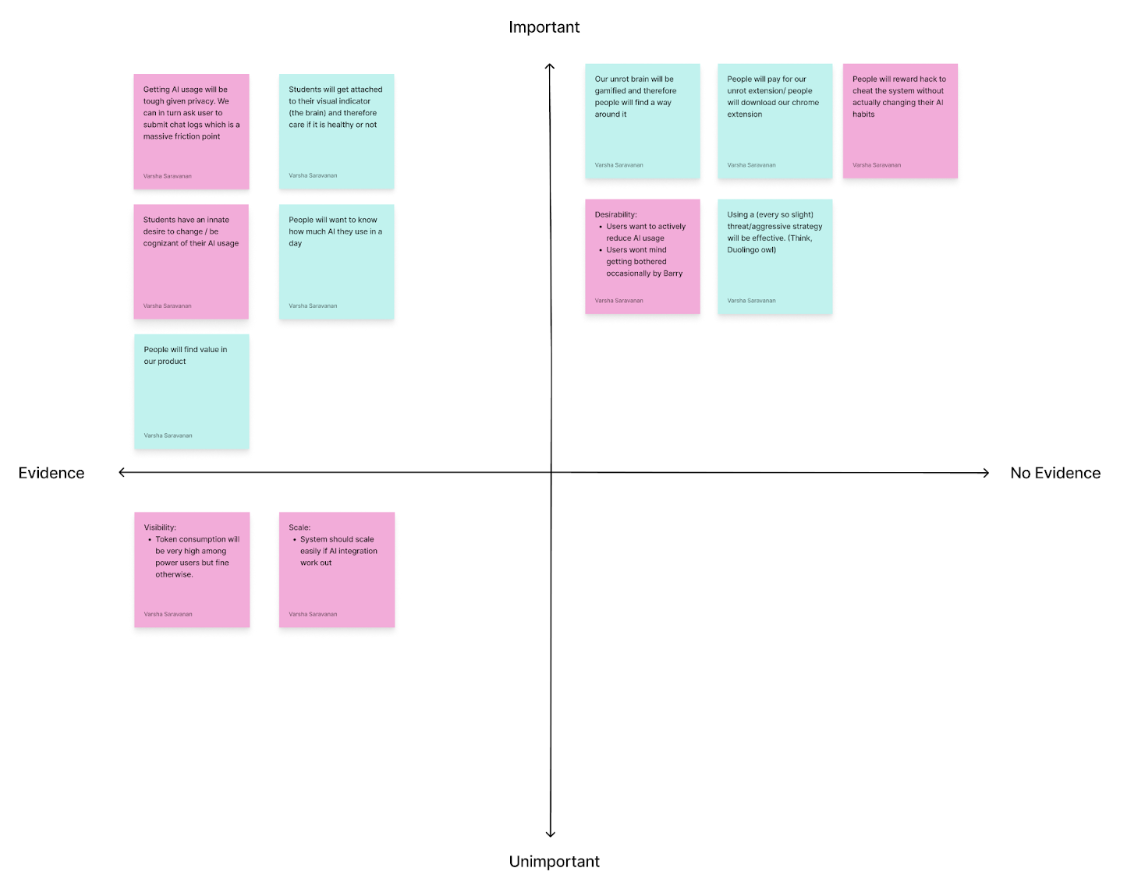
The assumption mapping exercise helped us identify that our most critical and unvalidated assumptions were the ones around user motivation and willingness to take accountability. More specifically, the map showed us that the biggest risks for Unrot lean on the behavioral side rather than the technical side, meaning our success depends less on whether we can build the extension and more on whether users engage with it honestly and consistently.
One of the assumptions was that users would want to actively reduce their AI usage and would accept having boundaries imposed on them by our intervention. These assumptions sit in the high importance, no evidence quadrant, which makes them central to our intervention’s success but still untested. This matters because Unrot’s value is not just showing usage, it is nudging users towards more intention, goal aligned behavior that requires users to be open to reflection and constraint.
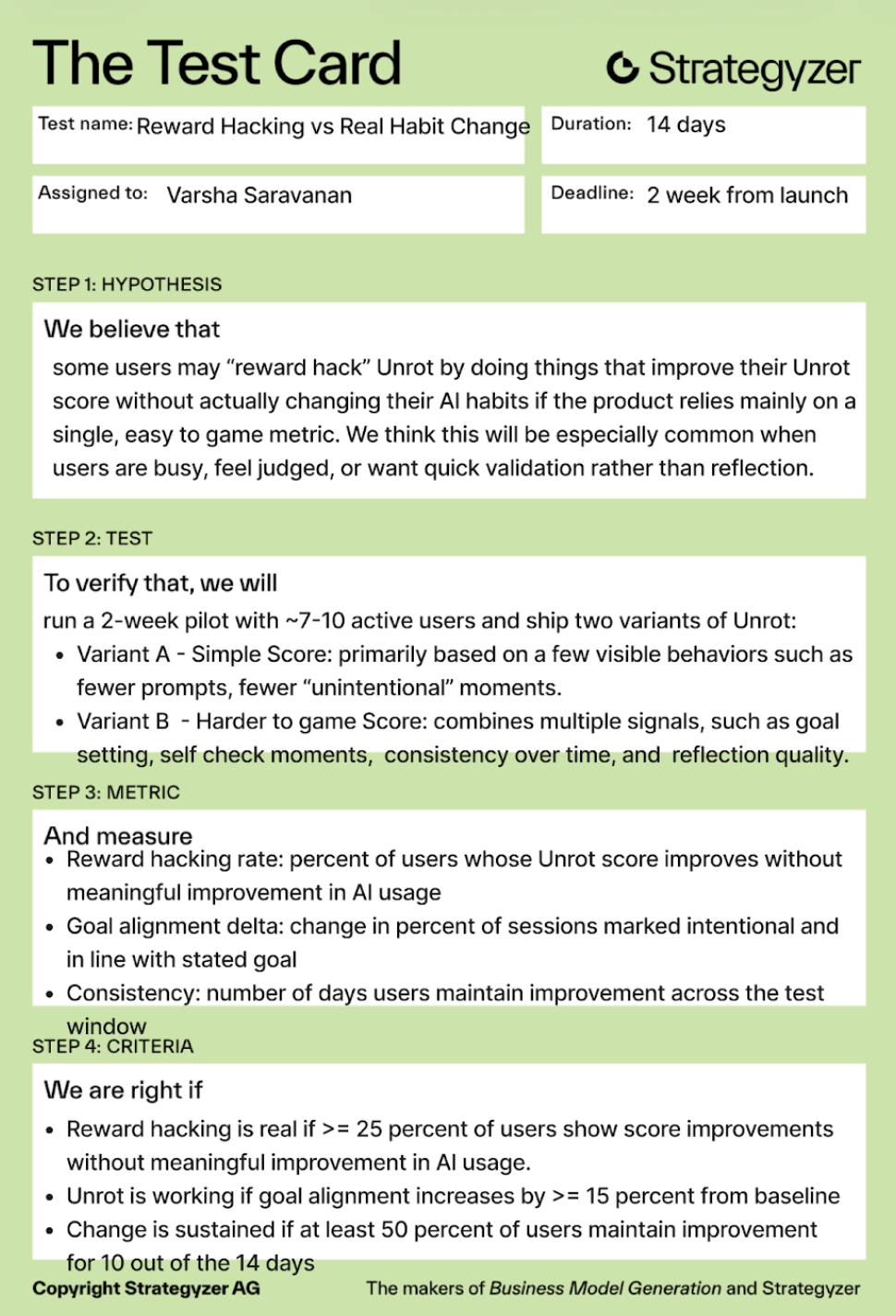
The map also surfaces another high importance, no evidence of risk around incentives: people may reward hack the system and improve their Unrot score without actually changing their behavior. If that happens, our ‘progress’ signals become misleading for users and the system, so strong metric design and checks become essential.
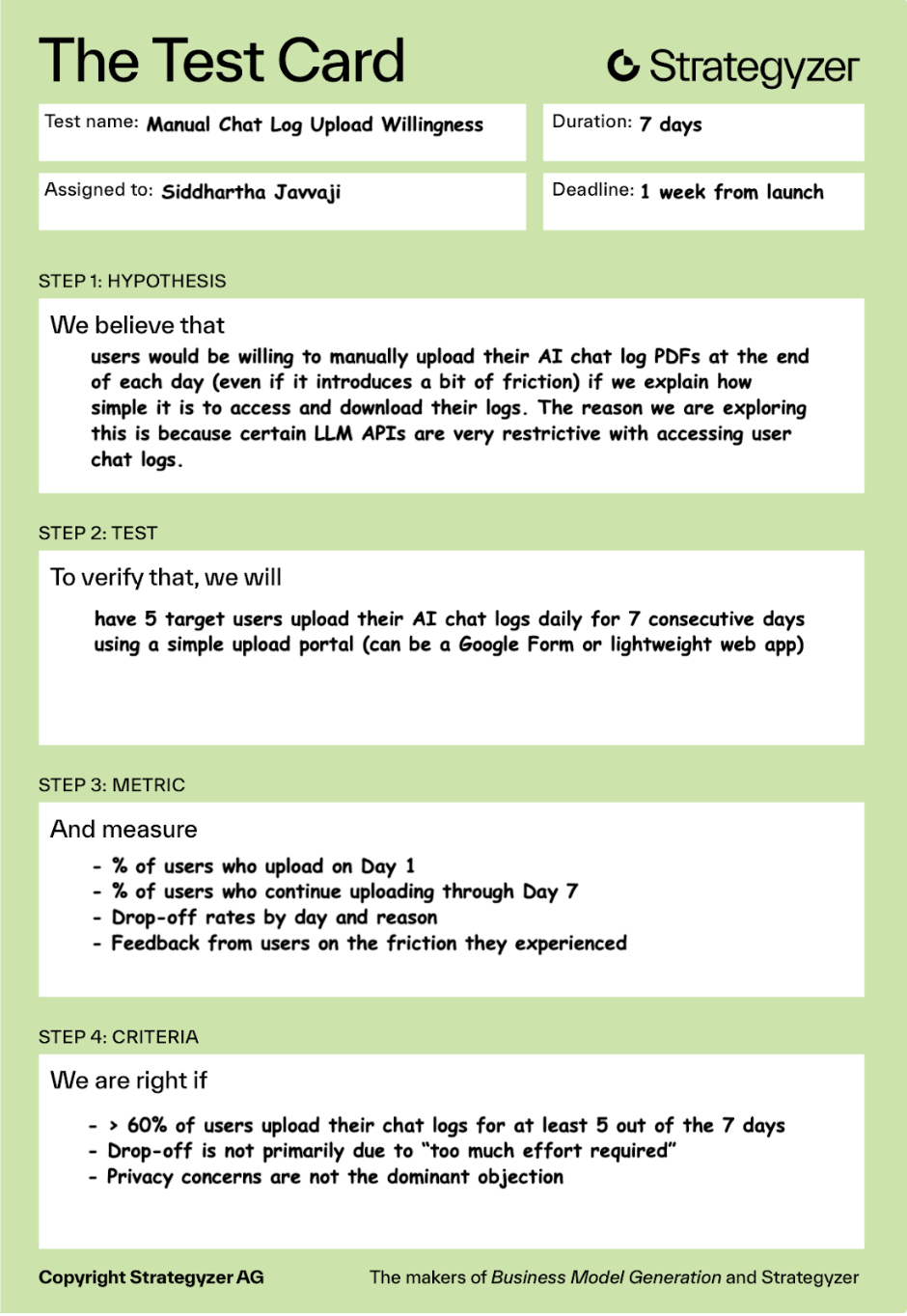
Finally, the exercise highlighted that privacy and data access constraints introduce friction, which could drive drop off and reduce retention. Overall, the map helped us to prioritize some key insights on what to test first: willingness to change and accept accountability, whether users game the system, before building the product itself.
Assumption Tests
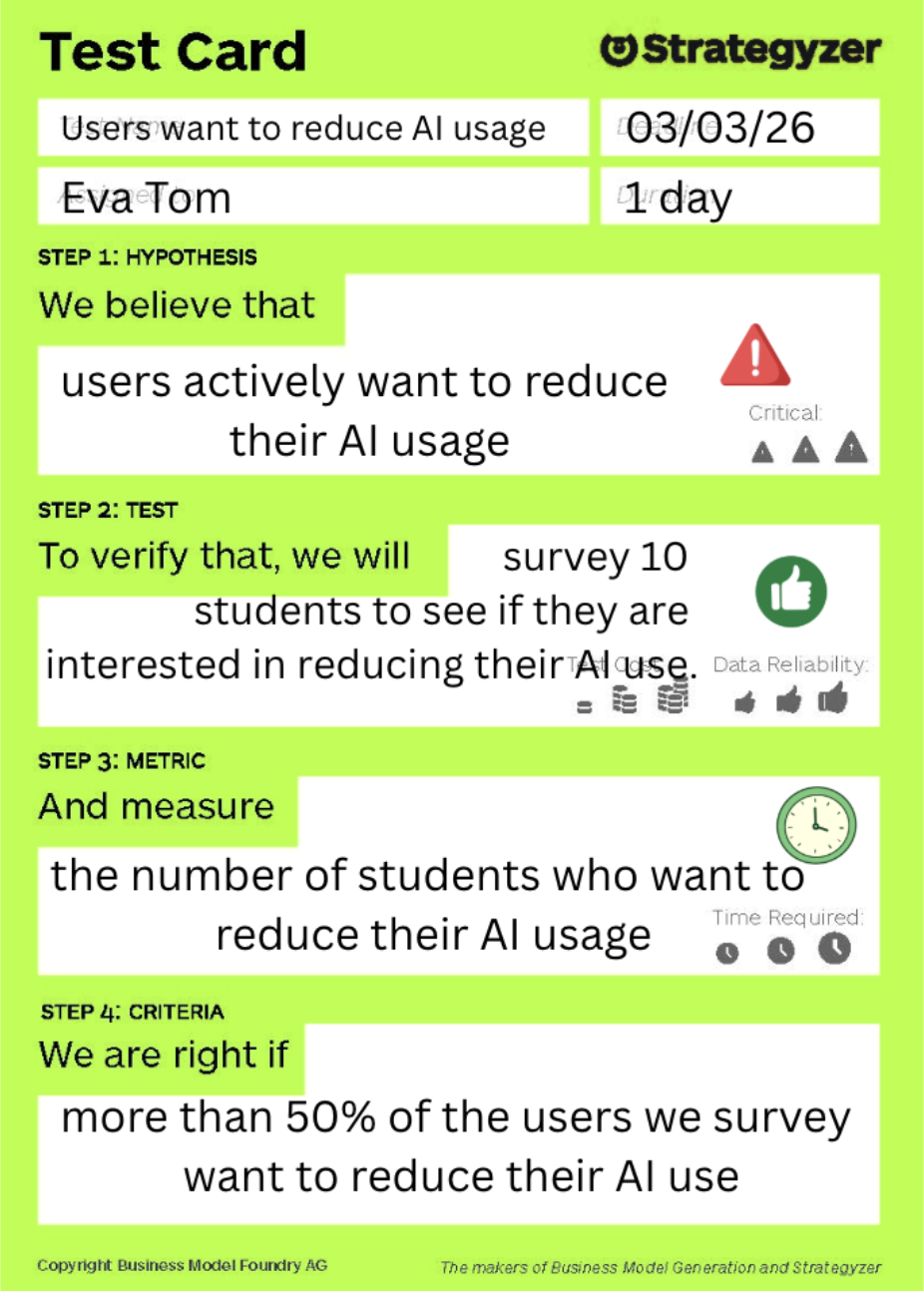
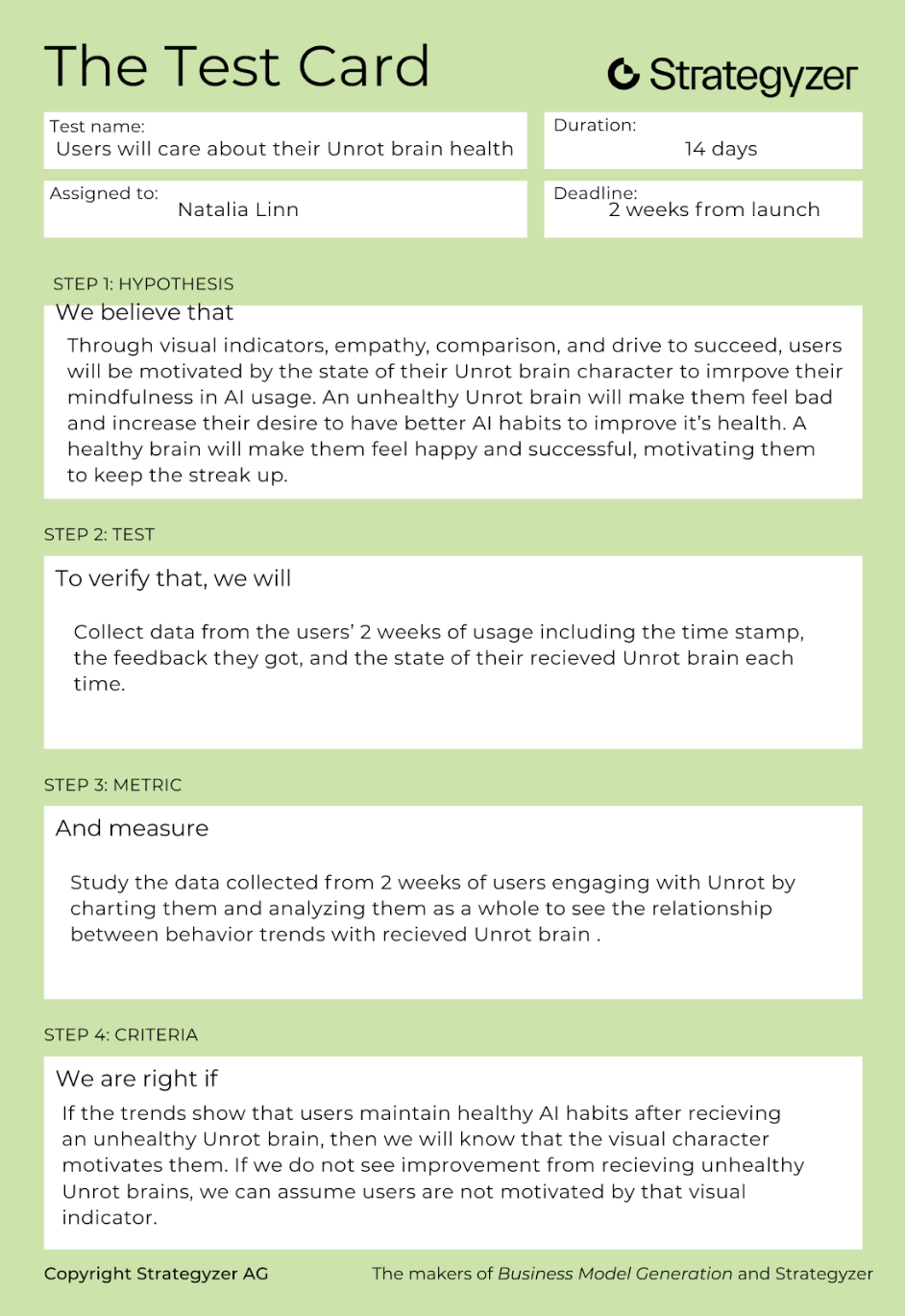
We pulled five assumptions, primarily from the unknown and important quadrant, to ensure we were testing assumptions that are crucial to the success of our MVP and would meaningfully change our direction if we found them to be false. A core assumption was that users actively want to reduce their AI usage, because the entire intervention depends on users having real motivation to change rather than just initial curiosity followed by a steep dropoff in user retention. We also tested whether users will care about their “Unrot” brain health, since the brain indicator and Barry are meant to create enough emotional investment to give users the “glimmer” to reflect and adjust their behavior. Finally, we treated reward hacking versus real habit change as a critical unknown. Even if users engage with the system, we needed to know whether they would genuinely become more intentional or simply learn how to optimize for a better looking brain without improving their underlying usage patterns. Here are the assumption tests that we carried out: