
Google Calendar
Link: https://calendar.google.com/
Overview: Google Calendar allows users to create and edit events.
Target Audience: Schools, students, workers; Anyone with access to internet and a device
Unique Value: Integrated with G-Suite/Google ecosystem which schools use
Screenshots:

Strengths:
- Minimalistic with low activation energy: Click anywhere on the calendar and type name of event.
- Organization: Color coding and event types
- Viewing options: You can view events by day, month, or year for scoping
Weaknesses:
- Notifications: Notification options are weak with little customizability and feedback opportunities
- Limited Completion Visuals: There is no way to mark an event as completed
- Lack of personalization/guidance: Calendar is unaware of usage patterns, common scheduling failures, or optimal scheduling for specific events
Our Opportunity:
Our product would address the soft commitment problem, where calendar entries alone don’t ensure follow-through. Google Calendar excels at capturing intentions but provides no support for executing them. There’s no mechanism for users to reflect on why they missed or canceled events, no visibility into their own patterns of planning failures, and no intervention at the critical intention-action gap.
Notion (Calendar)
Link: https://www.notion.com/
Overview: Notion is an all-in-one workspace combining notes, databases, wikis, and project management. The calendar is an extension of Notion.
Target Audience: Students, workers, and teams seeking a unified productivity system
Unique Value: Deep integration between calendar events and a flexible database/note-taking system. Events can connect to project pages, task lists, and documentation
Screenshots:

Strengths:
- Connected context: Events can link to Notion pages, providing background material, notes, and related tasks in one place
- Database flexibility: Users can create custom views, filters, and properties for events (priority, status, tags)
- Task-calendar integration: To-dos with due dates appear on the calendar, bridging planning and execution
- Templates: Reusable structures for recurring meeting notes or project workflows
Weaknesses:
- High activation energy: Powerful features require significant setup and learning investment
- Complexity as friction: Flexibility creates cognitive overhead that can discourage consistent use
- Still no completion feedback loop: No built-in reflection mechanism for why commitments weren’t met
- No behavioral awareness: System tracks what you planned but not your patterns of follow-through or failure
Our Opportunity:
Our product would target Notion’s gap between system complexity and behavioral insight. Notion gives users powerful tools to organize intentions but no guidance on whether those systems actually improve follow-through. Users can build elaborate planning setups yet still miss commitments. Notion offers no mechanism to surface the “why”! We will provide the reflection and pattern-recognition layer that transforms Notion from a planning tool into a behavior-change tool.
Motion AI Calendar
Link: https://www.usemotion.com/features/ai-calendar
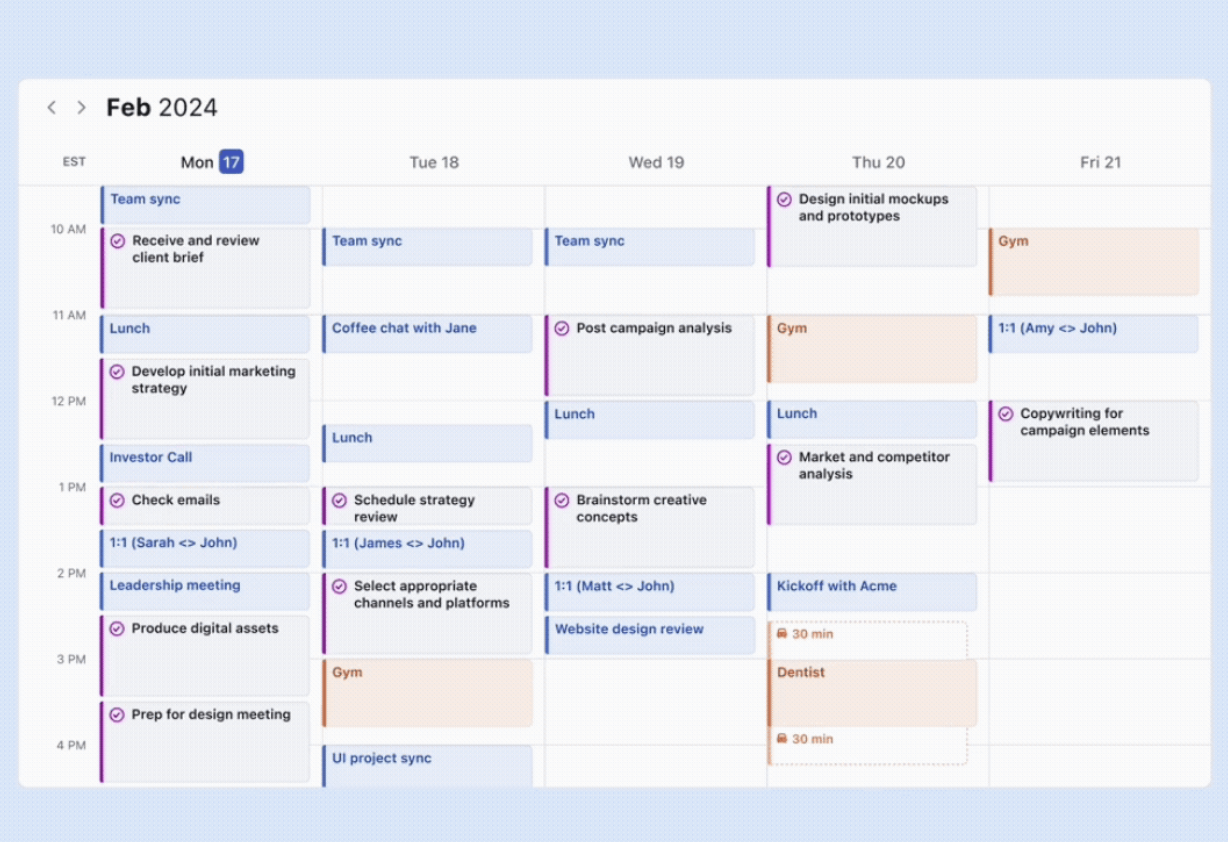
Overview: Motion’s AI Calendar automatically reorganizes your calendar when plans change and warns you about overcommitting. If a meeting runs long or an emergency comes up, the calendar reshuffles your week to make everything fit again. It understands your capacity and flags when you might have too much on your plate, and helps you find time for the things you want to accomplish.
Target Audience: People with busy, dynamic schedules who want to supercharge their productivity.
Unique Value: AI integration to intelligently move calendar events based on priority and availability.
Screenshot:
Strengths:
- Clean aesthetics and easy-to-use UI
- AI integration actually works; reorganizes your calendar automatically
- Cross-Platform
Weaknesses:
- Limited collaboration features
- Desktop experience is smoother than Mobile (Mobile performance and features aren’t as strong)
- Cost: $29/month
- Minimalist/sterile UI; not very personalized or fun
Our Opportunity:
- Better mobile experiences; not everyone wants to have to open their computer to look/organize their calendar
- More engaging, fun UI incorporating behavior change concepts like celebration
- Less expensive; cost is likely inflated by expensive AI models
Finch
Link: https://finchcare.com/
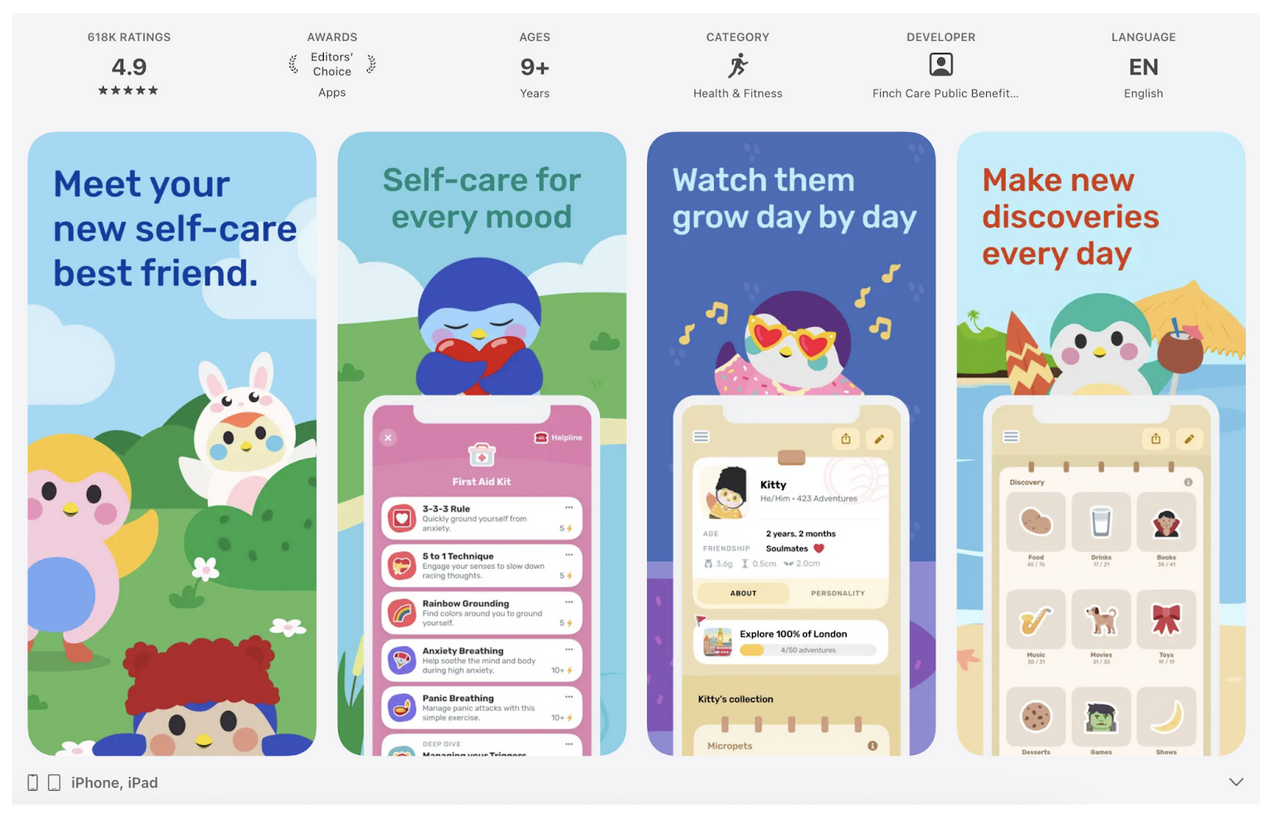
Overview: Finch is a self-care app that gives you a little buddy to take care of. Completing your self-care goals, like drinking water or getting enough sleep, nourishes your finch and helps it grow. You earn currency that can be used to buy cosmetic items for your finch, and the app offers suggestions and exercises to support mindfulness and goal-setting.
Target Audience: People seeking motivation to improve their self-care and who enjoy cute aesthetics.
Unique Value: Personifies your self-care goals as a little buddy you are responsible for caring for, and gamifies self-care to increase engagement, which, in turn, increases goal-setting and completion.
Screenshot:
Strengths:
- Cute, engaging aesthetic and narrative of caring for your finch
- Personalization/customization through cosmetic items
- A large variety of self-care tools beyond tracking goals
Weaknesses:
- Only on IOS/Android, not desktop
- No calendar/3rd party integration, goals are only stored as a todo-list in the app
- Cost: $9.99/month
Our Opportunity:
- Apply cuteness and fun to a calendar interface or other solution instead of just a to-do interface
- Come up with a framework people can implement in whatever calendar they use, so they aren’t locked into a single interface.
- We can offer a free solution
Lifestack
Link: https://lifestack.ai/
Overview: Lifestack is a calendar and to-do app that syncs with wearables to help users plan their day around their energy levels. Each day, AI suggests meals and rest times. Daily planning is heavily assisted by AI as well through an internal chat interface; users can choose whether they want an event/entire day planned and tweak their day based on their preferences.
Target Audience: Users with wearables who seek to integrate health data with task management.
Unique Features:
- Energy zone graph based on circadian rhythm
- Integration with productivity, health, and calendar apps
- Suggests breaks and lighter tasks during energy dips
Market Need: Users who want to effortlessly integrate health metrics into daily planning and leverage AI to schedule and plan.
Screenshot:
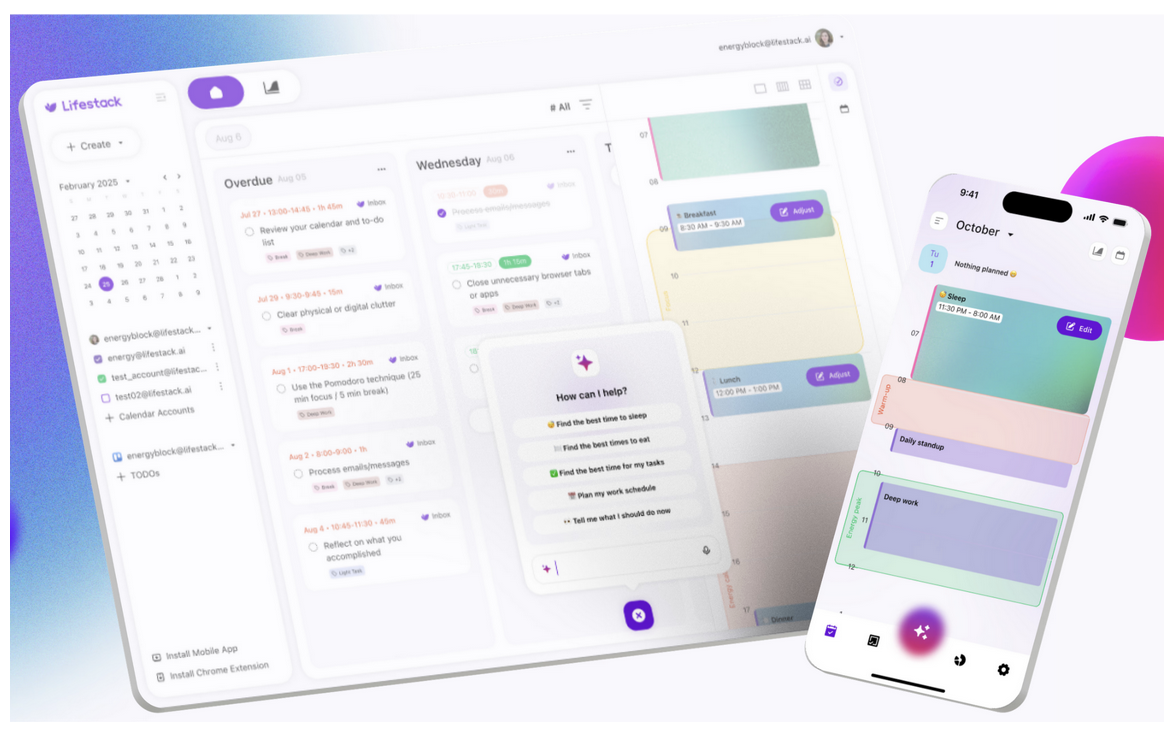
UI is simplistic, but not aesthetically pleasing. Use/phrasing of AI feels impersonal (emoji use & language mirrors that of a typical AI-forward interface)
Strengths:
- iOS, Android, web, and chrome extension
- Sleek UI
- Hyper-personalized recommendations
- Energy-aware planning
Weaknesses:
- $4.99/month or $42.00/year
- Calculation of energy levels might not be accurate for everyone (ie women who use the app)
- AI suggestions are helpful but not as dynamic personal as users would like
Our Opportunity:
Although Lifestack integrates highly personal health data into planning, its AI-delivered suggestions do not fully satisfy users’ urge for hyperpersonalized feedback. We can explore how to fulfill this niche by tweaking how AI is leveraged (perhaps we won’t use AI at all). Additionally, we can also create a more aesthetically pleasing and minimal UI.
Sunsama
Link: https://www.sunsama.com/
Overview: Sunsama is a purpose-built productivity tool geared towards white-collar professionals. It aims to inject intentionality into task management. The robust 3rd party integration makes it easy to compile all tasks, events, and even emails into Sunsama, allowing users to begin their day by dynamically prioritizing tasks. Throughout the day, the sleek, distraction-free design helps facilitate focus. To wrap up each day, Sunsama prompts users to reflect on their tasks and visualize their progress.
Target Audience: Modern professionals (and seemingly those that are younger & more tech-savvy).
Unique Features:
- Automated reminders for meetings, breaks, and end of day reflections
- Automated tracking of progress and wins
- Integration with Calendar, project management, task management,and messaging apps
- Daily/weekly analytics
- Integration with Zapier (automated workflows)
- Available on Web, macOS, iOS, Android
Market Need: Professionals who juggle multiple calendars and need a centralized tool to stay organized and productive. Given the price and integration with Zapier – an automation tool, Sunsama targets those who are willing to splurge for a product that works well and power-users of typical productivity tools.
Screenshot:
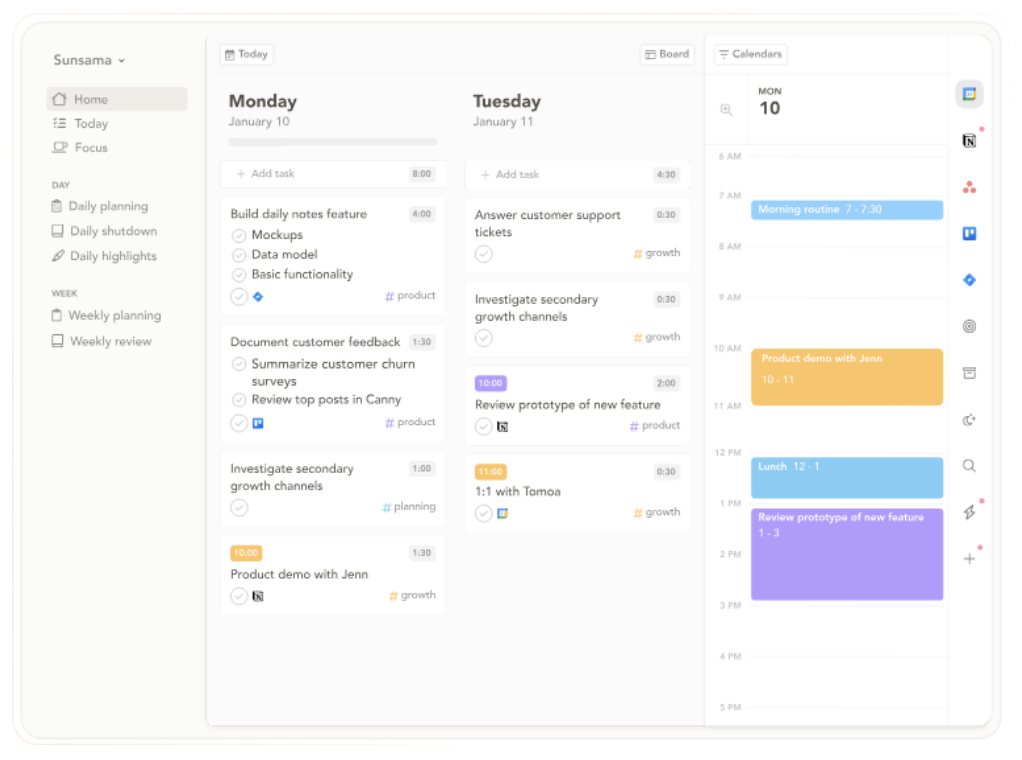
UI is clutter-free, color is used sparingly to group tasks. Small icons show the source of each task, which 1) subtly reassures users that their tasks are synced (visibility of system status!) 2) helps users attribute the reason/purpose of each task.
Strengths:
- Purpose built – features make sense for the target audience
Weaknesses:
- $20 a month!
- Mobile app lacks advanced features
- Limited long-term planning
- Lacks automation/assistance for planning – this seems intentional!
Our Opportunity:
Since Sunsama is geared towards working professionals, the plethora of features could be intimidating to those with less intense lifestyles but still want to work on refining their productivity. Even though Sunsama leans into adding intentionality planning by adding daily/weekly analytics + end of day prompts, we believe that we can lean into that even more. Many of our users viewed the midday check-in as a productive reminder to help them stay on track.
Todoist
Link: https://www.todoist.com/
Overview: Todoist is a cross-platform task management and productivity app designed to help individuals and teams capture, organize, and complete tasks efficiently.
Target Audience: Its target audience includes employees, students, freelancers, and small-to-mid sized teams who want a light but powerful system for managing both personal and collaborative work
Unique Features:
Todoist’s natural-language Quick Add allows users to create tasks with dates, priorities, and labels in a single line of text, reducing friction. Its advanced recurring due dates and text-based reminders stand out, as it enables complex schedules and habit-building. Features like voice-based task entry (Ramble), labels across projects, and extensive integrations further differentiate Todoist as a speedy productivity tool.
Market Need:
Todoist fulfills the need for a fast, intuitive task manager for personal productivity and light collaboration. It emphasizes quick capture and flexible organization rather than heavy planning, helping users stay consistent and meet deadlines. Its core value is making task management feel natural and low-effort.
Screenshots:
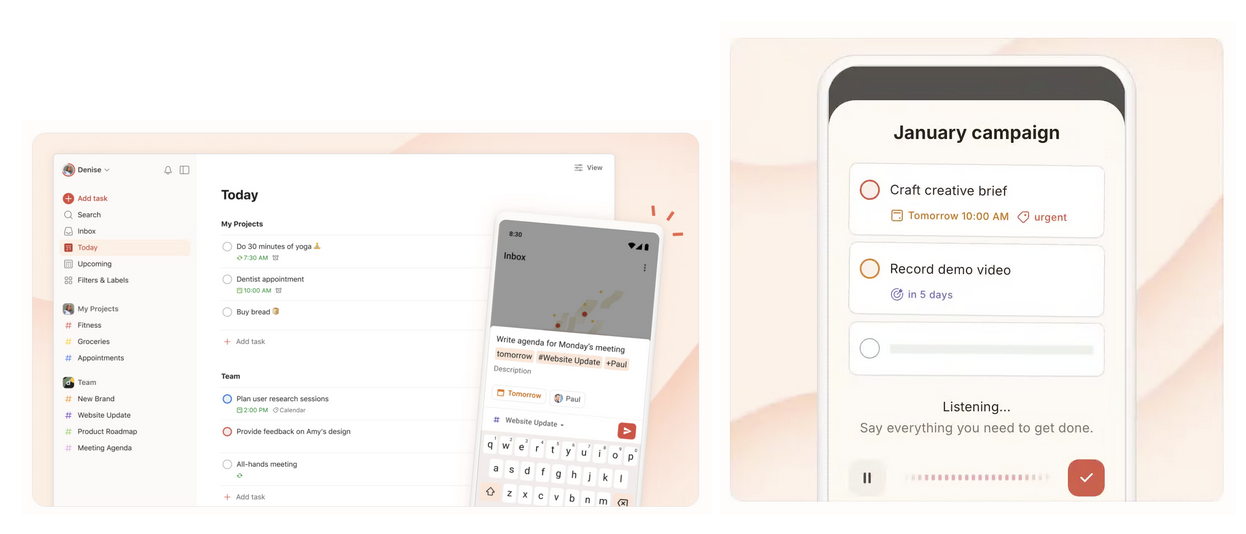
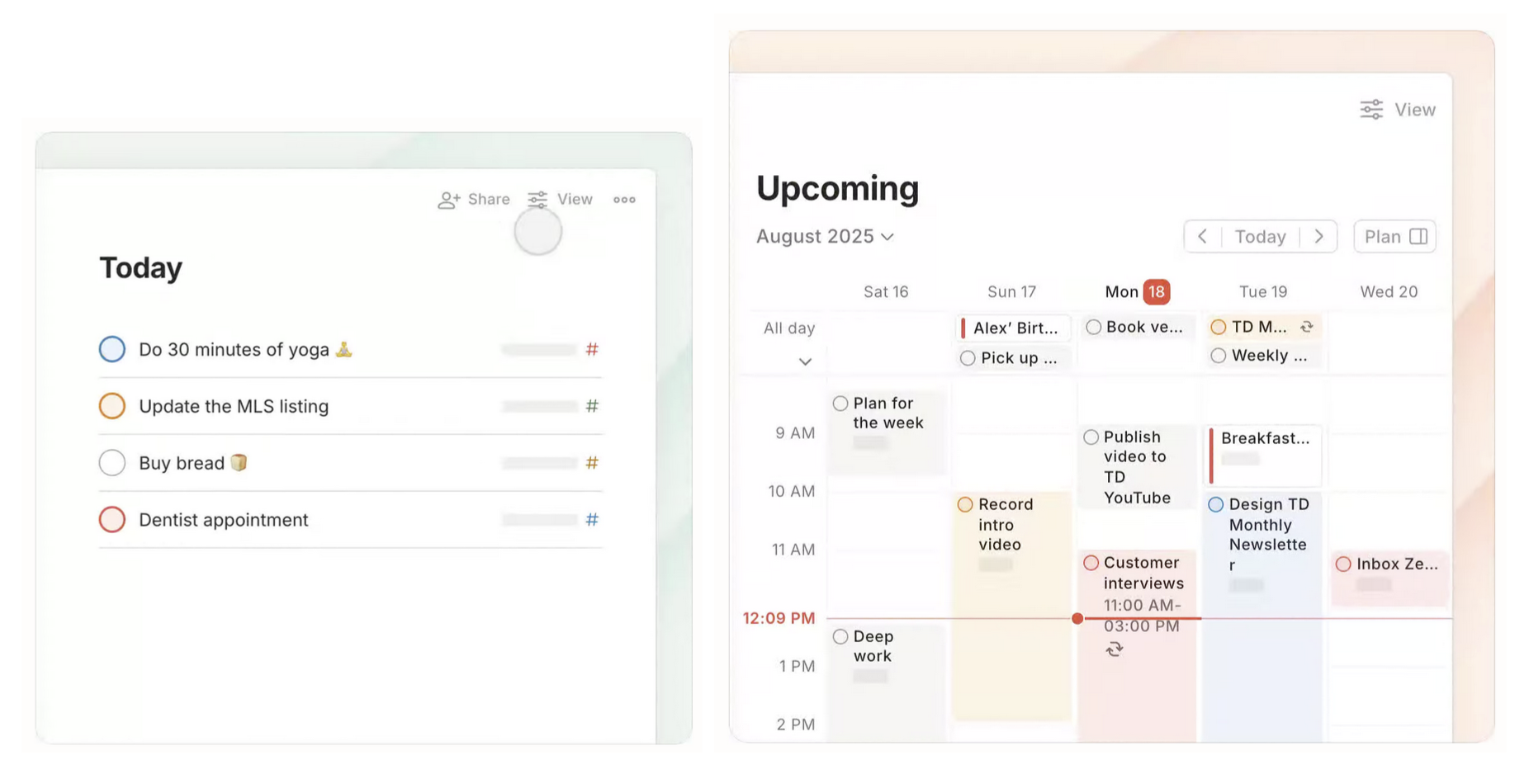
Strengths:
Todoist is great at fast, low-friction task capture through its natural-language Quick Add, making it easy for users to log tasks the moment they think of them. Its advanced recurring due dates, reminders, and priority system strongly support habit formation and long-term productivity, which sets them apart from simpler to-do apps. Combined with a clean, low-cognitive-load interface and 80+ integrations across platforms, Todoist scales smoothly from individual use to easy team collaboration.
Weaknesses:
Todoist lacks advanced project management features such as dependencies, timelines, or analytics, which limits its usefulness for complex team workflows. Collaboration tools are functional but basic, making it less competitive against more structured platforms like Asana or ClickUp for larger teams. Additionally, many of its most powerful features are locked behind a paid plan, which may deter budget-conscious users like students or casual task managers.
Our Opportunity:
To move from task tracking → behavioral commitment. Todoist helps users record intentions, but it doesn’t strongly enforce follow-through or create meaningful accountability which makes tasks easy to ignore or reschedule. Our app can differentiate by designing for commitment pressure: making plans feel socially visible, time-bound, or consequence-bearing. This way, users feel responsible for showing up and planning realistically.
Forest
Link: https://www.forestapp.cc/
Overview: Forest is a focus and productivity app designed to help users reduce phone distraction and stay focused by gamifying deep work.
Target Audience: Its target audience includes students, employees, and people struggling with procrastination or phone addiction, especially those who want a simple, motivating way to stay present during work and stay away from their phone.
Unique Features: Forest’s signature feature is its tree-growing mechanic, where staying focused grows a tree and leaving the app kills it, creating emotional accountability. The app also includes real-world impact through tree-planting partnerships, reinforcing purpose-driven motivation.
Market Need: Forest fulfills the need for a distraction-blocking, motivation-driven focus tool that helps users stay off their phones during work or study. Rather than organizing tasks, it encourages presence and sustained attention in the moment.
Screenshots:

Strengths:
Forest is highly effective at encouraging short-term focus by tying productivity to an emotional and visual reward such as growing a virtual tree that dies if the user leaves the app. Its gamified approach, combined with timers and streaks, makes focus sessions feel intentional and motivating rather than restrictive. The app’s simplicity and calming design lower resistance to starting work, which is especially effective for users with attention challenges.
Weaknesses:
Forest focuses almost exclusively on moment-to-moment focus, offering little support for long-term planning, task prioritization, or scheduling. Once a focus session ends, there is no structured way to connect that effort to the user’s broader goals or commitments. Additionally, its motivation system relies heavily on intrinsic guilt or extrinsic reward, which may lose effectiveness over time for some users.
Our Opportunity:
Compared to Forest, our opportunity is to move from momentary focus → long-term commitment and planning. Forest helps users stay focused for a block of time, but it doesn’t help them decide what to focus on, why it matters, or how today’s effort connects to future commitments. Our app can differentiate by combining focus with explicit planning, accountability, and responsibility.
Reclaim AI
Link: https://reclaim.ai/
Overview: Reclaim AI is an AI-powered calendar assistant designed to automatically optimize how users allocate their time across meetings, tasks, habits, and focus blocks. It integrates directly with existing calendars and task management tools to dynamically reschedule work based on priorities and availability.
Target Audience: Reclaim primarily targets busy professionals and teams with complex schedules who want to reduce manual planning and protect time for deep work.
Unique Features: Notable features include defended focus time, habit scheduling, and people analytics that show how time is spent across meetings and work. Its ability to dynamically reshuffle priorities in real time is technically impressive and differentiates it from static planners. The emphasis on calendar integrity (never double-booking, respecting constraints) is central to its design philosophy.
Market Need: Reclaim’s value proposition is “automated time protection.” It promises users that their calendar will work for them by intelligently balancing meetings, tasks, and personal routines without constant manual effort. For teams, it positions itself as a productivity and alignment tool that maximizes time efficiency at scale.
Screenshot:
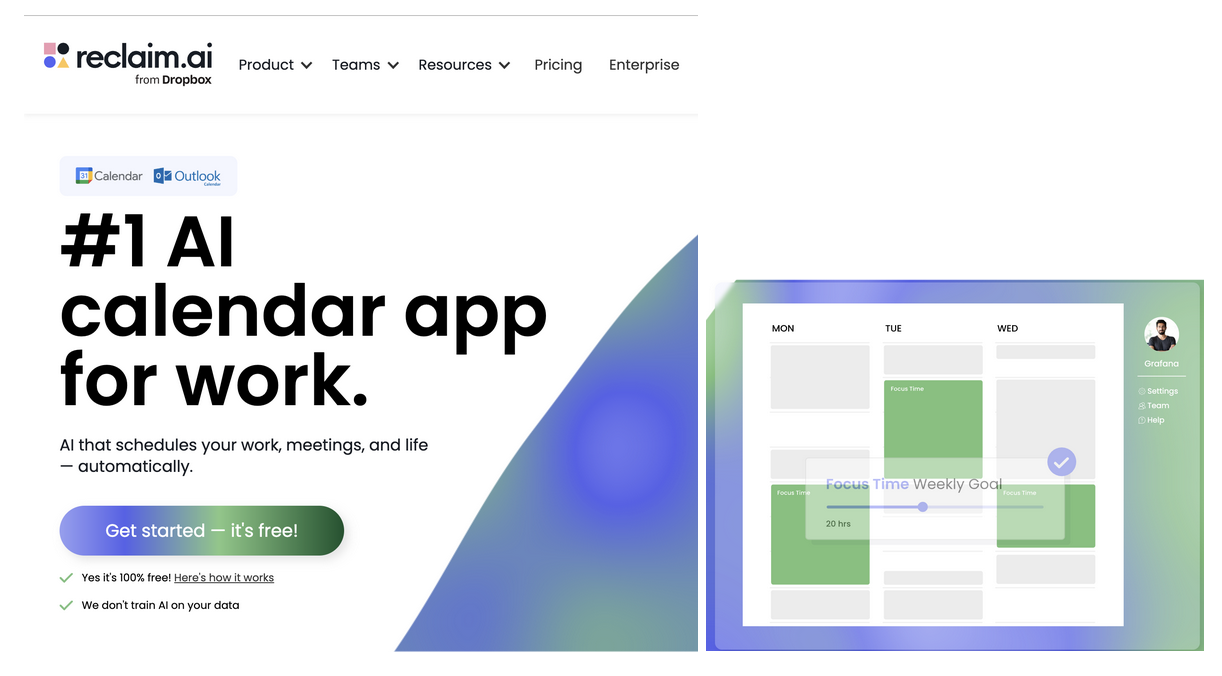
Strengths:
One of Reclaim’s main strengths is its high level of automation. Once configured, the system continuously adjusts the calendar without requiring frequent user input, which helps reduce cognitive load and scheduling friction. Its strong integration ecosystem (Google Calendar, task tools, Slack, Zoom) makes it particularly powerful for teams. Reclaim also excels at defending focus time and preventing meeting overload, which directly addresses burnout and time fragmentation.
Weaknesses:
However, Reclaim’s automation can feel opaque and overly rigid to users who want more visibility or control over how decisions are made. The setup process requires significant upfront configuration, which may discourage casual users or students. Additionally, while Reclaim schedules tasks, it does not deeply address why users fail to complete them, flakiness is treated as a scheduling optimization problem rather than a behavioral one.
Our Opportunity:
Our opportunity lies in addressing flakiness/time schedule beyond automation. While Reclaim optimizes schedules, it does not surface why plans fail or help users reflect on patterns of overcommitment, energy mismatch, or unrealistic planning. A more human-centered approach could combine scheduling with lightweight reflection, accountability cues, and behavioral insights, helping users not just plan better, but follow through more consistently.
Trevor AI
Link: https://www.trevorai.com/
Overview: Trevor AI is a lightweight AI-assisted daily planning tool that helps users convert task lists into time-blocked schedules. Unlike enterprise-focused tools, Trevor emphasizes simplicity and individual productivity.
Target Audience: It is primarily designed for students, freelancers, and solo professionals who want help organizing their day without complex automation or team features.
Unique Features: Key features include AI-assisted task duration estimates, visual time blocking, and manual drag-and-drop scheduling. The system’s simplicity and focus on daily planning make it appealing for users who feel overwhelmed by more complex productivity tools.
Market Need:
Trevor’s value proposition centers on clarity and ease. It promises users a simple way to turn abstract to-do lists into realistic daily schedules, making time visible and concrete. Rather than replacing the user’s judgment, Trevor acts as a gentle planning assistant.
Screenshots:

Strengths:
Trevor’s biggest strength is its intuitive, low-friction interface. Users can quickly drag tasks into their calendar and receive AI suggestions for task duration and placement. This transparency makes planning feel approachable and understandable. Trevor also lowers the barrier to time blocking, which helps users see how much time tasks actually consume.
Weaknesses:
Despite its usability, Trevor offers limited automation and adaptation over time. It does not strongly learn from user behavior or dynamically reschedule when plans fall apart. Team coordination, long-term planning, and contextual awareness (energy levels, recurring flakiness patterns) are largely absent. As a result, users may still overcommit or repeatedly reschedule tasks without meaningful feedback.
Our Opportunity:
Our opportunity is to build on Trevor’s clarity while addressing its lack of behavioral insight. Many users know what they planned but not why they flaked. By layering reflection, pattern detection, and adaptive feedback on top of daily planning, we can help users understand recurring breakdowns, such as underestimating task effort or scheduling during low-energy periods, and reduce flakiness over time rather than simply reshuffling tasks.
Our 2×2
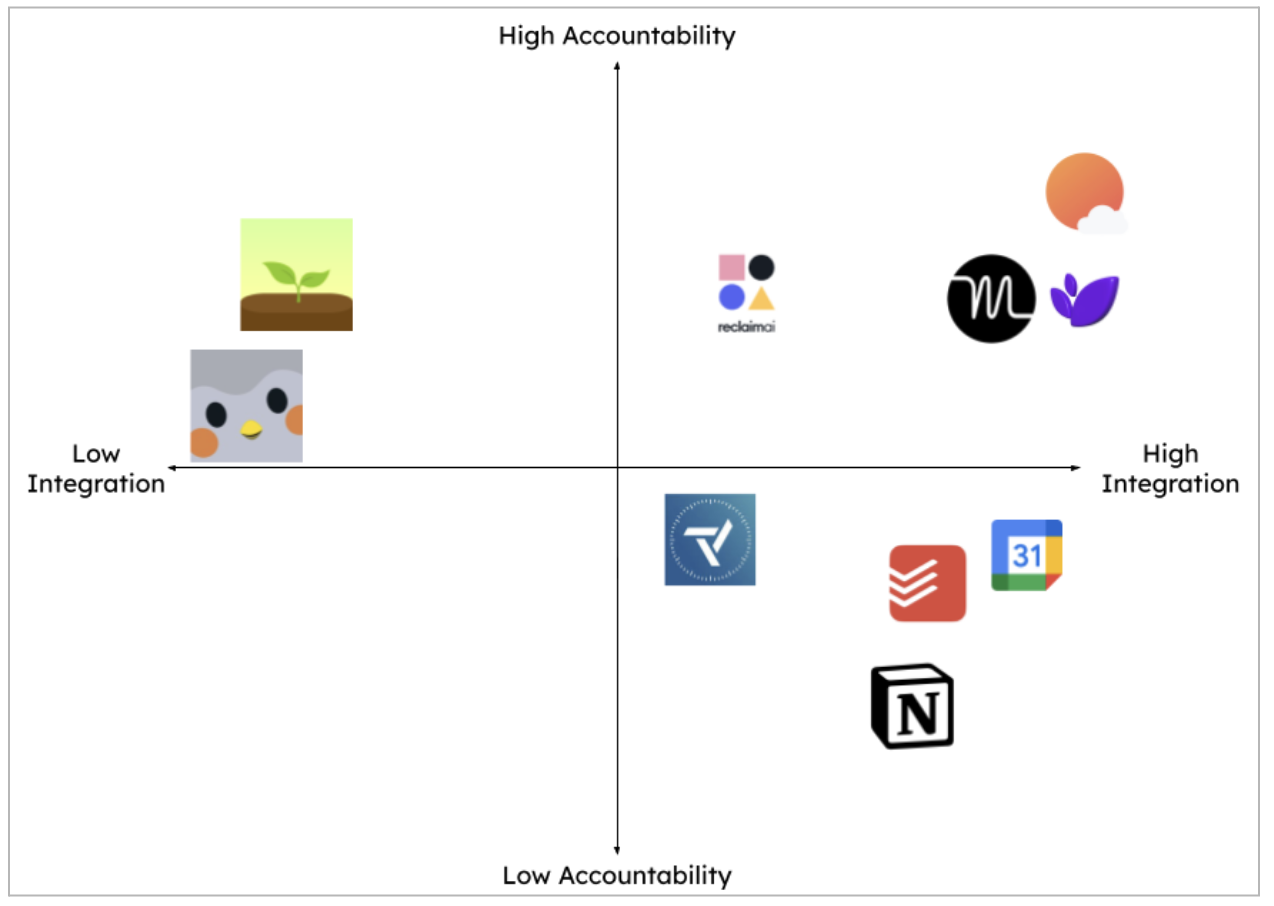
Many people are juggling multiple productivity tools at once because of personal preferences and organizational (work/school) needs, because of this, we thought that it was important to evaluate the integration ability as one of our axes. Robust integration can centralize information about tasks/planning and reduce cognitive load for users. Our second axis: accountability explores the nudges made by the productivity tool. Tools with higher accountability might suggest optimal times for events, encouraging users to reflect and refine on their day intermittently, while the tools with lower accountability might take a more traditional and static approach, where the focus is on making the users aware of the tasks at hand. Instead of forcing our users to abandon their existing methods and tools, we want to create a tool that is frictionless to adopt. With physical planners and calendars, the user has to be the one to initiate the effort to customize their user experience, but technology has made it possible to build customization into productivity tools, letting us meet our users where they are. With consideration of these two factors, we ranked our competitors in the following order.
Rankings:
- Sunsama – amazing integration + sleek UI + built-in daily reflections & features for retrospection
- Lifestack (integration with oura, fitbit, etc is a stand out! workflows are heavily assisted by AI, which reduces the intentionality of planning)
- Motion
- Reclaim AI
- Google Calendar
- Todoist
- Notion
- Trevor AI
- Forest
- Finch – tasks are siloed, features do not help users become more intentional and reflectivein planning
Insights:
- Most tools optimize planning, not follow-through.
Calendars, task managers, and AI schedulers are great at capturing intentions and organizing time, but provide little support for execution, motivation, or recovery after failure.
- The intention-action gap is the core unsolved problem.
Users know what they need to do and usually when, but struggle with starting, sustaining effort, and emotionally committing. No mainstream tool meaningfully targets this gap.
- Automation treats flakiness as a scheduling problem, not a behavioral one.
AI calendars (Motion, Reclaim, Trevor, Lifestack) assume that better time allocation will fix missed tasks, but ignore emotional blockers like fear, perfectionism, fatigue, and overwhelm.
- Calendars assume rational users, but real planning breakdowns are emotional.
Most tools are built for logic-driven behavior, while real users struggle due to anxiety, avoidance, guilt, low energy, and motivational collapse.
- There is no feedback loop explaining why plans fail.
Users can see what they missed, but no tool helps them reflect on patterns, emotional triggers, or planning biases that cause repeated failure.
- Gamified motivation tools focus on focus, not planning.
Finch and Forest successfully motivate behavior, but operate at the moment-of-action layer, not the planning + commitment layer.
- High-powered tools increase cognitive load, which can worsen avoidance.
Notion and AI schedulers introduce setup complexity and decision overhead, which can amplify procrastination instead of reducing it.
- Most tools ignore soft commitments.
Calendars treat events as binary



