
The three wireflows that we did are:
Onboarding flow → Schedule Sessions → Confirm Sessions + Actual Session. Put shortly, we felt like these aspects were the most difficult to conceptualize and most important for our users in terms of onboarding or regular use/interactions so we focused on them. More detailed reasons why we chose each interaction / flow is listed under each of the wireflows sections below!
Onboarding Wireflow

We started our workflow with an onboarding process that was as simple as possible. Individuals can sign up and log in using their google accounts, facebook and other social media accounts for smooth integration. Once the user account was created, our app prompts them to set up their calendar preferences and start scheduling/ planning as soon as possible.
Setting Up Preferences and Scheduling
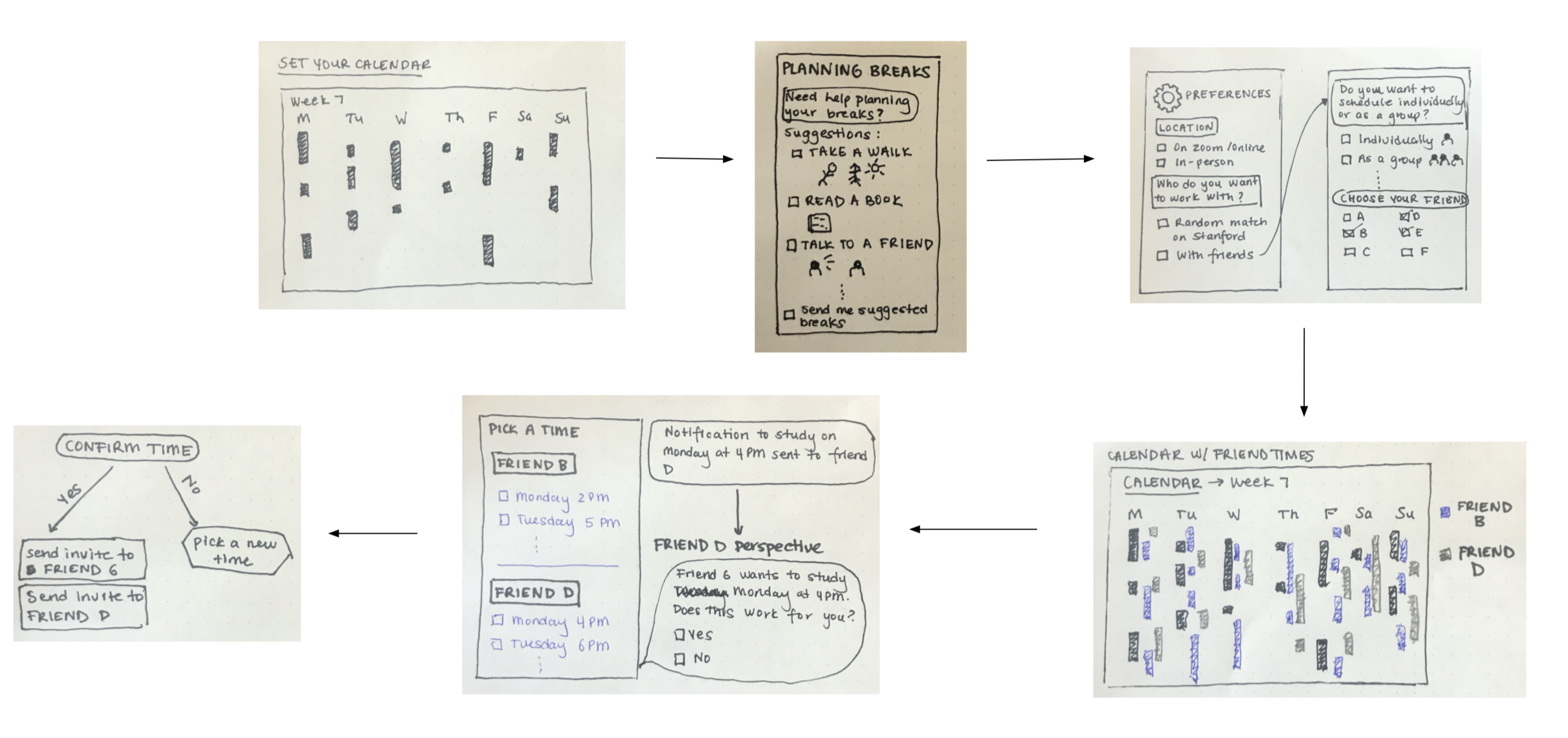
Picture 1: After signing up and logging in, Individuals are required to first input their calendar for a given week before choosing their friends and scheduling. If users want to go ahead and input their schedules for several weeks, they can do that as well.
Individuals also have the option to set preferences for their breaks between activities.
Picture 2: The app has a tab that users can click if they want ideas for how to take breaks. Also, if they select the ‘send me suggested breaks’ box, they will receive scheduled breaks recommendations.
Picture 3: Users can choose to either schedule work sessions in person over zoom. They also have the option of working in a group or individually – either way, users have the option of adding friends from their contact list. And then choosing who they want to work with for the week.
Picture 4: The app will visualize every chosen friend’s schedule, as well as yours. We think this will allow users to fully see what their options are for working with people.
Picture 5: Along with the joint calendar, the app will provide a list of available times for each friend. As you move along the list for each friend, the app will adjust the available time for the friends that are left to schedule with. Once a time is confirmed by a user, the app will send a notification to the friend asking whether the friend wants to confirm or not.
Picture 6: If both confirm, then a calendar invite is sent to both individuals. If not, the list of available times is brought up again.
Confirm Session + Actual Session
For the above two sections/wire flows, we focused specifically on the key app interfaces and interactions. However, upon discussion, we felt that it was crucial to think about what the work sessions would actually look like (once the people meet to work, how is our app involved? Will users still interact with our app or do we mainly just set up the scheduling portion, etc).
By focusing on this wireflow and discussing it through, my group realized that we needed a way to tell users to take a break! How should we remind users to take breaks? Would they remember to take breaks on their own? Should we leave all of this up to the users? If not, how can we notify them to take a break in a way that was not too disruptive or disturbing while being able to ensure that they would see the notification?
For instance, we considered a notification from our app, which would display on the user’s phone. However, we realized that if users are actually working, they are unlikely to be on their phone and may miss our notification. We thought that some sort of a notification that showed up on the laptop would be useful, given most people are working on a laptop in some way, shape, or form. But the main device our produce worked with (at the moment) is a phone. Ultimately, we thought that a calendar reminder that pops up on the phone and also on other devices like laptop, iPad would be ideal in balancing visibility and non intrusiveness. The large number of devices people, especially Stanford students, use nowadays would increase the chances our notification would be seen. Moreover, we realized that a small popup in the corner of the computer screen would not be too disrupting.




