
CS 247B Comparative Analysis 2×2
Budgeting Spreadsheets
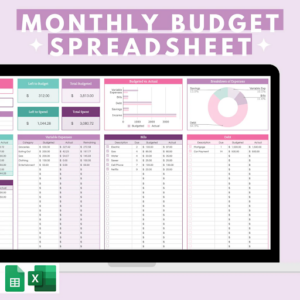
Budgeting spreadsheets are a DIY solution to keeping track of your spending, which can help curb your impulse purchases. Benefits of this approach include its accessibility (it’s free, and anyone can use Google sheets) and its customizability. In addition to existing budgeting template spreadsheets out there, users can customize their budgeting interface however they’d like and also combine with extensions that allow for more powerful capabilities like calculating graphs of historical spending patterns. Cons include the fact that it is heavily manual, and it is low intervention- it requires you to actually remember your budget and use that to curb your spending, rather than actually halting the process. Unique value proposition: an extremely customizable, accessible way to monitor your spending
Pause Chrome Extension

The Pause Chrome Extension is an extension that creates a pop-up screen with a timer every time you access a shopping website. Users set a time limit on how long they want to wait before they can actually access the site with the hopes that the pause will cause them to rethink their decision to shop. Pros of using this extension include that it actively intervenes and halts your online shopping process. Cons include that it only works for online shopping and not in-person shopping and that it’s pretty easily disabled. Unique value proposition: an easy accessible extension that will make you second guess your online shopping decision
Using Cash / Restricting Access to Credit Cards
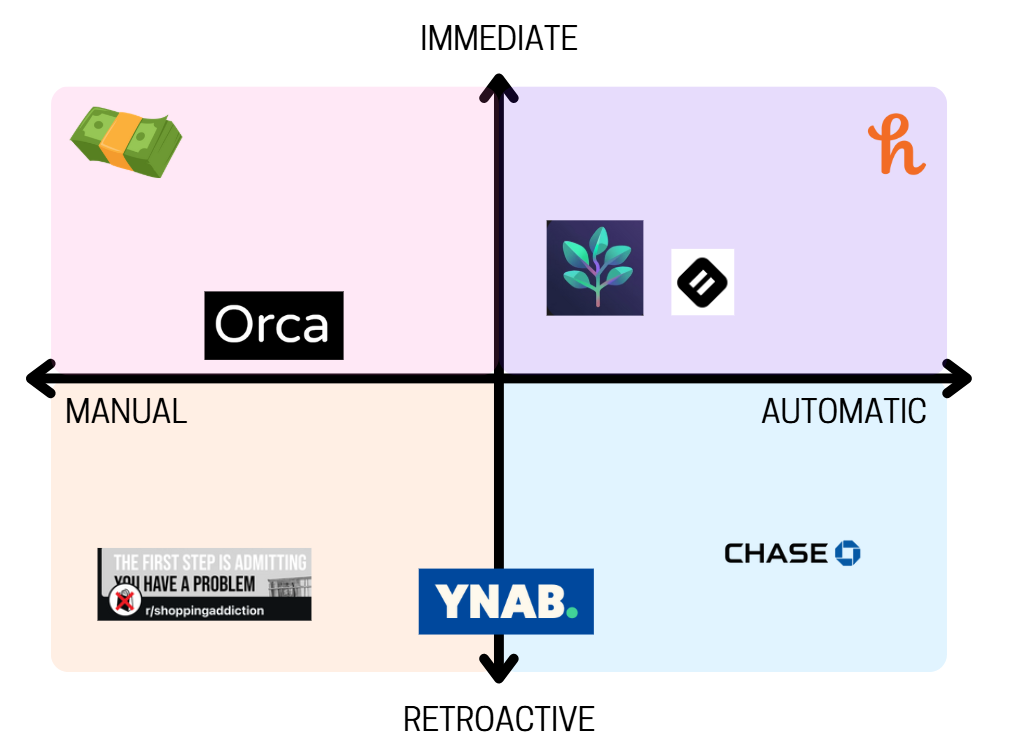
Only using spending cash and restricting access to credit cards can be extremely effective in reducing purchases, as you can really only spend up to the amount of cash you bring around with you, which is easy to limit. The biggest con to this approach is the lack of flexibility: some places don’t take cash; you may need your credit card in a pinch; and cash is annoying to carry around. Unique value proposition: a simple, tried-and-true way to physically limit spending
Chase Mobile

Chase Mobile is a banking app for people who have an account with the company. According to web traffic, about 95% of people who visit Chase.com are above the age of 25, which puts its target audience at a slightly older age than ours. It is meant to be a central place for banking needs. By including a built-in budget feature, they also fill the market need for budgeting solutions that require minimal manual effort. Since Chase has all of your purchases and already categorizes them, and can guess your monthly income and monthly bill cost, no effort is required from the user unless they want to account for banks other than Chase. Unique value proposition: All-in-one solution to mobile banking, low-maintenance budget feature
(But, it was clear that the purpose of the app was not to budget. The front page is filled with ways to spend more money. As soon as I opened the app I got an offer to “break up” a recent purchase to nudge me to begin using the pay over time feature, which costs a monthly fee. You can also find potential deals and ways to quickly open up new accounts, but I had to search a bit to find the budgeting tool.)
Pros
- Offers a budgeting tool that is corrected directly to the bank account. No need to manually input numbers or create categories–it’s done for you, and only takes a few taps to set up
- Can do many things in one place (pay bills, view balances, find deals, book travel, use budgeting tool)
Cons:
- Had to dig to find budgeting tool
- Can’t connect to other banks to use tools, so you’re only getting data from your Chase accounts
- Financial goals are set up for things like retirement or large purchases like a car or home, these aren’t as relevant for college students
- Deals and ways to open more accounts are way more visible and accessible than ways to save
Honey

Honey is a browser extension that automatically applies coupon codes while a user is checking out of an online shop. Users can also get cash back and earn points to redeem for gift cards. Honey’s biggest strength is its appeal to our desire for rewards. We feel rewarded when we get a discount, as well as feel better about the purchase itself. The points can be turned into another purchase, yielding even more rewards. And, with no fee or subscription, Honey seems to be purely beneficial to users (as long as they don’t care about their data or how it’s been accused of.taking profits from creators). You even get to see a little coin dancing with confetti when it finds a coupon–shopping is so fun! Unique value proposition: Automatic deal-finder
Pros:
- Little to no set up
- Free
- Offers a point system
Cons:
- Only on browser, not mobile
- Scammer allegations
- May nudge users to buy items they were on the fence about
Spendwise – Mindful spending (App Store)
How it works:
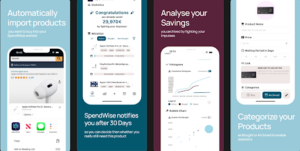
- **Feeling the Urge?** When you feel the urge to buy something, you can share the product webpage or app to the app using the share button. The app will automatically import the product on a digital Wishlist in the app.
- **Forget About It:** You can now close your shopping app, knowing, you will not forget about the product as it is saved for later.
- **Reminders:** After 30 days, my app will remind you about the product.
- **Mindful Evaluation:** Before making a purchase, my app guides you through a series of questions to help you determine if you really need the product.
- **Decision Time:** Decide whether to buy or dismiss the product.
- **Track Your Savings:** the app calculates how much money you’ve saved by avoiding impulsive purchases.
- **Celebrate Your Success:** See how much you’ve saved and celebrate your financial wins.
- **Build Lasting Habits:** Develop habits to resist the urge to buy unnecessary items.
Pros:
- Rewarding to not purchase because seeing the saving numbers go up
- Eases the purchasing impulse because the purchase is added to the app
- Eases the pressure to buy an item because worried about forgetting, the app will remind you
Cons:
- Only really works with large purchases, not daily ones like a quick coffee
- Might encourage more spending by reminding
- Doesn’t discourage spending during limited time sales
Shopping addiction reddit https://www.reddit.com/r/shoppingaddiction/

/shoppingaddiction is a subreddit dedicated to supporting individuals who struggle with compulsive shopping and impulse buying. It serves as a community where people can share their experiences, seek advice, and find encouragement from others facing similar challenges. The subreddit offers practical strategies for managing spending habits, discussions on the emotional and psychological aspects of shopping addiction, and accountability threads to help members stay mindful of their purchases. By providing a judgment-free space, r/shoppingaddiction can help individuals develop healthier financial and emotional relationships with shopping.
Pros:
- Offers community, as well as tips for recovery
- Eliminates shame of seeking help
- Accountability and no-buy check ins
- Seeks to address core of shopping addition (loneliness, depression, etc.)
Cons:
- Only retroactive, i.e. once they realize they have addiction
- Does not target immediate purchases
YNAB

YNAB is a personal finance tool that target users with little to no budget to assign each dollar in their connected bank account to a particular spending category. Additionally, users can create goals to work towards in terms of saving and view reports on their overall spending which are generated automatically. This software pushes users to carefully consider where each portion of the money their owns should be spent before they spend it and encourages them to spend money that is at least 30 days old. In turn, this helps both build the habit of saving and places a gap between the time money comes in and the time it is spent. Overall, this tool attempts to fulfill the user’s need for both a budget and long term spending habits.
Pros:
- Available on multiple platforms
- Tries to address views around spending (e.g. “How to categorize dollar questions”)
- Very visual way to see budget laid out
- Also incorporates goal setting/tracking
- May reduce some friction when compared to keeping a budget yourself
Cons:
- Requires moderate manual effort to categorize income
- Relies on long-term commitment to tool
- Paid service
Orca

Orca is an app that specifically targets users with impulsive spending habits in order to address these underlying behaviors. This tools does this by way of reframing impulsive spending as “impulsive spending” instead by having users transfer that money into another account instead whenever they would spend. Additionally, users can create quick shortcuts that automatically save money any time they skip a certain common purchase. This app also offers suggestions based on previous impulsive purchases of how much more the user needs to save to reach certain goals as well as where and what time of day to try to save money during. Overall, Orca fulfills a need for lasting behavior change through creating a new habit.
Pros:
- Targets underlying behaviors
- Develops a personalized notification system for the user including place and time
- Reframing into a positive habit will make a healthier relationship with money and spending
Cons:
- Difficult to create a new habit since most of the work is manual
- Easy to forget if purchases truly are very impulsive
- High friction in having to share each purchase through this app




Comments
Comments are closed.