
Intervention Study: Link
Intervention Study Storyboard:
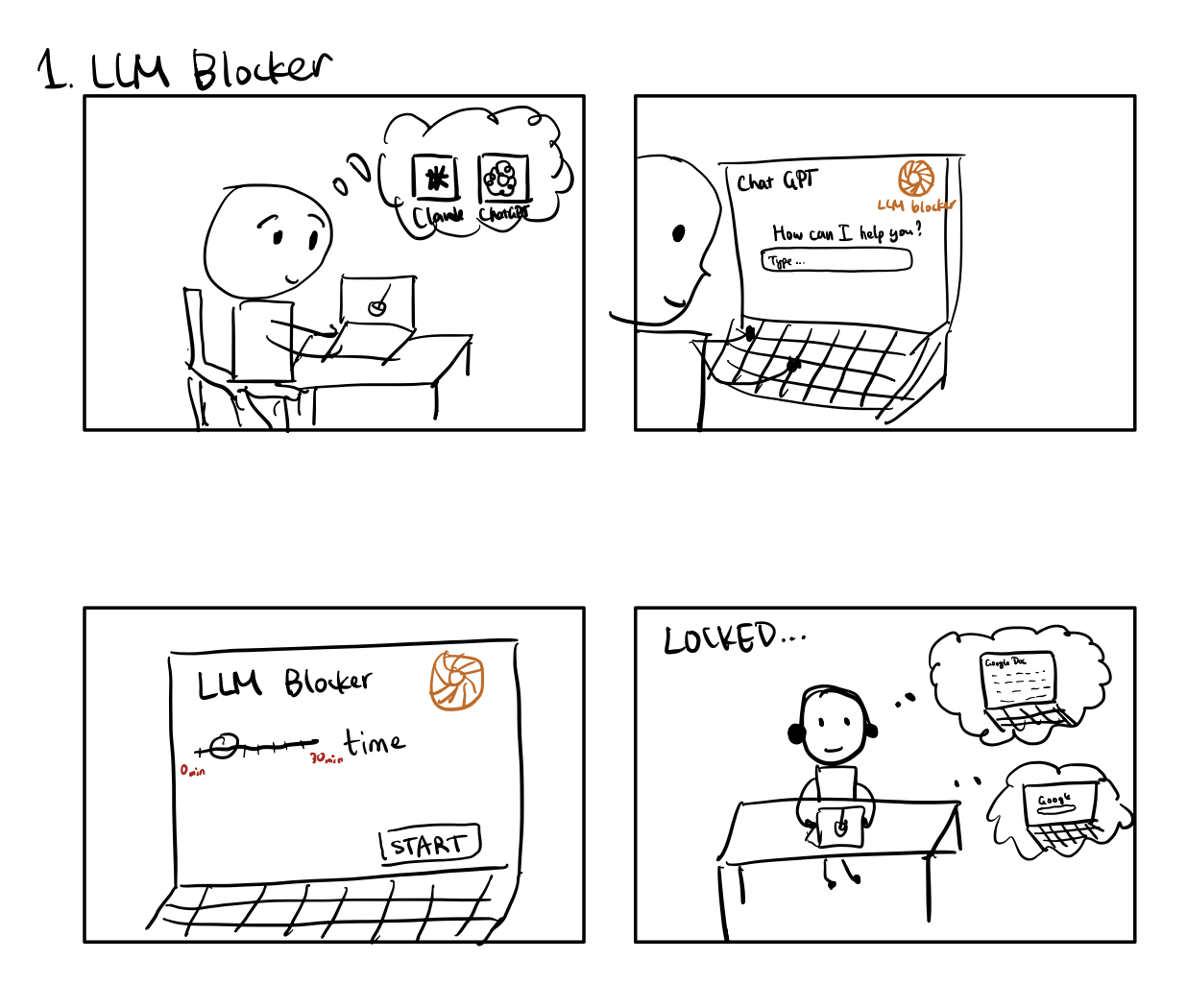
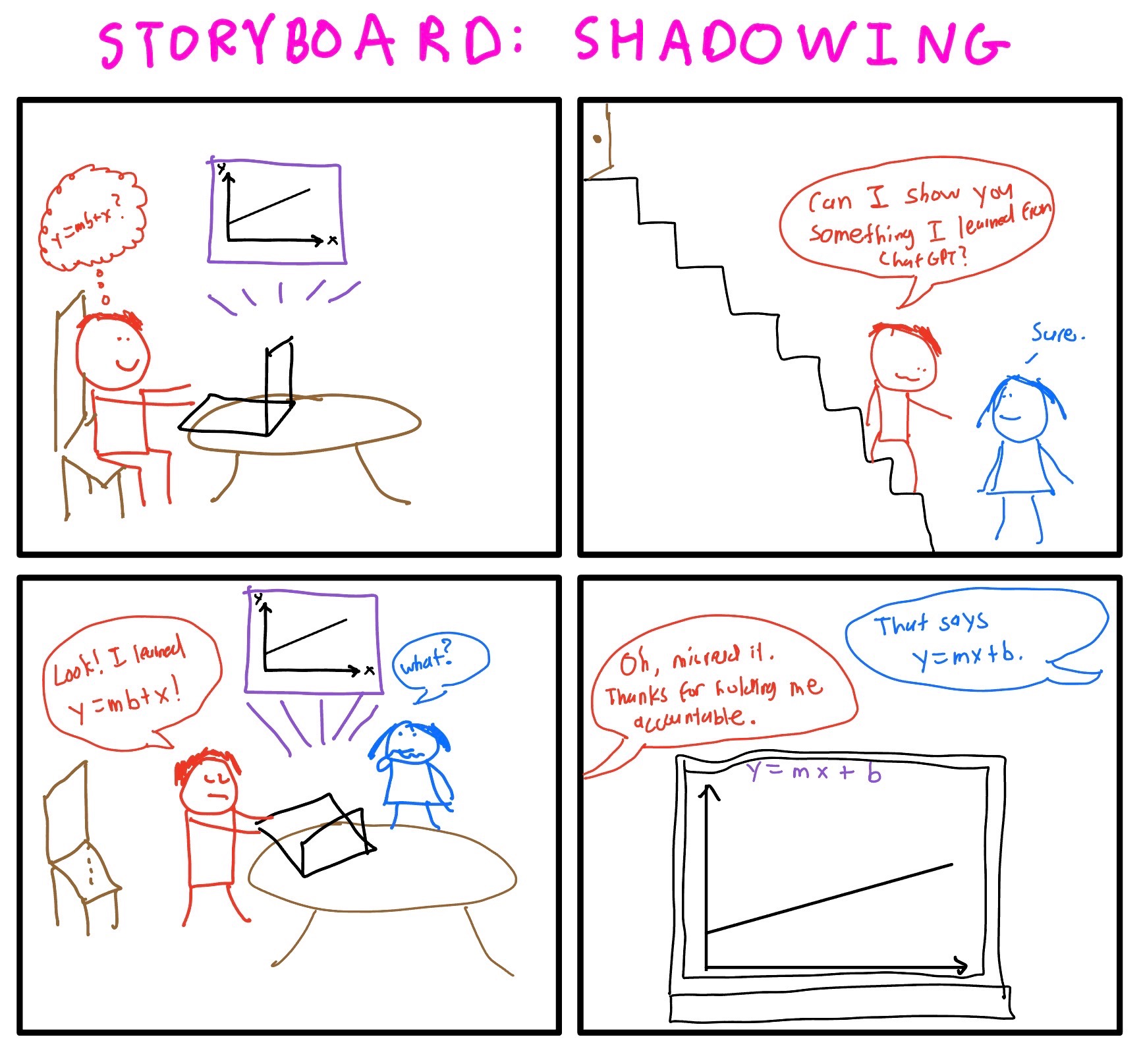
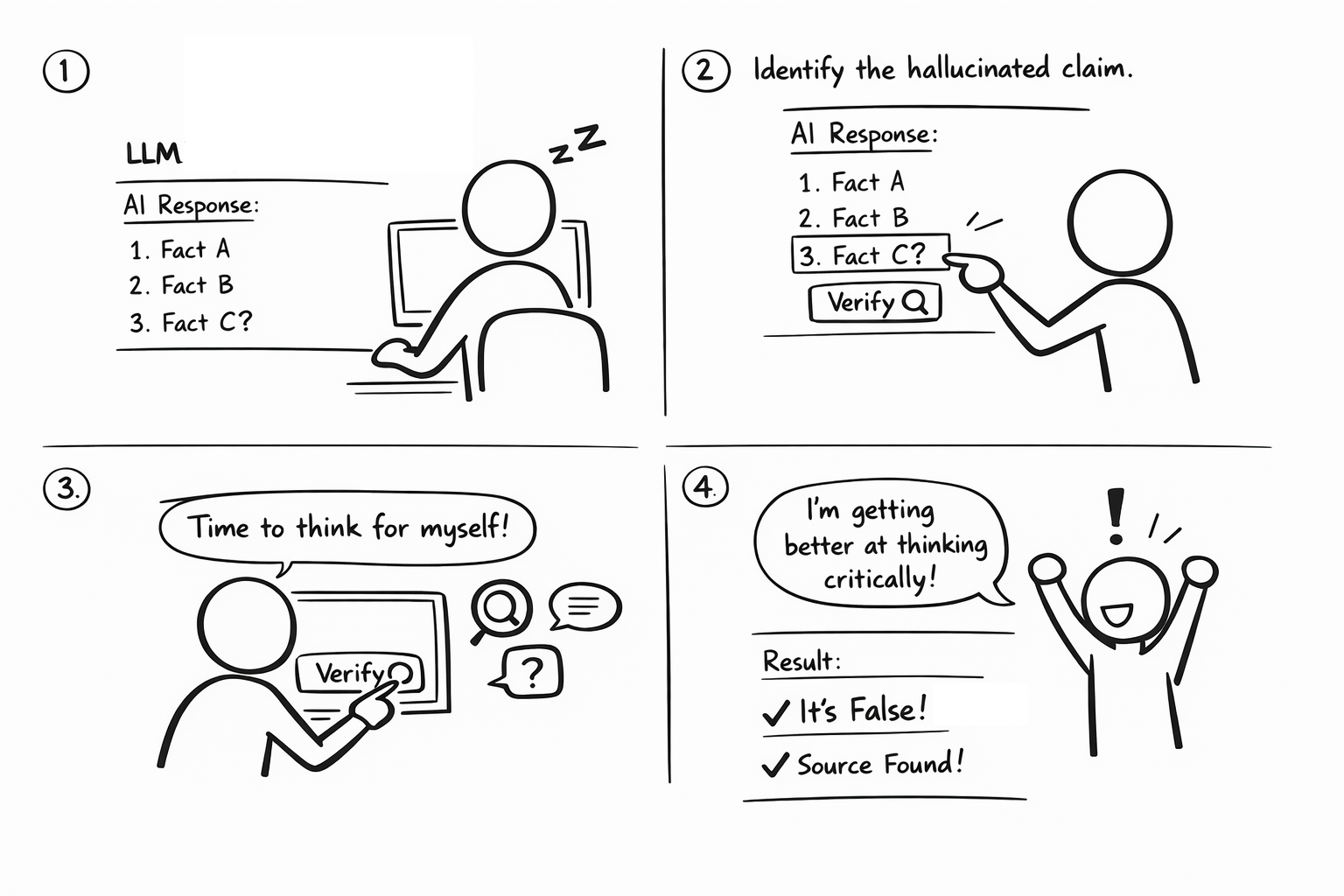
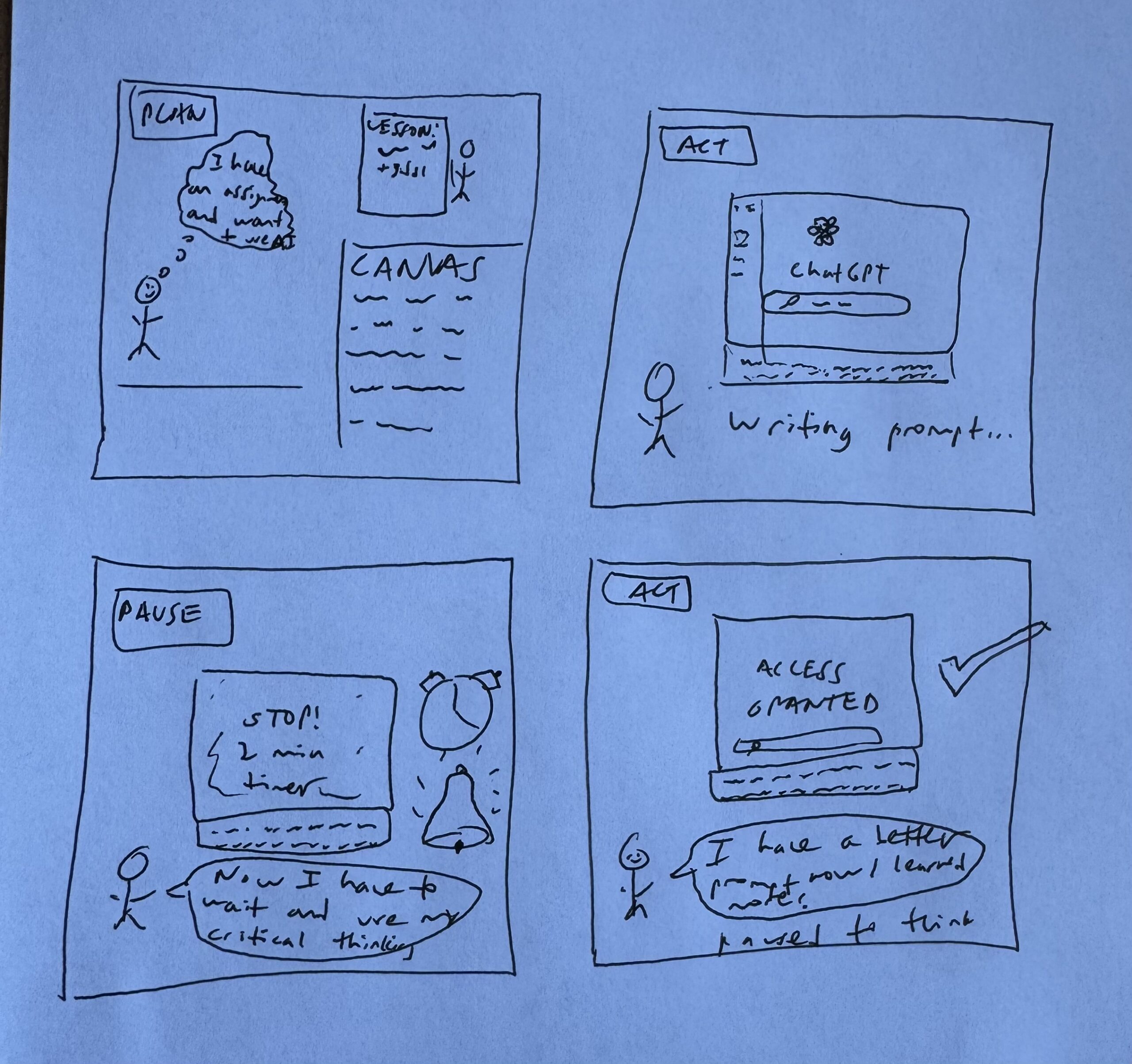
4 Intervention Ideas
Background & Behavioral Framing
From our baseline diary study, we identified several reinforcing causal loops.
- Loop 1: Time Pressure → LLM Shortcut → Reduced Effort → Reinforced Dependence
- Time scarcity leads to reflexive LLM prompting, which saves time in the short term but weakens independent reasoning confidence over time.
- Loop 2: Low Task Familiarity → Low Confidence → LLM as First Step
- When unsure, users consult LLMs before attempting their own reasoning.
- Loop 3: Reduced Ownership → Externalized Cognition → Less Deep Processing
=> These loops suggest three intervention opportunities:
- Insert friction before prompting
- Reframe identity and ownership
- Restructure triggers that lead to automatic prompting
IDEA 1: Self-Driven Prompt Helper (Chrome Extension) (Jenny)
- Framed as being able to encourage the user to do more thinking on their end, while also allowing the additional thinking/work on their end to make the chatbot they are using output more helpful answers (sends the planning along with the initial prompt), creating a positive loop of higher quality output and user thinking
- Core Mechanism
- When a user submits an initial prompt to an LLM, the system intercepts the prompt.
- Instead of sending it directly, it opens a reflective planning window.
- The system (using LLM API) generates customized scaffolding questions tailored to that specific prompt.
- The user must refine their plan before unlocking the LLM response. The LLM determines when the user has done sufficient thinking on their end. It frames it as beneficial to the student to help them improve the prompt and provide more specific concept to improve the output of the LLM.
- This can loop multiple times if the planning remains shallow.
- Motivation, Ability, Trigger
- Motivation: Reinforces identity as planner, not delegator.
- Ability: Converts vague goals into structured cognitive steps.
- Trigger: Activated upon pressing “Enter” on prompt.
- Pros
- Highly personalized.
- Encourages metacognitive depth.
- Generates rich behavioral data.
- Cons
- Risk of fatigue.
- Users may game responses.
- Implementation complexity higher.
IDEA 2: LLM Delay Timer (Timed Reflection Friction) (Alex)
- Core Mechanism
- When users open ChatGPT, a 2-minute countdown appears: “Spend 2 minutes thinking before unlocking AI assistance.”
- Motivation, Ability, Trigger
- Motivation: Creates pause for metacognition
- Ability: Forces initial attempt
- Trigger: LLM open event
- Pros
- Strong friction
- Simple implementation
- Clear behavioral manipulation
- Cons
- May create resentment
- Users may multitask instead
- Feels punitive rather than empowering
IDEA 3: Shadowing (Justin)
- Core Mechanism
- Ask a person to follow the participant / use LLM together
- If not possible, the participant can just report usage to someone else after they have finished a session
- Motivation, Ability, Trigger
- Motivation: Increases accountability + social norm effects (“I’m being observed / I have to explain my choices”)
- Ability: Helps participants articulate goals/constraints, catch over-delegation, and reflect on uncertainty.
- Trigger: When the participant is about to start an LLM session (opening ChatGPT / entering first prompt).
- Pros
- Strong behavior change lever: social accountability
- Works across contexts/tools; no need for deep integration.
- Produces rich qualitative data
- Cons
- Scheduling + logistics overhead; may not scale well.
- Observer effect: behavior may look better than normal.
- Privacy concerns: participants may avoid tasks that are truly representative.
IDEA 4: Two Truths One Hallucination (Jeongyeon)
- Core Mechanism
- After the model answers, the system highlights 3 claims; user picks the one most likely to be wrong/needs verification, then gets a “verify” shortcut.
- Motivation, Ability, Trigger
- Motivation: Turns verification into a quick, rewarding challenge that reinforces the user’s identity as a critical “auditor,” not a passive delegator.
- Ability: Lowers the effort of good behavior by surfacing 2–3 checkable claims and providing one-click verification actions (sources/search/ask for evidence).
- Trigger: Fires right after an LLM response (or only on copy/send for higher leverage) to prompt skepticism at the moment the output is likely to be used.
- Pros
- Quick (10–30s) and engaging, so it adds minimal friction.
- Trains skepticism by prompting users to identify which claim needs verification.
- Encourages verification right before users rely on/copy the output.
- Cons
- Can feel gimmicky or annoying if it appears too often.
- Users may random-guess to bypass it (“gaming” the intervention).
- Requires good claim selection; bad options reduce trust in the system.
Question we want to answer with an intervention study
Primary Question
Does introducing structured “think-first” friction before LLM prompting increase independent reasoning, reduce premature reliance, and improve users’ sense of ownership over their work?
Secondary Questions
- Does structured planning reduce shallow or reflexive prompting?
- Does the intervention change users’ perceived confidence in their own thinking?
- Does temporary friction produce longer-term habit shifts beyond the intervention period?
- How does the intervention affect task quality, efficiency, and stress?
What This Study Will Help Us Understand
This intervention study allows us to test:
- Whether friction can break automatic LLM use loops.
- Whether structured planning strengthens cognitive engagement.
- Whether identity shifts (from delegator -> thinker) are possible.
- Whether small behavioral nudges create durable habit change.
Expected Contributions
- Behavioral design for AI use
- Habit-formation interventions in digital tools
- Responsible LLM interaction design
- HCI approaches to cognitive scaffolding
Data Collection Plan
- Logistical Data (Automatic)
- Number of LLM sessions
- Time spent in decomposition step (?)
- Length of decomposition text
- Edits between original plan and final prompt
- Frequency of skipping or bypass attempts
- Content Data
- Planning prompts
- Final prompts
- Self-Report Data
- Daily diary
- Perceived confidence (7-point likery scale)
- Perceived cognitive load (7-point likery scale)
- Perceived usefulness
- Post-study
- Habit change perception
- Willingness to continue for daily use
- Perceived agency
- Daily diary
Intervention Study Plan
- Participants
- 5-8 participants
- Study Timeline
- Day 0 (Optional Pre-Interview for New Participants)
- Current LLM habits
- Confidence levels
- Perceived dependence
- Days 1-5 (Intervention Period)
- Set up
- Install Chrome extension.
- Use it during all LLM interactions.
- Daily diary
- What task did you use LLM for?
- Did the decomposition step change your thinking?
- Did you revise your original plan after reflection?
- Did you feel more ownership?
- If you went straight to LLM, why?
- Set up
- Day 6-7 (Post-Study Interview)
- Did your usage behavior change?
- Did confidence shift?
- Did the friction feel helpful or annoying?
- Would you keep using it?
- Day 0 (Optional Pre-Interview for New Participants)
Study Materials
Introduction Doc
Hi! Thanks for joining. We’re running a study to understand how people use LLM tools (like ChatGPT-style assistants) in real tasks and to get feedback on a few intervention ideas—small prompts, guardrails, or workflow nudges that could help people use LLMs more effectively and responsibly. This session will take about 45–60 minutes. There are no right answers and this isn’t a test—we’re evaluating the ideas, not you. You can skip any question or stop at any time. If you’re comfortable, we’d like to record so we don’t miss details; the recording/notes will be used only by the research team and reported in anonymized/aggregated form. Please avoid sharing confidential company information or highly sensitive personal details.
Do I have your consent to record? Any questions before we start?
Discussion Guide / Pre-Study Interview
Part 1. Warm-up + context
- What’s your current role / what kinds of tasks do you do most often (work/school/personal)?
- How often do you use LLM tools (daily/weekly/rarely)? Which ones?
- What are your top 2–3 use cases? (e.g., writing, coding, learning, planning, brainstorming)
Part 2. Recent experience
- Walk me through the most recent time you used an LLM:
- What was the goal?
- What did you ask it to do?
- What did you do with the output (copy/paste, edit, discard, follow-up)?
- What was hard or surprising?
Part 3. Trust, verification, and stakes
- What makes you trust an LLM output? What signals increase confidence?
- What makes you distrust it? What failure modes do you watch for?
- What do you do to check quality (if anything)?
- Probes: cross-check sources, run code/tests, ask follow-ups, compare to docs, sanity-check numbers
- When is LLM usage low-stakes vs high-stakes for you?
- Probe for examples where consequences mattered (grades, customers, decisions, safety, reputation)
Part 4. Possible Intervention Methods
Framing: “I’ll describe a few lightweight intervention ideas. For each: (1) gut reaction, (2) when it helps, (3) when it annoys/hurts, (4) how you’d change it, (5) where it should appear in the workflow.”
Concept A — Pause before action
A short prompt appears before you copy/send:
“Is this high-stakes? If yes, verify one key claim or add a source.”
- Questions:
- Helpful or annoying? Why?
- Best timing: before first prompt / before final answer / before paste/send?
- What would make you ignore it?
- What would make it feel respectful (not patronizing)?
Concept B — Assumptions + uncertainty
The tool highlights assumptions it’s making and gives a simple uncertainty note (e.g., “I’m assuming X; confidence is medium because…”).
- Questions:
- Does this increase trust or add noise?
- Should it be always-on, or only when requested?
- What wording would feel credible vs fake?
Concept C — Task-specific checklist (2–3 items)
For certain tasks, the tool shows a tiny checklist (e.g., for recommendations: “state constraints,” “compare 2 options,” “flag unknowns”).
- Questions:
- Which tasks deserve a checklist?
- What are the only 2–3 checks you’d actually do in real life?
- What would make it “one-tap useful” vs extra friction?
Concept D — Sensitive info nudge
If the prompt includes potentially sensitive info, a warning appears:
“Consider removing personal/confidential details.”
- Questions:
- What counts as sensitive to you?
- Would this feel protective or creepy?
- What false positives would be unacceptable?
Part 5. Prioritize + design principles
- Rank the concepts from most helpful to least helpful. Why?
- If we could ship only one intervention, which should it be and why?
- What’s a missing intervention idea that would actually change your behavior?
Post-Study Interview
- Over this week, what changed about how you used the LLM?
- Compared to your normal behavior, did you attempt more independent thinking before prompting?
- Why or why not?
- Did you feel more like the “author” of your work this week?
- Did your confidence change (in your own reasoning or in the final quality)?
- Did your understanding improve because you planned first?
- How did the intervention affect your speed?
- Did it feel like a cost worth paying?
- Did it ever make you frustrated or increase stress?
- Did you ever try to bypass it? What caused that moment?
- If the system asked follow-ups multiple times, when did it feel helpful vs repetitive?
- Would you keep it on permanently? Why/why not?
- What would make it feel more like coaching and less like friction?
- If you could redesign the intervention, what would you change?
Intro Email
Hi [First Name],
I’m [Your Name] from CS 247B. We’re running a research study to understand how people use LLM tools (ChatGPT-style assistants) in real tasks, and to get feedback on a few potential “interventions” (small prompts or workflow supports) designed to help users use LLMs effectively and responsibly.
What it involves
- Questions about how you currently use LLMs
- Data Logging (5 consecutive days, each day ~3 min)
- Post-Interview (~30 min)
If you’re interested, you can pick a time here: [SCHEDULING LINK]
Or reply with a few windows that work for you.
Best,
XXX
Closing Email
Hi [First Name],
Thank you again for taking the time to complete both the 5-day data logging and the post-interview for our CS 247B study. We really appreciate your thoughtful feedback—your examples and reflections will directly help us understand how people use LLM tools in real tasks and what kinds of interventions can support effective, responsible use without getting in the way.
As a reminder, we’ll use your input for research purposes and report findings in an aggregated/anonymized form.
If you think of anything else you’d like to add, feel free to respond—additional thoughts are always welcome.
Best,
XXX



