Getting the onboarding for your app is a high-stakes balancing act. The very first screens users see set the tone, collect critical info, and ideally spark instant value. But there are a few subtle friction points that are chances to lose them for good. I explored three apps: Strava, Jungle AI, and Splitwise to explore this balance and the hidden costs of every hurdle.
Social (Strava): Layered Info Gathering, Social Pressure
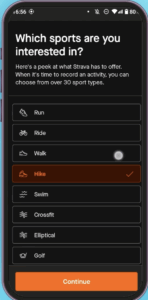
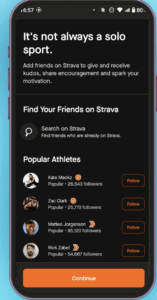
Strava’s onboarding is deep and structured. It immediately asks for personal basics (birthday, gender), then presses for sports interests (you must choose one before continuing), which tailors recommendations. But this restriction introduces a drop-off risk if users don’t want to decide just yet. Next, it asks what you want from the app and who your friends are, cuing you to connect contacts or follow influencers. Again, these steps maximize user data for personalized feeds and try to activate the network effect, but also create friction. But Strava isn’t always used as a social media app for each user; some of these fitness journeys are personal. This makes these onboarding steps less natural compared to Instagram or linked In where users are joining clearly to connect with people they know on the platform. Steps requesting notifications and location permissions further escalate drop-off, especially if not clearly explained. Although for a Strava it is an easier sell compared to other social media apps because of the mapped routes.
Productivity (Jungle AI Study Tool): Near-Zero Friction, Risk of Underwhelm
Jungle AI’s approach is radically different: it skips almost all onboarding, allowing immediate use. Users upload files and get value right away, with deeper profiling and personalization prompts optionally presented only after the first positive interaction. This strategy minimizes abandonments, probably supporting a 90%+ completion rate. However, it risks users missing all the product’s capabilities due to a lack of guidance or onboarding nudges. This is especially worrisome for products that have LLM chat elements; learning to prompt is important for success.

Splitwise’s onboarding is light and high-level. It assumes you already know why you’re here (tracking and splitting expenses) but misses a chance to show its deeper, more powerful features. It smartly surfaces main use cases (“set up a trip” or “set up apartment expenses”) at the end to deliver instant value. However, without optional tutorials, users may not see what makes Splitwise truly powerful, potentially limiting long-term retention. If the tool were to require verification steps (like Venmo requiring bank data), this friction can cause much bigger drop-offs.