AI Content Shield: https://chromewebstore.google.com/detail/ai-content-shield-ai-dete/eoghcliblbhjimkgnfemelcpfdnmiceo?pli=1

- Solution: AI Content Shield is a tool that detects, verifies, and labels AI-generated content to promote transparency, trust, and responsible AI use across digital platforms.
- Problem: The rapid rise of generative AI has made it difficult to distinguish between human-created and AI-generated content, leading to misinformation, academic dishonesty, intellectual property concerns, and erosion of trust online.
- Target Audience: Educational institutions and instructors; Publishers, journalists, and media organizations; Companies concerned with brand integrity and IP protection; Platforms moderating user-generated content; Employers and recruiters reviewing written submissions
- Value Proposition: AI Content Shield provides reliable, easy-to-integrate AI-content detection and verification, helping organizations maintain credibility, uphold standards, and make informed decisions with confidence.
- Strengths: Addresses a timely, high-impact problem; Broad applicability across many industries such as education and media; Supports ethical and transparent AI usage; Can integrate into existing workflows and platforms
- Weaknesses: Detection accuracy may degrade as generative models evolve; Potential false positives/negatives could reduce trust; May face skepticism from users wary of surveillance or over-policing
- Interesting Aspects: Positions AI not as the problem, but as part of the solution; Highlights the tension between innovation and accountability; Opens conversations around digital authorship and ownership; Could evolve into a broader trust and provenance framework (e.g., watermarking, content lineage)
Khanmigo: https://www.khanmigo.ai/
- Problem: As generative AI becomes widely accessible, grade-school students increasingly rely on AI tools to obtain direct answers rather than engaging deeply with learning material. This risks undermining foundational skills such as problem-solving, reasoning, and conceptual understanding. At the same time, teachers face growing pressure to adapt lesson plans, assessments, and feedback workflows to incorporate AI—often without sufficient training, time, or guarantees around student data privacy and security.
- Solution: Khanmigo is an AI-powered tutor embedded within Khan Academy that guides students step-by-step through problems using Socratic questioning rather than providing direct answers. By prompting students to explain their thinking, reflect on mistakes, and make incremental progress, Khanmigo reinforces critical thinking and mastery learning. For teachers, Khanmigo streamlines workflows by assisting with lesson planning, formative feedback, and classroom support—while maintaining strict safeguards around student data privacy and responsible AI use.
- Target Audience: Grade-level students and teachers (primarily K–12)
- Value Proposition: Khan Academy is already a trusted, widely adopted educational platform in grade-level schools. Khanmigo builds seamlessly on this existing ecosystem, allowing schools to integrate AI-powered tutoring without disrupting established curricula, lesson plans, or teacher workflows. This lowers adoption barriers while ensuring AI use aligns with educational best practices and learning goals.
- Strengths: Strong alignment with pedagogy focused on mastery and critical thinking; Trusted brand with deep relationships in K–12 education; Built-in safeguards for student privacy and data security; Reduces teacher workload rather than adding complexity; Encourages ethical, responsible AI use in early education
- Weaknesses: May be less appealing to students seeking quick answers; Effectiveness depends on student willingness to engage thoughtfully; Teachers may still need training to fully leverage AI features; Limited impact if schools lack access to devices or reliable internet
- Unique Features: Socratic, non-answer-giving AI tutoring model; Seamless integration with Khan Academy’s existing content and progress tracking; Teacher-focused AI tools designed specifically for classroom use; Privacy-first design tailored for minors and educational institutions; Positions AI as a learning partner, not a shortcut
Freedom (https://freedom.to/)

- Target Audience: students, professionals, anyone seeking increased focus/concentration
- Unique features: blocks websites and/or apps on multiple devices; lets you customize your schedule; enable “Locked Mode” to prevent ending focus sessions early
- Market need: help users reduce digital distraction and mindless usage of AI tools by limiting access to them; encourages more intentional engagement with tasks
- Weaknesses:
- Using a restrictive approach; maybe doesn’t help fostering internal self-regulation or reflection.
- Does not help users learn how to engage more thoughtfully with tools like AI but only prevents access.
- May feel overly rigid or punitive, especially for users who still want to use AI in intentional or limited ways.
- Strengths:
- Highly effective at reducing distraction by blocking access to websites and apps across devices.
- Custom scheduling and “Locked Mode” support commitment and self-control, especially during focused work sessions.
- Simple and low-friction to use, making it accessible to a wide audience.
CircleIn’s AI Tutor (https://www.circleinapp.com/professors/aitutor)

-
- Target audience: students and educators looking for academic support that preserves learning integrity
- Unique features: it doesn’t give direct answers or complete assignments for students but guides them through relevant concepts to prompt deeper understanding
- Market need it fulfills: many ai tools simply and immediately produce answers but this encourages students to work through independently with structured guidance
- Strengths:
- Encourages deeper learning by guiding students through concepts instead of providing direct answers.
- Aligns well with academic integrity and pedagogical best practices.
- Supports structured, step-by-step reasoning similar to a human tutor.
- Weaknesses:
- Primarily limited to formal academic contexts like coursework, tutoring scenarios
- Still positions AI as the central driver of the learning process rather than helping users regulate when and why they turn to AI.
- Does not address broader cognitive reliance on AI outside of schoolwork such as planning, writing, decision-making
Elevate https://elevateapp.com/index.html

- Target audience: Elevate Brain Training is most often used by young adults and adults who want to improve everyday cognitive skills. The audience also could include people who want self-improvement, mental fitness, and healthy structured daily routines.
- Unique features: Elevate has 40+ brain puzzles across different dimensions: writing, speaking, reading, math, memory. It is used in short daily sessions designed to fit easily into routines, potentially forming a habit.
- Value proposition: On the Apple App Store, this is a very popular app, having been named App of the Year in 2014 and is an Editor’s Choice winner. It provides small mental tasks in a structured, approachable way for people who feel like their brain is out of shape.
- Strengths: Users praise the strong UX and engagement loop, saying the app has a great design. There is a clear feedback loop, with progress dashboards and scores making improvement feel tangible.
- Weaknesses: A weakness of Elevate (and similar brain-training apps) is that there is a risk of “training for the app” – as in, you learn to play the games it gives you, and these gains do not transfer into real-life cognitive skills. Also, some users find the early puzzles too easy or repetitive. Another blocker and source of criticism from many is the app’s payment model ($4.99 monthly, $49.99 yearly).
ZeroGPT https://www.zerogpt.com/

- Target audience: ZeroGPT is used by instructors wanting to screen students’ work for AI, as well as students who want to check if their writing will be flagged by AI detection tools.
- Unique features: The ZeroGPT website features AI generated text detection for essays and other written assignments. It has an “advanced and premium model” with the “most accurate results”.
- Value proposition: AI text detection has become popular in recent years, due to institutional concerns around academic integrity in the era of AI. ZeroGPT provides instructors an easy (copy/paste or bulk upload) way to check student writing. On the other side, it gives students visibility into how AI detection tools evaluate their work, potentially reducing uncertainty and anxiety.
- Strengths: The site is easy to use and highlights particular sentences that read as AI generated.
- Weakness: A major problem with ZeroGPT is that it can flag false positives. This tool can also encourage students to use it as a workaround – where they modify AI-generated text and iterate in ZeroGPT just enough so that they aren’t flagged by the tool – rather than engaging with the writing process itself.
Quizlet (https://quizlet.com/)

- Target audience: secondary + college students studying from sets/notes.
- Unique features (mindful): conversational practice modes (“tutor-like” interactions) layered on top of study materials.
- Market need: turning passive content (flashcards/notes) into active recall + dialogue.
- Strengths: integrated into an existing study habit (Quizlet); great for retrieval practice.
- Weaknesses: less about verification/citations and more about studying; can still become “give me the answer” depending on prompts.
Paperpal (https://paperpal.com/)

- Target audience: students/researchers writing essays, theses, manuscripts.
- Unique features (mindful): academic writing assistance + “Research & Cite” positioning to validate AI-suggested text with references.
- Market need: improve clarity + correctness while maintaining academic integrity norms.
- Strengths: lives where students write (Docs/Word/etc.); pushes citation/validation workflow.
- Weaknesses: still “output-forward” (writing) rather than “learning-forward”; may not improve conceptual mastery.
Limitly (https://apps.apple.com/us/app/limitly-screen-time-control/id6746193907)

- Target Audience: People who want to control the frequency and duration in which they use a certain app or perform a certain behavior, but do not have the appropriate control over their own behaviors. It is also for people who have a tendency of losing track of time when deeply invested but have to move on to other actions.
- Unique Features: The unique features of this app include supporting the blockage of certain websites when using browsers like safari. It also allows more freedom of screen time blockage (i.e. No app A in the morning, or just 20 mins for App B on a certain day.)
- Market needs it fulfills: Enables more freedom of intentional usage of apps as well as time!
- Strengths:
- Easy to access with just a tap each time
- Works across devices
- Improves user experience through a vibrant UI that invokes warning signs (orange-colored UI) but not to the point of anxiety (red).
- Weaknesses:
- Subscriptions costs
- Requiring more advanced operating system (like IOS 18)
Screen Timer (https://apps.apple.com/us/app/screen-time-ai-screentimer/id6747777738)

- Target Audience: The general public that struggles with keeping track of how much time they are spending on each activity and people who want to limit how much they utilize an app or limit their actions, but are also worried that they will be unable to do so themselves.
- Unique Features:
- Enables emergency bypassing of apps when they immediately need to access them even though time is up. There is a certain amount of bypasses allowed (weekly, monthly, yearly.)
- AI buddy that may sometimes suggest less time for app usage, suggesting earlier app blockage.
- Delay time before an app opens
- Market needs it fulfills: It helps those who are worried that they might need to use an app in an emergency sometimes but may end up just continuing to use it even after, so they just never limit their usages. (I.e. someone reached their time limit on messages, but needs to send an emergency message, so they have to open it by closing their phone’s built-in screen time, leading them to keep texting for the rest of the day.
- Strengths:
- Accessible both on-app and off-app
- Gives overall statistics of usages that will help with hindsight analysis.
- Improves user experience through a simple and clean UI.
- Weaknesses:
- IOS 26 or higher
- Subscriptions
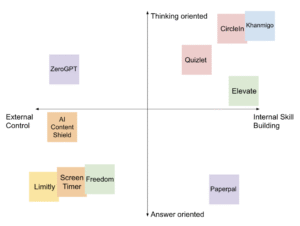
COMPARATIVE MATRIX: