
Wireflows
Our wireflows focus on helping users build a consistent daily learning habit, addressing key persona pain points: forgetting to practice, lack of motivation, and difficulty integrating learning into existing routines. Each wireflow supports habit formation through low friction onboarding, clear progress visibility, and flexible reminders.
Wireflow 1: Onboarding and Personalization
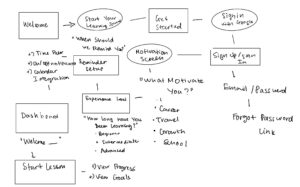
Flow: Welcome → Motivation question → Experience level → Reminder setup → Dashboard
Persona need addressed:
Our persona is motivated but struggles with consistency and wants learning to feel relevant to their personal goals (career, travel, or personal growth). They also have varying experience levels and schedules.
Design justification:
-
Asking “What motivates you?” helps personalize lessons and increases emotional investment, which improves habit adherence.
-
Asking experience level ensures lessons match the user’s skill, preventing frustration or boredom.
-
Setting a reminder time during onboarding ensures reminders align with their real schedule rather than forcing generic notifications.
-
Ending on the dashboard immediately after setup creates a clear next step and reduces drop-off.
Why this matters:
Personalization early increases engagement and ensures the system adapts to the user, not the other way around.

Wireflow 2: Lesson Completion and Progress Tracking (Happy Path)
Flow: Reminder notification → Dashboard → Start lesson → Complete lesson → Progress update
Persona need addressed:
Our persona wants to build a daily habit but struggles to see long-term progress, which reduces motivation.
Design justification:
-
The notification acts as a trigger, supporting habit loop formation (cue → action → reward).
-
The dashboard prominently shows “Start lesson” to reduce decision friction.
-
Showing progress and goals after completion reinforces accomplishment and creates a reward signal.
-
Immediate feedback supports intrinsic motivation and habit reinforcement.
Why this matters:
Visible progress helps users understand their growth and increases likelihood of continued use.
Wireflow 3: Reminder and Snooze Flow
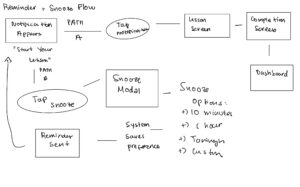
Flow: Reminder notification → User snoozes → Select snooze time → Reminder sent later → User starts lesson
Persona need addressed:
Our persona often cannot practice at the exact reminder time due to unpredictable schedules but still wants to maintain consistency.
Design justification:
-
The snooze feature supports flexibility, allowing users to delay rather than ignore reminders.
-
Providing preset options (10 min, 1 hour, tonight) reduces cognitive load and makes postponing easy.
-
Re-triggering reminders ensures users do not permanently abandon the habit.
Why this matters:
Rigid reminders often lead users to disable notifications entirely. Flexible reminders help maintain engagement without creating frustration.
Sketchy Screens
Our team created sketchy screens for four key flows: Profile & Settings, Onboarding, Notifications & Snooze, and Friends Feed. These initial sketches helped us explore layout, hierarchy, and interaction patterns. After reviewing each other’s work, we identified usability issues related to clarity, navigation, motivation, and social accountability. We iterated on each flow to better support our persona: a busy learner who wants to build a consistent learning habit but often forgets or lacks motivation.
1. Profile + Settings Flow (Marcus)
Original done in class:
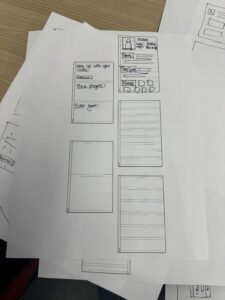
Critique: The original profile screen included useful information such as profile photo, goals, time spent, and friends. However:
-
There was no clear hierarchy, and important metrics like streak and goals were visually similar to less critical information.
-
It was unclear how users could edit their profile or adjust settings.
-
Navigation between profile and settings was ambiguous.
Updated:

Edits made
We redesigned the profile and settings flow to include:
-
A structured profile overview screen showing:
-
profile photo
-
streak
-
goals
-
time spent
-
friends preview
-
-
A clear Edit Profile button
-
A dedicated Settings screen with categorized sections:
-
Notifications and reminder time
-
Calendar integration
-
Privacy settings
-
Social visibility
-
Our persona relies on reminders and social accountability, so users need clear control over reminders and visibility. Improving hierarchy and navigation ensures users can easily adjust their settings and stay engaged.
2. Onboarding Flow (Adi)
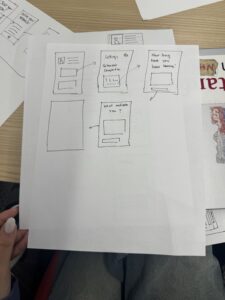
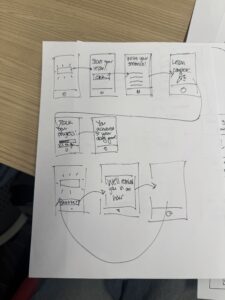
Original version critique
The original onboarding screens asked important personalization questions such as motivation and learning experience. However:
-
There was no clear progression indicator, making it unclear how many steps remained.
-
Answer options were loosely structured, increasing cognitive effort.
-
There was no clear transition from onboarding to the main dashboard.
-
Profile setup was not integrated into onboarding.
This could increase onboarding drop-off.
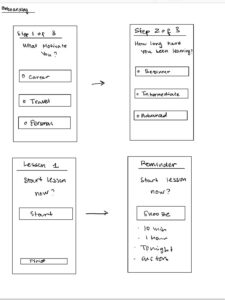
Edits made
We added:
-
A step indicator (Step 1 of 3)
-
Structured answer selections (radio button style choices)
-
A Next button on every screen
-
Optional profile setup
-
Clear transition to dashboard
This reduces uncertainty and improves onboarding completion. Personalization ensures lessons and reminders align with user goals, increasing long-term engagement.
3.Calendar Integration Flow (Nhu)

Original done in class
The original sketches included a calendar view and reminder timing features, showing intent to integrate learning into the user’s daily schedule. However:
-
It was unclear how the calendar connected to reminders or lessons.
-
Users could view the calendar, but there was no clear way to set or adjust learning times directly from it.
-
The calendar lacked visual indicators of completed or scheduled lessons.
-
There was no clear connection between calendar events and the lesson start flow.
This limited the usefulness of the calendar as an active planning and habit-building tool.
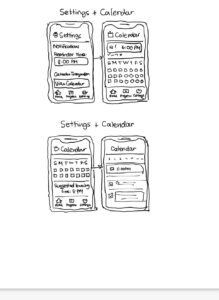
Edits made
We redesigned the calendar integration flow to include:
-
A monthly and weekly calendar view showing scheduled learning sessions
-
Visual indicators for:
-
completed lessons
-
scheduled lessons
-
missed lessons
-
-
Ability to tap a time slot to schedule a learning session
-
Option to sync with the user’s external calendar
-
Direct transition from calendar event → lesson start screen
Our persona has a busy and unpredictable schedule and struggles to consistently make time for learning. Calendar integration allows users to embed learning into their existing routines rather than relying on memory alone. Providing visual feedback on completed and missed sessions strengthens accountability and helps users maintain consistent habits. Allowing users to schedule sessions directly within the calendar reduces friction and supports long-term engagement.
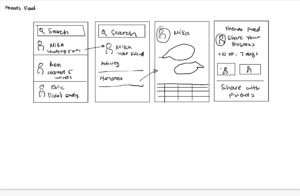
4. Friends Feed Flow (Anthony)
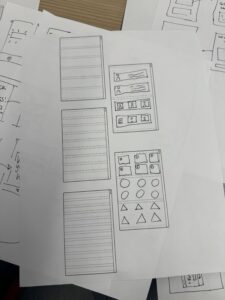
Original done in class
Critique
The original friends and social screens showed friend icons and progress information. However:
-
It was unclear what users could do with this information.
-
There was no clear feed structure or timeline.
-
No ability to interact, comment, or share.
-
Social features felt disconnected from learning progress.
This reduced the motivational potential of social accountability.
Edits made
We created a structured Friends Feed with:
-
Activity feed showing:
-
lesson completion
-
streak milestones
-
progress updates
-
-
Friend profile previews
-
Ability to:
-
like progress
-
comment
-
share progress
-
-
Option to share personal progress
We found that social accountability motivates consistent behavior. Seeing friends’ activity encourages users to maintain their streak and engage regularly. This aligns with our persona’s need for external motivation.



