
SnapEdit (Team 13) Assumption Testing – Part 2 w/ Prototypes
Testing Process
As a team of two, we split up to test each of our 3 core assumptions identified in Part 1:
- Test #1 Overarching assumption: Users value speed over design control enough to choose SnapEdit over Canva for their use case.
- Test #2 Overarching assumption: Prompt-first design generation will lead to faster and more relevant design options than template browsing.
- Test #3 Overarching assumption: Users see the AI-guided workflow as sophisticated and trustworthy enough to produce high quality designs for their use cases (so we’re still “simple-to-sophisticated”, not just simple).
For our tests, we targeted Gen Z participants (college students, nail salon manager, freelance front-end engineer) who have previously used graphic design platforms like Canva but lack formal design training and experience in design roles. For each test, we asked the participant to walk through our vibe-coded prototype as they perform a design task of their choice based on a real project they’ve created before on Canva. Detailed testing plans and metrics for each assumption, interview transcripts, and additional test notes can be found here: Assumption Test Pt. 2 Plan and Findings.
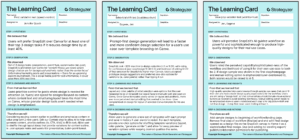
Learning Cards (#1, #2, #3)
Team Synthesis and Decisions (Pivot, iterate, or validate?)
Learning Card #1 Assumption: Users value speed over design control enough to choose SnapEdit over Canva for their use case.
Our user listed their top 3 most frequent design projects on Canva as academic presentations for school (3-5 hours to design), event flyers (1-2 hours to design), and social media club posts (~1 hour of design time). Among these choices, SnapEdit was preferred over Canva for “content-heavy” design use cases – presentations, informative social media posts, and informational flyers – where structuring information and text layout was more important than choosing an attractive, bold design for an event flyer. For informational social media posts, our user perceived SnapEdit as being able to reduce their design time by half, in which the AI-guided workflow allowed content-first users to skip past template browsing while automating the more tedious tasks of having to manually move around text boxes and make decisions on information hierarchy. We compared this participant with another participant from the following assumption test, who chose a presentation as the design task of their choice and browsed templates to find a template with a fitting layout first and settle for the style, which he accepted will require manual editing and component removals to achieve the minimalist design he wants.
This is an important observation and business advantage. While we originally hypothesized that users would choose SnapEdit for their design work for the speed, we’ve realized a critical gap that Canva can’t fulfill but uniquely can – designing around the content, not conforming the content to fit a preset design. Instead of speed over control, these test results reveal that our clear differentiator to our users is content-first design. Our next step will be to consider places to insert content earlier in the flow (not a fully decided iteration), and within the content step, use AI for outline suggestions, AI-generated filler content, and smart content organization to be tested with 2 new users for a design task of their choice. How would users feel if ChatGPT could turn your notes into a presentation-ready outline and handle slide design?
Learning Card #2 Assumption: Prompt-first design generation will lead to faster and more relevant design options than template browsing.
When using both SnapEdit’s prompt-first design generation and Canva’s template browsing and search filter to find a suitable design to edit, our user spent half as much time to select a design on SnapEdit compared to Canva, with the latter having lower ratings in user confidence in design-fit for use case and high ratings in likelihood of editing. For our user’s design task of selecting a template on Canva that he could use for a professional technical presentation showcasing product mockups, there were several observed difficulties that contributed to the mis-match. Our user prioritized a suitable layout and a minimalist design style, opening up three templates that fit the aesthetic, clicking through the slides, and closing them if the slide layout didn’t match what he wanted. Our user had actually seemed to spend less time browsing on Canva and more time refining his search with more specific key words and selecting filter options. For his final selection, he ended up choosing a “product launch” presentation template on Canva that compromised on his design preference in order to get access to the mockup slide layout.
His design selection process and preference for filtered rather than broad template search confirms that for our select user group, match to use case provides more confidence and certainty in the selected design than being the best aesthetic pick out of numerous results, de-risking prompt-first generation in requiring an extensive behavior shift. Our next step will be to match user behavior by providing a new set of templates per prompt and allowing one-click variation (shuffle layout, shuffle color palettes, “generate similar”) for each template, allowing for previews without having to open up the design editor interface.
Learning Card #3 Assumption: Users see the AI-guided workflow as sophisticated and trustworthy enough to produce high quality designs for their use cases (so we’re still “simple-to-sophisticated”, not just simple).
SnapEdit’s AI-guided workflow reviewed a low score (2/5) for the perceived capability/sophistication that it will produce a high-quality result. There were two main concerns for the user. The first was a lack of a finished design to understand the workflow’s capabilities or use case breadth, and it wasn’t until the third step where the user could see a preview of what a generated result could look like. The second concern was due to the perceived limitations of a 4-step design process that starts with a prompt and ends with generation, in which our user was uncertain on whether the design choices she selected could be tweaked or were final. In the second-to-last step (content), it wasn’t clear to our user that the design preview could be opened into a design editing file where the user could make manual tweaks. However, after being shown a final product for what the design could look like and showcasing how manual editing was the final step before exporting, our user raised her original perceived workflow capability score to 4-5.
This insight into user perception of output quality revealed that the primary trust driver for our platform was not the workflow itself, but the initial expectations that needed to be set to showcase use case breadth and visual quality potential. Our first action plan based on this insight is to display sample designs on the front page as projects users can create and even edit for their own needs. The other user perception insight we wanted to address in our next iteration was the simplicity and restriction that the 4-step structure communicates – while we believed the process showed how simple our tool is in guiding the user to a final polished product, users may churn if they interpret the numbered workflow as a limitation in the number of choices they can make for the final product. Our next iteration will be to remove the final step of the workflow (finalize) and end with the final design opened as a design edit file in SnapEdit’s canvas, visually framing the final product as sophisticated with high creative control and allowing the user to use our existing export options for publishing.
