
Market Size Analysis
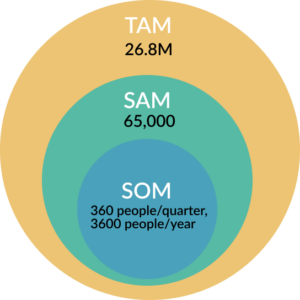
TAM: Total Addressable Market
- Anyone who uses an IDE / text editor for writing code, whether this is for a class, for work, for leisure, or anything else.
- According to the 20th edition of the State of the Developer Nation report, there were 26.8 million active software developers in the world at the end of 2021.
SAM: Serviceable Available Market
- Students in CS courses in the US, either introductory coding classes or classes that introduce a new language/framework.
- Our targets will be those who are still in the learning phase of coding, since our IDE will focus on how to help you make smarter decisions as you write code.
- According to a 2019 Ars Technica report, the US has around 65,000 CS graduates per year. This closely tracks changes in the number of students enrolled in introductory computer science courses per year.
SOM: Serviceable Obtainable Market
- Within the scope of CS 177, the obtainable market will consist of students studying CS at Stanford. We’re aiming for roughly 10% of students who take CS106A/B, which equates to around 360 people.
- There are ~1200 students per quarter across both classes, which means ~3600 student for the whole year if we were to reach 100% of this market
Reflections on Interviews
In these interviews, we focused on students at Stanford with varying amounts of computer science experience and teaching experience in CS to better understand what students who are first learning to code might find helpful.
Interview 1: Defne, a Symbolic Systems undergraduate student who learned programming through CS 106A and CS 106B and has coded in Matlab, Python, and C++ in an academic context as well as through HackerRank for interview preparation.
In her responses about learning to code, Defne focused a lot on the usability of QTCreator (her IDE at the time), noting how difficult it was to work within the IDE and circumvent bugs in the IDE code when she was first starting out. She also expressed frustration toward dense error messages full of jargon that she found unhelpful in learning what was actually wrong with her code. She found that these error messages made provided scaffolding code even more difficult to understand; as she hadn’t written it, she had no existing intuition on how to debug an existing codebase and little help from her IDE with this challenge.
Key Quotes:
“Error messages in traditional IDEs can be incredibly difficult to understand for beginners, it would be amazing to just be able to learn what’s wrong with your program in plain English”
“It can be tough to figure out why my computer is struggling to run programs sometimes – is it something that is inefficient in my code? I’d like to be able to more easily figure out how to improve code efficiency when I write”
“Error messages tend to just say when something’s wrong, and they’re not necessarily helpful in learn what that is”
Interview 2: Sumer, a current grad student and TA for introductory EE and CS courses at UC Berkeley and Stanford for the past four years. Sumer first learned to code at the age of 10.
Sumer first started coding in TextWrangler, a minimalistic text editor with syntax highlighting and without a lot of intelligent autocompletion features. Like Defne, he experienced challenges with debugging when learning to program. Dense error messages were a common point of frustration, and his initial approach to writing and fixing code was essentially trial and error. He was excited about new IDE’s suggestion features like IntelliJ’s IntelliSense and GitHub CoPilot, noting that these features helped him develop a deeper understanding of the language and how to write code that was more understandable to himself and others. He also wished these suggestions would extend to writing faster and more efficient code across languages and would have helped him learn programming concepts he had been missing when he started his CS journey.
Key Quotes:
“Most IDEs like IntelliJ and VSCode are too hefty and full of features for beginners. I love something that is simple and minimalistic with a less steep learning curve”
“My favorite text editors and IDEs have been ones with intelligent suggestions – it’s helped me learn how to make my code not only more functional, but more beautiful, efficient, and compliant with the idioms of the language”
“My initial approach to debugging was essentially Brownian motion but with code. I’d make random changes and hope something clicked until I eventually realized I’d have to take a more structured approach”
