
EduSphere: Pivoting from Learners to Tutors
Product Overview
Edusphere, an EdTech platform facing a financial crisis with 14 months of cash remaining, is executing a strategic pivot away from its failing B2C (Business-to-Student) model. Despite providing high quality educational content, the platform suffers from a poor 2.5% free-to-premium conversion rate, as students use free, ad-supported videos but will not pay for subscriptions. Based on user research and data indicating that organizers (parents and tutors) are the actual paying customers, Edusphere is shifting to a B2B2C strategy targeting professional tutors, offering them valuable time-saving organizational tools with the premium content library included as a perk, thereby creating a more sustainable revenue stream. Goals of our pivot include reducing customer acquisition cost by targeting professionals with clearer incentives, increasing conversion by delivering functional value rather than passive content, and retaining users through workflow integration rather than platform loyalty. Instead of continuing to chase individual learners, we are building tools for the people responsible for helping those learners succeed.
Scope and Objectives
Scope (What we WILL build)
- Dashboard for managing students, sessions, lesson notes
- Learning Content Hub (upload materials, tag, organize, share)
- Communication tools (email templates, parent summaries, auto reminders)
- Scheduling + task management (integrations with Google Calendar)
- Billing and invoicing (basic MVP version)
- Student progress tracking (lightweight for MVP)
- AI-assisted content generation (worksheets, explanations, summaries)
- Role-based access: Tutor → Student → Parent
Out of Scope (NOT included in MVP)
- Full LMS with coursework submission
- Grading workflows
- Multi-tutor organization management (for now)
- Mobile apps
- Advanced analytics dashboards
- Marketplace for selling content (Phase 2)
OKRs
Objective 1: Reduce tutors’ time spent on operational tasks.
- KR1: Tutors report 30% reduction in planning/admin time
- KR2: 75% adoption of Content Hub
- KR3: 2-click workflow to prepare lesson
Objective 2: Improve communication transparency for parents.
- KR1: 80% parent weekly summary open rate
- KR2: <10% missed/forgotten sessions
Objective 3: Validate willingness to pay & business model.
- KR1: Convert 20% of active tutors to paid tier
- KR2: Maintain >55% weekly active usage
User Personas
The Disorganized Tutor
Demographics: Typically aged 18–30, often a college student or recent graduate tutoring part-time, with a flexible but busy schedule.
Needs: A simple system to keep track of what’s been covered with each student and what’s planned next.
Pain Points: Prep time often gets skipped or done last minute. Lesson notes are scattered across Docs, Notes apps, or just remembered.
Goals: To show up to sessions feeling confident and prepared without having to reinvent the wheel each time.
The Tool Juggler
Demographics: Aged 28–45, a full-time independent tutor or small-center educator working with 10–30 students weekly.
Needs: An integrated toolkit that centralizes scheduling, communication, and lesson planning.
Pain Points: Spends hours managing spreadsheets, email chains, calendar invites, and documents across platforms.
Goals: To streamline their workflow, reduce prep time, and offer a consistent, high-quality experience to students and families.
The Overwhelmed Parent
Demographics: Aged 35–55, working professional or caretaker managing multiple responsibilities, often not present during tutoring sessions.
Needs: Regular updates on their child’s progress and easy communication with the tutor.
Pain Points: Unclear what their child is working on or how they’re doing. Messages from the tutor are scattered or infrequent.
Goals: To stay informed and feel confident that tutoring is helping, without needing to chase updates or attend sessions.
User Stories and Jobs to Be Done
User Stories
For The Disorganized Tutor:
“As a part-time tutor, I want to track what I’ve done with each student so I can plan the next session quickly and stay consistent.”
For The Tool Juggler:
“As a full-time tutor, I want a single platform to manage prep, messages, and records so I can save time and work more efficiently.”
For The Overwhelmed Parent:
“As a parent of a tutored student, I want clear updates on my child’s progress so I can feel confident we’re on track without micromanaging.”
Jobs to Be Done Statement
“When managing multiple students across subjects and schedules, I want a unified system that keeps my lessons, notes, and communication in one place, so I can spend less time organizing and more time teaching.”
Functional Requirements
| Workflow | Feature | Priority | Details |
| Tutor Dashboard & Student Management | Student Roster | P0 | View: Grid or List view of all active students linked to the tutor’s account.
Data Columns: Name (Thumbnail + Full Name), Status (Active/Inactive), Active Assignments (Count of incomplete items), Last Login (Date/Time), and Next Session Date. Sorting: Sortable by Name, Most Recent Activity, and “Action Needed” (e.g., overdue assignments). Empty State: Clear CTA to “Add Your First Student” if the roster is empty. |
| Student Profile | P0 | Creation Flow: Modal input for “Student Full Name” and “Parent Email” (if under 13) or “Student Email”.
Invitation Logic: System sends a white-labeled invite email with a magic link for account setup. Link expires in 48 hours. Profile Fields:
Navigation: Persistent “Assign Work” button visible in the sticky header of the profile view. |
|
| Student Folders | P0 | Organization: Three-tab layout within the profile:
History: Chronological feed of past assignments and completion status. In Progress: Current active tutoring plans and due dates. Tutor Notes: Private, encrypted text area for the tutor to log observations (e.g., “Struggles with quadratic formula”). These are never visible to the student/parent. |
|
| Tutoring Sessions | P0 | Upcoming View: Calendar widget or list showing the next 7 days of scheduled sessions.
Integration: Manual entry of date/time per student. (Future V2: Sync with Google Cal). Session Notes Preview: Hovering over a session card shows the last 3 lines of “Tutor Notes” for that student to refresh memory quickly. |
|
| Quick Actions | P0 | Speed Dial/Dashboard Buttons:
|
|
| Content Organization & Playlist Creation | Global Search w/ Filters | P0 | Search Logic: ElasticSearch implementation supporting fuzzy matching (e.g., “pythagorean” matches “pythagoras”).
Hierarchy UI: Three-column browser:
Filters: Checkboxes for “Tutor Resources” (Refresher Guides) vs. “Student Resources” (Videos/Quizzes). |
| Tutoring Plan Creation | P0 | Builder UI: Split screen. Left side = Content Library; Right side = “Plan Builder.”
Drag-and-Drop: Users can drag content from library to builder to sequence the lesson. Dates: Input fields for “Target Completion Date” per item or per playlist. Save Logic: “Save as Template” (reusable for other students) vs. “Save to Student” (one-time use). |
|
| Offline Use | P2 | Print Generation: “Print to PDF” button on text guides and quizzes. PDF must auto-format to 8.5×11″ with EduSphere branding in the header.
Encryption: Downloaded PDFs are password-protected (optional setting) or watermarked with the Tutor’s name to discourage unauthorized sharing. |
|
| Auto-versioning | P1 | If a tutor modifies a saved Playlist Template, the system keeps the previous version available. Useful if a tutor wants to revert to last year’s curriculum. | |
| Assignment Workflow | Assign to Student Action | P0 | Assignment Modal: Triggered from a Playlist.
Notification System: Triggers an email via SendGrid/AWS SES. Email Subject: “[Tutor Name] sent you a new assignment: [Playlist Name].” Link Logic: The email contains a unique “deep link” that logs the student directly into that specific playlist view (auth token required). |
| Progress Tracking | Status Indicators | P0 | The Tutor Dashboard must visually indicate the status of assignments per student:
Visuals:
Real-time: Status must update via websocket/polling without page refresh if the tutor is viewing the dashboard while the student works. |
| Quiz Results View | P0 | Clicking a quiz score opens a modal showing the exact student answers side-by-side with the correct answer key.
Analytics: Highlight “Commonly Missed Questions” if the quiz was assigned to multiple students. |
|
| Student View | Add tutor-specific features to Student Dashboard | P0 | [In addition to existing student dashboard, if a student has an assigned tutor:]
To-Do List: Primary view is a chronological list of assignments sorted by Due Date. Session View: Sidebar widget showing “Next Session: [Date/Time]” with [Join Link] if virtual. [If a student doesn’t have an assigned tutor:] Add a button leading to a pop-up modal asking to add a tutor via email or join code. |
| Onboarding | Onboarding Flow | P0 | Add parent, student, and tutor authentication flows. Each account setup should also have options to add an associated tutor, student, and/or parent via email or join code. |
| Parent-Tutor Communication | Parent summary generator | P2 | Workflow: Tutor selects “Generate Report” > Selects Date Range.
Output: System compiles a clean PDF/Email summary listing: Topics Covered, Assignments Completed, Quiz Scores, and Tutor’s written feedback. Delivery: One-click send to the Parent Email on file. |
| Automatic session reminders | P1 | Logic: System creates a cron job to send email/SMS reminders 24 hours and 1 hour before a scheduled session to both Student and Parent. | |
| Payment | Invoice Generator | P1 | Manual Entry: Tutor enters “Hours Tutored” and “Hourly Rate.”
Generation: System creates a branded PDF invoice to email to the parent. Stripe Integration (Future): Direct payment link embedded in the invoice. |
| Payment tracking | P1 | Status Toggle: Manual toggle for the tutor to mark invoices as “Sent,” “Paid,” or “Overdue” to keep track of their own bookkeeping. |
Non-Functional Requirements
| Workflow | Requirement | Priority | Details |
| Usability | Printable Assets | P2 | All text-based worksheets and quizzes must be able to be formatted to fit Letter paper sizes when printed, ensuring content isn’t cut off. |
| Mobile and tablet usability | P0 | Interface must adapt to iPad Portrait (768px) and Landscape. Touch targets (buttons/inputs) must be min 44x44px. Drag-and-drop features must support touch events (Touch API), not just mouse events. | |
| Security | Encrypted file storage | P0 | At Rest: All student PII (Personally Identifiable Information), syllabi, and session notes must be encrypted at rest using AES-256 standards (e.g., AWS S3 Server-Side Encryption).
In Transit: All data transmission must occur over TLS 1.3 (HTTPS). |
| GDPR-compliant deletion workflows | P0 | Automated workflow in Admin panel to permanently purge all data associated with a specific User ID upon request within 30 days. Includes cascading delete of student profiles if a parent requests deletion. | |
| Legal | COPPA Compliance | P0 | Age Gate: Registration must ask for birthdate. If <13, flow MUST divert to “Parent Email” requirement.
Parental Consent: Account activation for <13 users requires a verified parent click-through (Verified Parental Consent). Data Minimization: Student profiles for <13 users must NOT require phone numbers or physical addresses. |
| Data Isolation | P0 | Tutor-to-Student data must be logically isolated. A tutor cannot see data for students not on their specific roster, and students cannot see each other’s data.
Multi-tenant architecture logic. A WHERE tutor_id = X clause must be enforced on all database queries for student data. Penetration testing must validate that manipulating URL IDs (e.g., /student/123) returns 403 Forbidden for unauthorized tutors. |
|
| Performance | Video Buffering Fix | P0 | Video content must use adaptive bitrate streaming to ensure playback starts within < 2 seconds on standard 4G/broadband connections.
Adaptive Bitrate: Implement HLS (HTTP Live Streaming) or DASH. Video player must dynamically switch resolution (360p/720p/1080p) based on user bandwidth. CDN: Content must be served via a global CDN (e.g., Cloudflare/Cloudfront) to resolve US-East latency issues. |
| Real-Time Sync | P0 | When a student marks an item as complete, the Tutor’s and Parent’s dashboard should update the status within < 30 seconds (near real-time) without requiring a hard page refresh, to support live tutoring sessions. | |
| Uptime SLA | P0 | The platform must maintain 99.9% uptime during peak tutoring hours (3:00 PM – 9:00 PM Local Time).
Monitor and log crashes. |
Our Prototype
Clickable Prototype with Tutor and Student View: https://edusphere-tutor-tool-ew4p.bolt.host/

Figure 1 (left) shows Edusphere’s Tutor Dashboard, where tutors can manage students, assign homework, schedule sessions, and more.
Figure 2 (right) shows Edusphere’s Content Library, where tutors can access curated resources to prepare for sessions or assign to students.
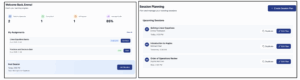
Figure 3 (left) shows Edusphere’s Student Dashboard, where students can view, access, and complete assignments, review assigned content, and join tutoring sessions.
Figure 4 (right) shows the Session Planning view for tutors, where they can create tailored tutoring plans for their students.
Constraints and Assumptions
Key assumptions
EduSphere’s product success rests on three core assumptions, especially given that the EdTech space is so saturated: tutors have a need that EduSphere’s product offering can fill in the first place, tutors are willing to pay for EduSphere, and students have a need for tutors in the first place.
If students don’t need tutors in the first place, our assumption that tutors are a viable market would be incorrect; even if tutors have this need, perhaps our market sizing is off or shrinking. If tutors don’t need any help, and are satisfied with their current preparation, our product fails completely, as our product attempts to help tutors with their work. Lastly, if tutors are unwilling to pay for our product, our monetization strategy fails, leaving the company with the same problem we were struggling with before the pivot.
Tutors are looking for content, organizational, and management help
To test our assumption that tutors are looking for help with creating content, managing content and their students outside of their existing methods of preparation and organization, we interviewed three tutors. From our interviews with prototype testing, we found that in terms of content for tutors, videos were not very helpful (these may remain more helpful for students); instead, one tutor expressed that they wanted a text-based summary. However, tutors generally found the quiz, originally designed for students, also helpful for refreshing their own memory. One tutor specifically expressed the need for organization and student tracking, in contrast with his “chaotic” Google Drive, which EduSphere provides: “Yeah I mean content is free everywhere. But I like organization and control.”
Tutors are willing to pay for this help
From interviews with tutors, we also tested how much tutors are willing to pay for this help. Tutors confirmed that, if the prototype existed, they would be willing to pay around $10-$15/month for the organizational, preparational, and analytical features, revealing both user need and willingness to pay in line with our monetization model. This assumption testing also additionally revealed that tutors value workflow tools (tracking, assignments, and analytics) more than content itself, which EduSphere has access to. Tutors’ willingness to pay depends on time saved and visibility into student progress. This assumption might benefit from additional testing; as we aim to target independent tutors in the near future, who might be less willing or able to pay for our product, we would want to gain a better understanding of price sensitivity and make adjustments to our monetization model if needed.
Students have a need for tutors despite online tools and online learning content
To test this assumption, we again interviewed tutors along with a prototype simulating EduSphere’s content library, along with a quiz. We compared interviewee responses, reactions, and performance on the quiz between those given a tutor, and those without a tutor. Without a tutor, interviewees rewound videos, Googled/used ChatGPT for formulas, and generally showed uncertainty. With a tutor, they asked clarifying questions and verified approaches, indicating better grasp of concepts. Interviewees also generally expressed a preference for tutors for solidifying understanding after getting a surface-level understanding of material. However, they also did appreciate how accessible online resources such as videos and ChatGPT are, whereas tutors may not be available 24/7; our platform might be able to address this, however, with our existing content base. As a next step, it would also be helpful to consider how much students would be willing to pay for tutors, especially if tutors increase their prices as a result of using our product.
Constraining ethical implications
EduSphere may also deal with some ethical implications that could impact the product in the future.
Fairness and accessibility
Pivoting from B2C to B2B2C means the premium content advantage and tutor tooling becomes a benefit accessible primarily to families who can afford tutoring. There is a risk of expanding educational inequality even as the product helps tutors be more effective.
Privacy and data protection
Centralizing student data could potentially create sensitive educational records. EduSphere would have to emphasize secure data protection. EduSphere also does not plan to give any student data for third parties to address this ethical concern.
Tutor motivation
By giving tutors analytics and progress data, Edusphere risks shifting perceived academic responsibility away from students and parents toward tutors. Over-reliance on analytics could inadvertently create pressure on tutors to “produce results” in a quantifiable way, which may distort educational relationships.
Milestones and Timeline
V1 (Current): Tutor Workflow Features (Est. 3-4 months)
- Tutor Dashboard & Student Management
- Student roster, profiles, folders, tutoring sessions, quick actions, assign to students, progress tracking, onboarding
- Content Organization & Playlist Creation (using existing EduSphere content)
- Global search with filters, tutoring plan creation, quiz results view
- Student View Updates
- Add tutor-specific features to Student Dashboard, onboarding
- Rollout: Private beta with our user research participants and independent tutors
V2 (Next): Tutor-Centric + Parent Improvements (Est. 7-9 months)
- Tutor Payment
- Invoice generator, payment tracking
- Parent-Tutor communication
- Misc. improvements
- Auto versioning
- Rollout: Learning from V1, also expanding to more independent tutors
V3 (Later): Advanced Content Improvement (Est. 12+ months)
- Misc. improvements
- Offline use, mobile usability
- Content improvements
- Printable assets
- Rollout: Learning from V1/V2, also continuing to expand and now expanding to small tutoring centers
Target Market Milestones:
- Currently beginning with SOM (independent tutors)
- Hoping to acquire California’s worth of tutors / small tutoring centers in Y2, expansion to 2-3 state’s worth in Y3
- Hoping to slowly begin Phase 2 (incorporating larger tutoring centers, schools, and enterprises) in Y5
Resource Requirements
Team Members
- Product Manager (x1): $100K/year
- Software Engineers (x4): $110K/year each
- UI/UX Designer (x1): $90K/year
- Content Development Team: $500K budget allocated for building out proprietary worksheets, lesson plans, and resource kits for tutors
Key Technologies
- Web App Infrastructure: Built using a scalable cloud stack (Firebase, AWS, Vercel) to support content delivery, session planning, and messaging
- Learning Content Management System (LCMS): To store and organize educational resources
- User Management & Communication Tools: Secure backend systems for handling tutor, student, and parent interactions
- Analytics Dashboard: Tracks engagement, onboarding, and retention metrics for ongoing product iteration
Estimated Budget
- Total ask: $1.5M to cover team salaries, content buildout, and infrastructure for a functional MVP
Testing and Quality Assurance
Our plan is to systematically validate the core workflows before wider rollout.
QA Testing
- Validate the core workflow end to end: create tutor account → add student → organize materials in the Content Hub → assign work → student completes items → tutor sees updated progress, including edge cases like late or partial completion.
- Confirm permissions, privacy, and performance: Tutor Notes and sensitive student info stay private, students and parents only see what they should, reminders and Google Calendar sync work as expected, and the main dashboard loads in under 2 seconds.
User Testing Plan
- Run a private beta with 20 tutors across subjects, each onboarding 3 to 5 students and using the platform for at least 2 weeks in real tutoring.
- Conduct short weekly checkins and surveys to surface friction points, time savings, and how confident tutors feel about prep and parent communication.
Acceptance Criteria for V1
- At least 85 percent of beta tutors can complete the core workflow on first use without a walkthrough.
- Progress updates appear on the tutor side within 30 seconds in typical conditions, and there are no open P0 bugs and minimal P1 bugs with clear workaround plans.
Metrics and Success Criteria
We will measure success based on activation, engagement, communication outcomes, and conversion to paid plans.
Activation and Onboarding
- 80 percent or higher of newly signed-up tutors add at least one student within 7 days of onboarding.
- 70 percent or higher of newly signed-up tutors assign work to at least one student within 7 days of onboarding.
Engagement and Workflow Impact
- 60 percent or higher weekly active usage among tutors with active students.
- 30 percent or higher reduction in tutor planning and admin time by Month 1 (self-reported).
- 75 percent or higher of active tutors regularly use the Content Hub to organize or assign materials.
Communication and Reliability
- 80 percent or higher parent progress email open rate.
- 10 percent or lower missed or forgotten sessions for users with reminders enabled.
- <2 second dashboard load time during peak hours.
Conversion and Retention
- 20 percent or higher of active tutors convert to a paid tier within 6 weeks of launch.
- At least 50 paying tutors by Month 1 and 500 paying tutors by Month 3.
- 60 percent or higher 3 month retention among activated tutors (tutors with 5 or more students in the system).
Go to Market
The value proposition of our roadmap focuses on enhancing tutors’ abilities by providing centralized content management, clearer student tracking, and streamlined communication with parents.
The MVP is a web-based platform with student profiles, a content library, a plan builder, session notes, and parent summaries. This release will deliver onboarding clarity, increase frequency of in-session use, and short-term tutor and student user retention.
Our distribution strategy will begin through direct web access to keep adoption friction low and enable rapid iteration, followed by partnerships with small tutoring centers once tutor-level retention is established. Marketing and promotion will be done through social media and educational channels such as tutor-focused Facebook groups, Instagram communities, Reddit forums, and flyers in libraries where tutoring frequently occurs. We will offer a referral discount to encourage tutor-to-tutor sharing. Sales outreach will be done through LinkedIn, tutoring groups, and email, supported by a free trial. Using our identified funnel, we will monitor friction points such as sign-up abandonment (due to required fields), missing curriculum content, and failure to register students. Our launch plan begins with a soft launch to gather feedback, followed by a public beta and then small-center outreach once usage patterns stabilize.
Customer support will be provided through an FAQ, how-to guides, a structured onboarding flow, and a ticket-based support system that tracks response and resolution times. Future releases will introduce an in-app support bot and proactive notifications to reduce confusion and prevent drop-off.
We will proceed if we acquire 50 paying tutors within 1 month and 500 within 3 months, achieve ≥60% retention at 3 months for activated tutors (5+ students), reach ≥50% onboarding completion, and maintain ≥40% weekly active use.
We will pivot if sign-ups are strong but retention drops below 30% at 3 months, if fewer than 20% of tutors reach the “first plan” activation milestone, or if usage patterns show that major features are misunderstood or unused.
We will perish the current direction if retention remains below 15% after multiple iterations, if weekly active use stays below 20%, if fewer than 100 paying tutors are acquired by month three, or if tutoring centers show negligible interest even after achieving tutor-level product-market fit.
References
Global Online Tutoring Services Market: $23.73 bil by 2030 (Source: Grand View Research)
Small Centers/Tutors: ~182,700 in the US (Source: Consumer Affairs)
Medium Centers: ~10,000 in the US (Source: Ed Working Papers)
Tutors burn 6-10 hours a week on planning, grading, and coordinating resources. (Source: Study Spaces, 2025)

Comments