
Team: Amrita Palaparthi, Jin-Hee Lee, Monique Ouk, Neel Kishnani
Product: IDEaL (IDE for all Learners) – an education-focused text editor for non-tech-savvy people learning how to code.
User Interviews
1) Interview with J (abbreviated for anonymity)
- 21 years old, junior, he/him, current 106B student
- Attitude
- “I would love more guidance that’s 100x easier on the eyes for the debugging process.”
- “I hated learning how to set up and use Qt Creator. After 4 weeks, I’m still not used to understanding everything it tells me.”
- “Yeah, I think that learning-based framework would be great. I would just make sure it stays as easy to understand as possible.”
- Participatory Roadmap Highlights
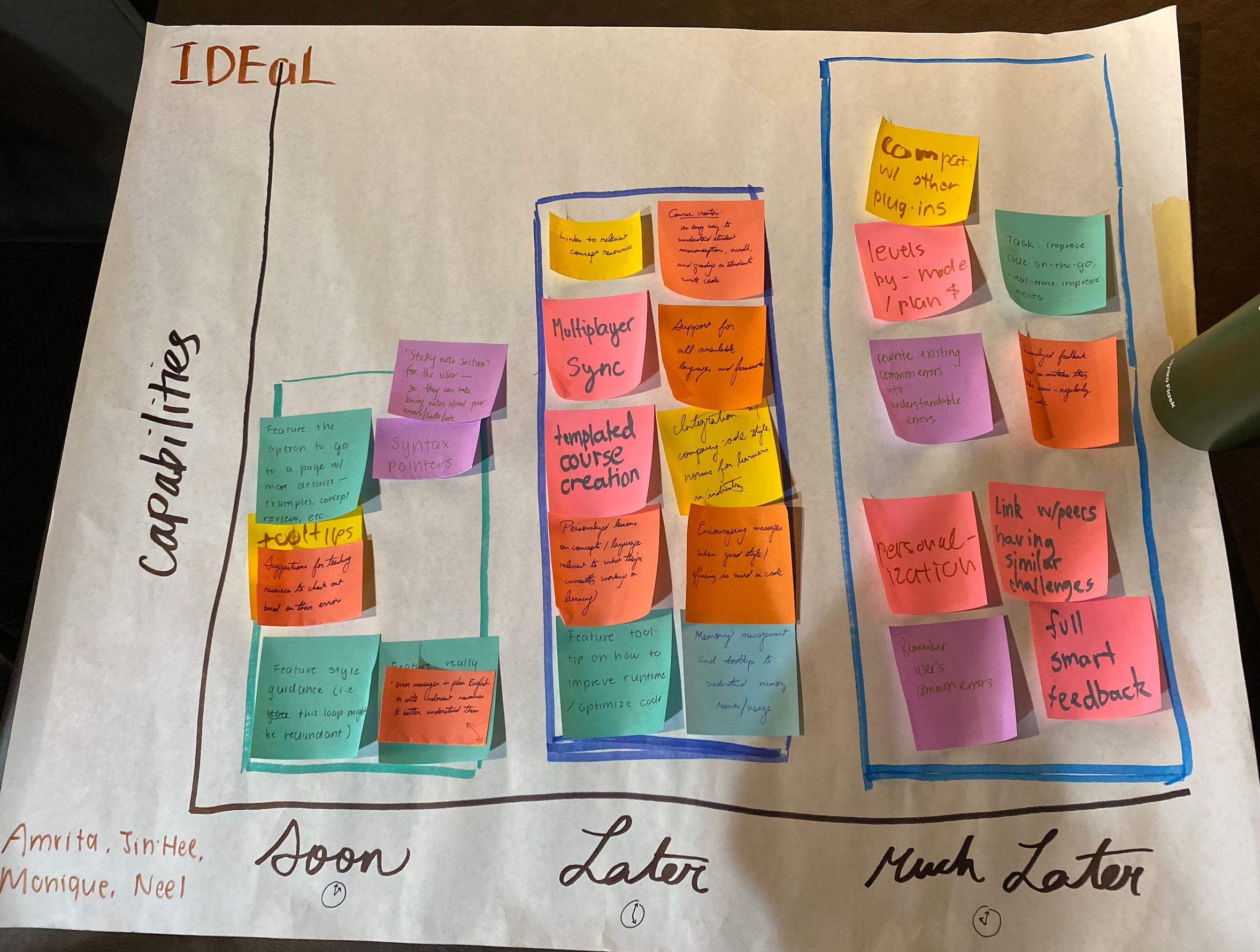
- Didn’t think that “linking with peers” (in the “Much Later” section) was necessary at all
- Questioned why runtime/optimization was in “Later” and thought of moving it to “Soon,” but ended up moving it back after talking aloud and prioritizing simplicity / basics
- Pointed out a redundancy in “plain messaging” notes
- Somewhat passive throughout exercise, in his words was “happy with the mission of simplicity as long as you make good on that.”
- Diagram Photo
2) Interview with S (abbreviated for anonymity)
- Late 20s-early 30s, he/him non-coder who has to code a bit when needed in work (business), thus interested in how to code better
- Attitude
- Cares most about functionality at the end of the day, has had lots of frustrating experiences feeling like tech apps are too jargon-y and inaccessible
- “Well, I might think differently, since I don’t really care how my code looks. But I do want to code better and be able to debug better, which I know is made easier by having good style.”
- Participatory Roadmap Highlights
- Added a post-it note to “Soon”: a “sticky-note section” that can pin errors/notes/messages that they find are most important to them. Wanted to be able to have all of their favorite tips/messages in one, quickly viewable place.
- Moved a post-it note from “Much Later” to “Later”: the encouraging messages when you do something well
- Moved a post-it note from “Later” to “Soon”: the option to go to a page with more details from the app, such as lecture slides or an explanatory webpage that delves more into detail on a concept like a for loop.
- Diagram Photo
3) Interview with A (abbreviated for anonymity)
- 19 years old, sophomore, she/her, took introductory CS last year
- Attitude
- Noted that repeated failure is often a great way to learn from mistakes with starting out coding – “If I never learned from my mistakes early on, I’d have been likely to repeat them and just build up bad coding habits”
- “I think when you’re first starting out, it’s not super important to have really pretty or efficient code. You want to get to something that works and move forward from there.”
- Currently learning to code in C and C++, facing challenges with memory management as a language-specific feature
- Participatory Roadmap Highlights
- Surprisingly, heavily deprioritized features that replaced existing error messages with understandable alternatives in favor of providing extra information along with errors
- “I feel like [error message replacement] can take away some of the learning you get from seeing errors as they are – I don’t want to be fully dependent on my IDE and be unable to code outside of it if need be”
- Highly prioritized course specific features – while we saw running tests for course assignments as a bonus benefit, this was a really exciting and urgent feature for A
- Deprioritized features related to personalization wrt remembering user errors and customizing the IDE
- “If I make an error a few times, it’s not really likely I’m going to make it again. I also don’t want to be reminded about it in a different context and get confused”
- Very excited about the sticky note section, as there are common syntax patterns that she has trouble remembering and has to look up repeatedly
- Prioritized learning about memory management and errors with use of memory about the same as runtime efficiency
- This contradicts with previous interviews where users tended to highly prioritize memory and runtime, which suggests that emphasis might be limited to students in specific courses (e.g. CS 106B) that focus on runtime rather than just functionality
- Surprisingly, heavily deprioritized features that replaced existing error messages with understandable alternatives in favor of providing extra information along with errors
- Diagram
4) Interview with I (abbreviated for anonymity)
- 21 years old, first year graduate student, she/her
- Attitude
- Really focused on lack of overwhelm – “I’d really have liked to limit the number of features initially in my IDE and add in features in stages as I learned more”
- Thought a learning-focused IDE would be useful to initial learners of programming and not particularly useful to people learning new languages – “I already know how to code, and so I can just use StackOverflow at this point”
- Very familiar with course grading and management tools, and not particularly interested in integrated them with an IDE
- Participatory Roadmap Highlights
- Moved memory management and runtime understanding features to Soon – “I think they’re very important especially when taking courses like 106B that are focused on runtime”
- Moved multiplayer sync and most linking out to resources to Much later – “They’re already available through the course website, so this seems redundant”
- Not particularly excited about positive feedback from IDEs – “Negative feedback is much more helpful, encouragement is really just a bonus”
- Surprisingly, deprioritized some personalization features related to sticky notes and common errors – “I can always just note them down in some external tool, so it doesn’t really need to be integrated into the IDE”
- Excited about the idea of fully replacing jargon-filled error messages – “When I was starting out, I would have just not wanted to see real error messages at all and work my way up to them”
- Diagram
5) Interview with X (abbreviated for anonymity)
- 20 y/o, section leader for CS106B
- Attitude
- Excited about the product, hates Qt Creator
- Doesn’t like that you have to update Qt Creator so often and install the whole toolchain with XCode again
- Appreciates that many tools are written for Qt but thinks an alternative would be better
- Really likes Sublime and uses it for everything other than section leading
- Likes having full terminal access
- Participatory Roadmap Highlights
- Identified some new features
- Gradescope-esque test administration
- Paperless-esque comments directly in student submissions (like Google docs)
- Thinks that multiplayer would be really good for collaboration
- Identified some new features
6) Interview with Y (abbreviated for anonymity)
- 18 y/o, current CS106B student
- Attitude
- Likes that Qt Creator has an integrated terminal / output tab
- Feels like the code analysis can be cumbersome
- Really annoyed at how heavyweight it is with XCode
- Enjoys how CS106B library integrates with Qt tools to be able to have a GUI for testing
- Blank starter projects are easy to get up and running
- “What’s been the best thing for you about Qt Creator so far?” – I like that it keeps all my projects and build files consolidated
- “What’s been your favorite IDE you’ve used” – I haven’t used too many but I like PyCharm more than Qt Creator because it was more minimal and I was just learning Python so I didn’t really need all the features
- Participatory Roadmap Highlights
-
- Really liked the style feedback integration, reminded them of IGs with section leaders
- Feels like this could be useful as an alternative to Qt Creator, allows for more targeted feedback
- Agreed that full smart feedback would be a much later task
-

7) Interview with Z (abbreviated for anonymity)
- 22 years old, undergrad, she/her, has taken CS106A
- Attitude
- Was super annoyed about not figuring out why her code wasn’t compiling
- “What if there’s a lot of errors that could possibly happen and they’re all due to different things? Are you going to categorize or survey and understand which errors are more or less common? Are there broad categories like ‘oh this is an infinite loop’”
- “What helped me the most was finding forums that would explain things in-depth. Could the error messages also link to relevant forums? Or links to relevant articles, or links to specific tutorials”
- Feature that asks “how relevant was this to your problem” so we get feedback if links are useful are not
- Getting used to syntax was really big for me when I started coding
- Participatory Roadmap Highlights:
- Error message in plain English is really helpful
- Moving “multiplayer sync” from “LATER” to “SOON” especially because peer programming in 106A was heavily emphasized; it would be a lot easier to peer program if you could be on the IDE together
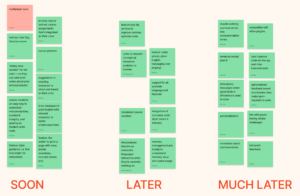
8) Interview with B (abbreviated for anonymity)
- Sophomore, CS106A, very humanities
- Attitude
- Struggled more with conceptually “logic-ing it out” more than anything
- I don’t think that pycharm is particularly bad at pointing out errors
- I do have to scroll a bit, which is annoying when all the error messages show up — I was super lost at first when trying to figure out which line is wrong. Highlighting that would be useful… Not even just the line, but pinpointing exactly what went wrong would save me a lot of time
- Pycharm is clear with “you forgot to add an apostrophe or something”… Most confused when it’s something conceptual
- Participatory Roadmap Highlights
- Style guidance is most unclear in pycharm… so that is most crucial for me
- I really like the MUCH LATER stickies… but maybe a reminder that “oh, you always do this…” instead of just fixing it to me
- Moved “Remember user’s common errors” from MUCH LATER to SOONER
- Wants IDE to remember errors and point it out but NOT automatically fix it, because that would just be a crutch

Competitors
Pycharm
- What makes it great?
- Specific to Python, which has ranked 1-2 for most popular/used coding languages in the past few years
- Language used in many fields (statistics, machine learning, traditional tech, and more), considered much easier to learn than others → lots of people who will be coding in it
- For us, the IDE used by CS106A
- Debugging tool and UI
- Can use lots of plugins
- “Intelligent editor” that points out functionality errors on-the-go
- Can catch semantic errors like a misspelling of a previously declared variable
- Community edition has everything a beginner coder would need
- What could it be doing better?
- Unintuitive to figure out how it interacts with your command line, especially for beginners
- The plethora of features can feel overwhelming, rather than having a few most popular options
- No way to pin or highlight fixes that are most important to you
Qt Creator
- What makes it great?
- Works for multiple languages
- Embedded console allows you to run everything within Qt (don’t have to go to your command line, which beginners especially appreciate)
- Better visual cues in debugging process, particularly the debugging pane that allows you to keep track of all variables
- Two types of error messages: red (this is breaking your code) and yellow (this doesn’t break stuff right now, but we think you should fix it)
- For us, the IDE used by CS106B
- What could it be doing better?
- Pretty expensive! The individual subscription is around $300/month
- Easy to get lost in the stack frame. Specifically, hitting a breakpoint during the debugging process can take you a few frames too deep into totally unfamiliar code that you didn’t write. Beginners have no idea they need to navigate to the file that they actually wrote, nor do they know how.
- Error messages (both red and yellow) are jargony and hard to follow
VSCode
- What makes it great?
- Works across a wide variety languages and frameworks with tailored suggestions and syntax highlighting for each
- Easily extensible to add on additional plugins
- IntelliSense for intelligent code completion suggestions
- Can dive deeper into information about variable and parameter types and navigate through function definitions
- Free and open source community edition!
- Real-time collaboration through VSCode LiveShare extension
- What could it be doing better?
- Steep learning curve with a large variety of features can be unfriendly to beginner coders
- Can be difficult to set up with command line to run programs initially
- Using the debugger can be difficult as a learner not already familiar with common debugging features
- A text editor rather than a fully-fledged IDE, and so lacks the depth of features for intelligent debugging and early catching of bugs in language-specific IDEs
- Has a busy, rich interface that can be overwhelming to navigate and find niche features in
Codio
- What makes it great?
- Integration with population course grading systems including Canvas, Blackboard, and Moodle
- Enables course creators to include written lessons and assignment descriptions side by side with text editor
- Includes auto-graded assessments that can be customized and offered through the app
- Free instructor accounts with unlimited Virtual Machines in the cloud
- Assistance with curriculum authoring for CS instructors
- Tailored offerings to k12 CS programs, college courses, and businesses
- What could it be doing better?
- Extremely limited syntax highlighting
- No use of intelligent suggestions
- Run as an online editor, making it difficult to learn how to code locally
- Free version is only offered to instructors, limiting students’ ability to learn to program for free outside the classroom
- Targeted mainly towards instructors and course organizers than students directly
- Use of VMs is known to cause frustrating bugs when trying to run code within the IDE
- Inconsistent UI, where student interactions with lessons vary across pages
Sublime
- What makes it great?
- Strong key bindings
- Minimal interface, not a full IDE with terminal integration, etc.
- Terminal command to launch text editor
- Feels like vim and emacs, not as clunky or heavyweight as VSCode for example
- Customization
- Built-in support for plugins
- What could be improved?
- Can be seen as too minimal, a small terminal interface would be nice
- License required ($50)
- Auto-correct and auto-complete can be annoying
- Doesn’t have the same flexibility as vim (i.e. vimrc)
Nick Parlante’s Experimental Server
- What makes it great?
- Awesome for learning, can step forward and backward to execute lines of code
- Good integration with Paperless
- Immediate test case feedback
- Graphics with Karel / Bit
- What could be improved?
- UI is pretty bad, clunky, no CSS
- No code analysis
- Doesn’t expose students to writing a Python / C++ file from scratch
- Obfuscates Python syntax
Eclipse
- What makes it great?
- If you delete a member, every file that accessed it turns red immediately
- Incremental compiler: maintains your code compiled in every point of time
- You will see every place on the project tree that’s been broken, changed, etc
- Ability to control project through different decorators
- “Quick-fix” ability available in any location of the line
- UI is easy to customize
- What could be improved?
- Workspace; it’s annoying to redo all your settings when making a new workspace
- No good way to copy settings from a different workspace
- Development is “in maintain” mode; slowly adopting new trends
- No more revolutionary features
- Javascript support was broken many years ago and never fixed
- Purely a Java IDE now
- Now “bloatware” with millions of low quality plugins
IntelliJ
- What makes it great?
- ItelliJ IDEA has smart code completion: “While the basic completion suggests names of classes, methods, fields, and keywords within the visibility scope, the smart completion suggests only those types that are expected in the current context.”
- Intelligent coding assistance for other languages like SQL, JPQL, HTML, JS, even if the language expression is injected into a String literal in the Java
- IntelliJ has global configurations
- Predicts your needs; automates the “tedious and repetitive” development tasks
- What could be improved?
- Shows red line for correct code
- Doesn’t recognize new extracted modules
- Has to have cache invalidated
- Changes paths found in strings in “totally unrelated context”
- Horrible incremental compile; have to open a file or do manual compile just to get new errors pop up
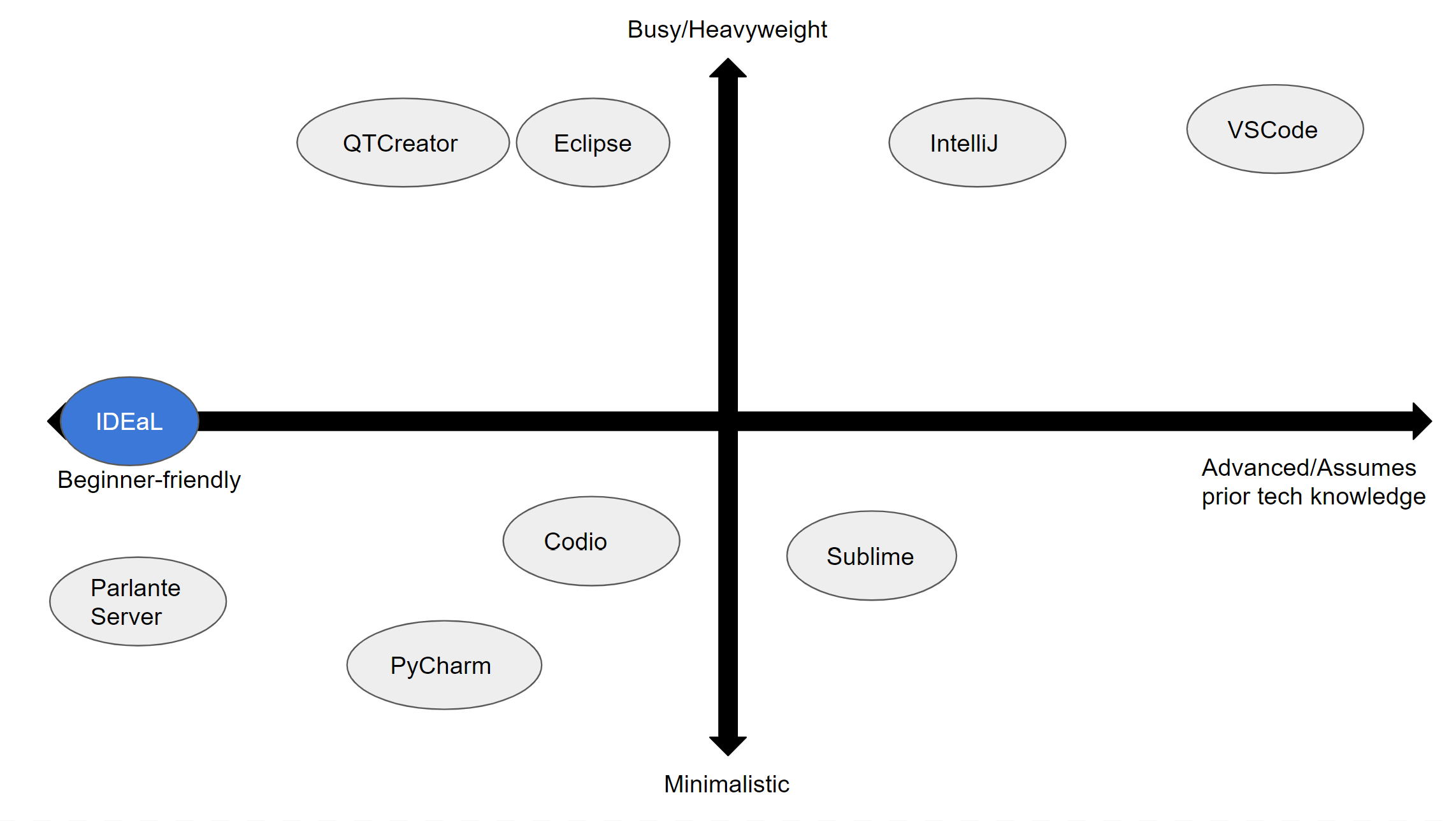
2×2 Matrix of Competition
Insights
- Popular IDEs used in industry (e.g. VSCode) tend to assume a substantial amount of prior knowledge
- Beginner-friendly IDEs like Codio and QTCreator tend to be buggy and difficult to use/install
- Parlante server offers beginner friendliness and minimalism, but is limited in cross-language support and functionality for non-Stanford users
- We didn’t notice any competitors who were on the side of very minimalistic and very advanced / assuming prior tech knowledge.
- We also didn’t feel that any competitors were right in the middle of these axes – particularly the empty center row between minimalistic / busy. We believe that plug-ins are a great compromise on this front and will allow the user to customize how much they want to see in their IDE.

Comments
Comments are closed.