Time Frame
The Time Frame web app makes scheduling group meetings fast and engaging. By providing an application that makes the scheduling experience more automated and collaborative, we are helping to increase responsiveness and take the burden of sending reminders off the scheduler. A customer has described the benefits of using Time Frame with the following words: “I have good visual memory, so with Time Frame I can quickly and intuitively know if most people have responded and when they are available.” Another customer said: “Time Frame makes scheduling less stressful, it makes the experience nicer.”
During one of our Look & Feel prototype (Fig. 1) testing sessions we identified the “visual affine scheduler” user persona. In a case study surrounding this persona one could discuss the influence of one visual as an overview of all participant’s response status and availability. The quantifiable impact on their experience would be reduced task time and decreased mental demand during the scheduling process. Mental demand can be measured using the NASA Task Load Index (TLX), a questionnaire evaluating the subjective workload of a task. The results for mental demand can be compared between two conditions: filling out a when2meet and using the Time Frame app. Decreased mental demand using Time Frame would prove enhanced user experience during the scheduling process.
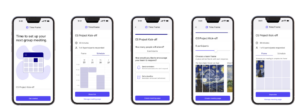
Fig. 1 Look & Feel Prototype to Test Reminder and Progress Feedback Assumptions
The top three areas of uncertainty are: 1) understanding if the value of reminders outweighs the drawbacks, 2) understanding what form our app should take in the scheduling process, and 3) understanding how to differentiate meeting types and their associated expectations and constraints.
To evaluate our areas of uncertainty we will be conducting user tests to learn about user engagement with the tool and its impact on both scheduler and responder behavior. User testing with schedulers and responders will help us understand their perceptions of and interaction with several reminder approaches. We will then select an approach based on the clarity of the concept and perceived value for users. We also plan to observe a series of scheduling processes through competitor solutions to further map the current experience and identify areas to reduce friction. Talking to more users about all of their meetings will help us categorize meeting types and their attributes so that we can figure out which ones we should target.
We have interviewed undergraduate and graduate students along with young professionals on the topic of scheduling group meetings. There is significant pain around the effort to set up meetings and long response times from team members in the current experience that is not adequately addressed by competitors. Given that the scheduling market is a red ocean with lots of big players, we’ve also investigated how we might differentiate ourselves with a niche customer segment. We see university IT departments as our most promising customers as they are motivated to increase the productivity of their populations and may purchase an impactful product on behalf of school affiliates who are invested in the product already.
As we begin to progressively increase the volume of users testing and using Time Frame, we will be tracking several leading signals to evaluate the efficacy of our solution for a more efficient, effortless scheduling. Our first leading signal centers around adoption of reminders by schedulers. Based on our research, around 80% of schedulers report that slow response times by teammates negatively impacts their experience. To that end, we expect roughly 80% of schedulers to opt into reminders to signal value. On the flip side, our research indicates that response time is currently around 2 days on average. To signal that our solution creates a more efficient scheduling experience, we expect to see a decrease to 1 day response time on average.
If we learn that our reminder approach fails to generate promising signals, we’ll consider pivoting to other solutions that we’ve considered. The first alternative is a deadline-based approach which reduces friction for responders but may be less effective in reducing response time. Another alternative we considered is an auto-generated meeting time that teammates have to edit if it doesn’t fit with their availability. This is likely to elicit immediate response but may drive user confusion.
While there are many scheduling solutions on the market today, none of our competitors (When2meet, doodle, LettuceMeet etc.) are tackling the main issue of getting people to respond on time without having to continuously follow up with them in an effective manner. From needfinding, this emerged as a very major problem that users face and it would be game changing if we can fix it for them. We estimate that the cost of delay is roughly 100k, the amount that we plan to earn this in year 1 from our TAM/SAM/SOM, minus the 50k we anticipate in costs, includes cost of licenses and starting up, assuming we take no salary for the first year or get external funding as well, which yields 50k for the first year. The timeline for product development is as follows:
- Setting up web app – 2-3 weeks
- Slack integration – 1 month
- Calendar integration (will need security reviews etc) – 2-3 months
- Designing the UI – 2 months
- Engaging Reminders feature – 1-2 months
- Adding extra features (different kinds of engaging reminders depending on what you prefer, some auto population etc.) – 2-3 months