
Conducting comparative research in the domain of reducing sedentary behavior.
Overview
Our team’s goal this quarter is to tackle reducing sedentary behavior and improving body care (e.g., taking care of our eyes, posture, etc.). In order to better understand behavior interventions for doing so, we compared a handful of existing solutions in this problem space, examining their strengths and weaknesses to inform the design of our intervention.
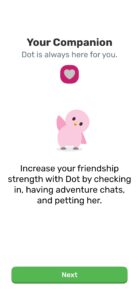
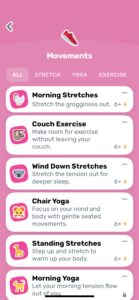
Finch: Self Care Widget Pet, mobile app
Finch is a delightful self-care application that connects the act of caring for a virtual pet with promoting physical and mental health through daily activities. These self-care exercises encompass a variety of practices, including setting daily goals, performing grounding exercises to combat anxiety, engaging in breathing meditation, experiencing calming soundscapes, and participating in physical movements. The app has an abundance of resources available for users to tailor to their individual needs, such as setting any of the custom goals and reminders.
However, the wide range of features can feel overwhelming for users who are not familiar with the app and may lead to external pressures to complete all the tasks in the app, leading to stress or burnout. Users must already have a strong intrinsic motivation to maintain their goal tracking. This presents an opportunity for improvement—using a character that users can develop a connection to in order to prompt behavior change is a great idea, but what are ways we can establish and maintain that connection? We hope to find a balance between external and intrinsic motivation, or a way to utilize both types of motivation in a complementary way to drive behavior change.
Unique value proposition: A charming reward system that incentivizes self-care through gamification.

Praxis Eye Health, Chrome extension
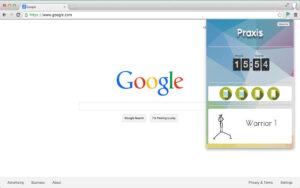
The Praxis Eye Health Chrome extension is a tool designed to improve eye health and reduce eye strain for individuals who spend a lot of time using a computer. This extension features customizable settings, such as screen time reminders following the 20-20-20 rule: Look 20 feet away from the screen every 20 minutes for at least 20 seconds. In addition to these reminders, the extension also displays different yoga poses for users to try. However, this prompting of physical activity is not explicit, so its effectiveness may be limited.
Additionally, the pop-up from the extension shown in the image below is not shown unless users click on the extension, so the simple, easy-to-use interface blends into the user’s Chrome browser to suit their specific needs. However, because this extension is so simple, there is a concern regarding whether or not this extension, on its own, is substantial enough to lead to significant behavior change.
An opportunity for improvement would be being more hands-on with prompting users and providing more text and explanation to guide and inform users. Another weakness of Praxis Eye Health is that screen time reminders may be interruptive for some users (i.e., users could perceive reminders as disruptive to their workflow), which could reduce their overall productivity. An opportunity for improvement here is finding a way to integrate an intervention people’s workflow rather than interrupting their workflow.
Unique value proposition: A convenient, easy-to-use solution for individuals who spend a lot of time in front of a computer screen and want to prioritize their eye health.
The Stand Reminder, Apple WatchOS
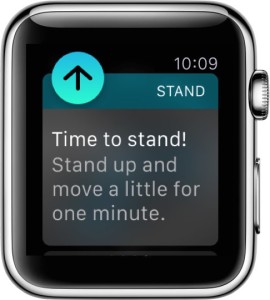
The Stand Reminder is a default feature included on all Apple WatchOS devices with the goal of combating sedentary lifestyles. Remaining stationary for long periods of time have been found to have negative consequences on one’s health, which is one of the underlying motivations for the creation of Apple’s stand reminder feature. Within the 50th minute of every passing hour, if the user has remained seated for that duration of time, the Apple Watch device sends a notification prompting the user to move about for a minimum of one minute. If the user does stand up during that moment, they are then greeted with another notification commending them for making progr ess towards their “Stand Goal”, which is a part of a larger Activity rings feature included on all Apple WatchOS devices.
It is important to note, though, that many users ignore these notifications, as they are not the most engaging, and the reminder is the same every day. Thus, an opportunity for improvement lies within the reminder message itself. Apple’s message is very standard and uniform across all users, but perhaps these reminder messages could be more tailored to users, or there could be more “personality” behind the messages.
Unique value proposition: Quick on-the-go reminders to reduce sedentary behavior and promote healthier lifestyles
ThinkUp, mobile app
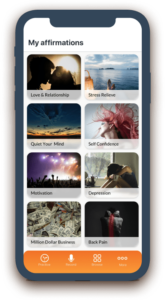
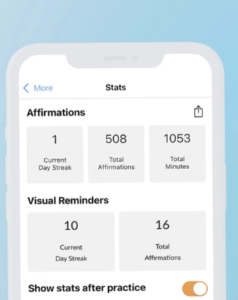
ThinkUp is a cross-platform mobile application that enables users to develop their own personalized self-improvement program. In an effort to help users achieve their goals and reach their potential, ThinkUp works with users to build sources of motivation through the creation of a “positive mindset” and the utilization of positive affirmations in order for the user to be successful in whatever metric that they please. It is stated that the mindset ThinkUp imparts on its users is not only beneficial for their users’ self-esteem, but also for their overall “health, prosperity, and happiness”. As a proven technique recommended by therapists, positive affirmations have been proven to improve one’s overall positivity and outlook in regards to personal development. ThinkUp utilizes this finding in an effective manner, enabling users to personalize their own experiences and create a mindset that best works for them. While this app is not specifically about reducing sedentary behavior, this concept of positive affirmations can certainly be implemented in our intervention.
A problem with ThinkUp (and many self-improvement apps) is that users often fall into the pitfall of thinking they will only be happier/better off if they do a specific thing (e.g., practice mindfulness). Users often end up focusing too much on expected outcomes, so we hope to build upon this app’s ideas and principles by providing users with ways to engage in self-improvement activities they are genuinely interested in and enjoy doing.
Unique value proposition: An uplifting app that uses positive, self-affirmations to help you overcome challenges and achieve your goals.
Awareness Timer, macOS app
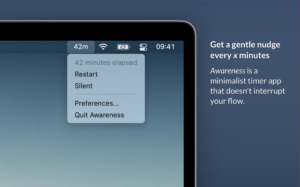
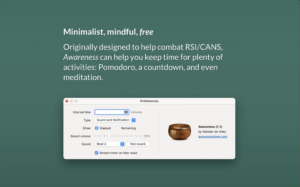
Awareness Timer is a macOS timer app designed to merge with users’ workflows in order to ensure that they incorporate time for physical activities into their schedules. It was initially designed to help users combat pain in the arms, neck and shoulders, which can result from extended periods of sitting. The app can be accessed from the Mac’s menu bar and is designed to remind users to move after a set duration of time has elapsed. The app includes a Pomodoro, countdown timer, and a feature designed to help users meditate. The app has a number of strengths, for example when the timer elapses, the app gives the user a gentle reminder through a pop-up notification which stays at the top of the screen or by playing a sound. The app also has a silent mode feature which allows users to check the timer discreetly during moments when notification reminders would be disruptive to their workflow. The app design also makes it useful for users who want to practice guided breathing or meditations during their breaks.
An opportunity for improvement, or exploration, is whether or not a singing bowl is the best method of sending a reminder, and if not, what are some better options? Perhaps an announcement or statement from a character or avatar could be more effective?
Unique value proposition: A minimalist timer and reminder app that works with, not interrupts, your flow.
Time Out, macOS app
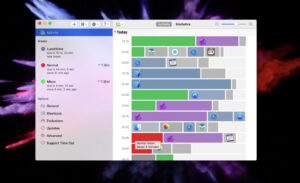
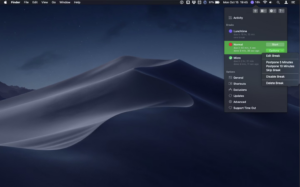
Time Out is an app for macOS that provides users with gentle reminders to take breaks regularly. It prompts users to take “normal” breaks (about 10 minutes every hour) for users to move about and relax, as well as “micro” breaks (brief 15 second pause every 15 minutes) that remind users to not tense up. This app’s main strength is that its settings are highly customizable, allowing users to choose the time between different types of breaks, how long the breaks last, as well as add different types of breaks. Additionally, the app detects when users take a natural break (e.g., taking a short nap on their desk or getting up from their computer to go to the bathroom) and skips the scheduled breaks during those moments. It also features an activities feed, which is designed to help users keep track of their time by showing the usage of various applications on their computer. During breaks, there is a progress bar that allows users to see how many minutes are left in the current session of their break, and there are also different buttons in the app to help the users defer or skip their breaks.
Something that is both a strength and a weakness is tat the notification pop-up remains on top of the other applications that the user has running. This can be beneficial in keeping the user aware, but it may also be stressful or distracting for the user. We hope for our solution to fade into the background more.
Unique value proposition: A customizable computer app that provides gentle break reminders for users.
Take a Break, Chrome extension
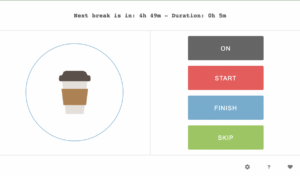
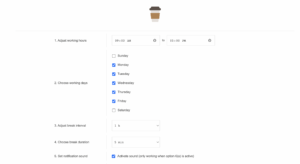
Take a Break is a browser extension/add-on that helps users to set specific time frames to take a break. The ON or OFF switch toggles the countdown on and off. Users can also use the “Skip” button to wait for their next break, so this extension is flexible in terms of meeting users’ needs. Take a Break is also very simple in terms of its interface design—there is only a page where users can set their time frames and a pop-up from the extension.
While this simplicity and clean design is a strength, is it enough to capture users’ interest and maintain engagement? Further, users having the ability to set their time frames is beneficial, but it raises the question of whether it is more effective to have users determine a priori when they want their breaks to be or the computer automatically or randomly send out reminders. This is an opportunity for improvement—it could be that users want to be more hands-off and let the computer determine the break periods. In addition, the sound/ringer that goes off when it’s time to take a break is a bit startling—it’s a loud, jarring noise, which means this would be difficult to use in office and school settings.
Unique value proposition: A simple extension that reminds you to take a break at a customizable time frame.
StretchMinder, mobile app
StretchMinder is a work break guide that aims to help people add more movement into their workdays. It essentially nudges users to take care of themselves using small, “bite-size” exercises that they can do at their desk or work station. It provides customized stretch sets and routines for users, such as back and neck exercises and breathing exercises. The app is also customizable to users’ work schedule, so users can set their work days and hours, reminder intervals, and their lunch hours. Because the app’s exercises are only 3 minutes long, a strength of this app is that it can be integrated easily into people’s daily routines and workflows—even for people who are very busy. Especially because the stretches and breaks available in the app are all designed to be work-friendly, this app would lend itself to actually being used in the workplace. Another strength is its expansive library of a wide variety of breaks and stretches, and this element of novelty would certainly keep users engaged and interested. However, this app only focuses on reducing sedentary behavior, while we hope to target other aspects of body care as well, like eye health, headache prevention, water breaks, etc. Additionally, StretchMinder allows users to track their progress and the time they spent taking breaks.
An opportunity to build upon this feature is to add social accountability or sharing so that people can build this habit with their friends and see their friends’ progress too.
Unique value proposition: A work-friendly app that helps you be active at work and energizes your workday.

Mapped Findings
After identifying these competitors, we mapped them on a 2×2 matrix based on the amount of disruption caused by the app (x-axis) and the effort required from users (y-axis). The matrix is shown below.
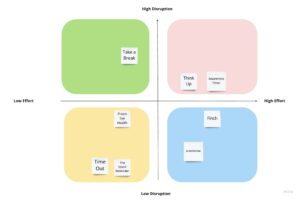
Based on this matrix, we realized that we do not want our intervention to involve high levels of disruption in people’s routines and workflows. Further, we recognize that people often resist going out of their way to make changes. Our pre-baseline study interviews also indicated an avoidance toward big actions in comparison to smaller ones. Thus, we decided to narrow our focus on the low effort, low disruption quadrant, as we aim to create a product that streamlines the break-taking process by seamlessly integrating into users’ existing workflows with manageable, realistic, and doable actions (i.e., small, simple breaks).




Comments
Comments are closed.